OpenCrabs is a self-hosted, provider-agnostic AI orchestration agent that runs as a single Rust binary. It automates your terminal, browser, channels (Telegram/Discord/Slack/WhatsApp/Trello), and codebase, all while respecting your privacy and keeping you in control.
10,782 tests across providers, tools, channels, TUI, self-healing, and browser automation.
Native CLI integration — use Claude Code CLI, OpenCode CLI, Codex CLI, and Command Code CLI as providers without API keys
Sticky fallback chain — auto-failover on rate limits or errors, health-aware persistence survives restarts
Prompt caching across Anthropic, OpenRouter, Gemini, Qwen DashScope reduces costs up to 95%
Context window override — cap or expand context for any model via config (the built-in OpenCrabs provider is the exception: its window is fixed at 200k)
Xiaomi MiMo — 30+ models including the MiMo reasoning series, keyed provider
Moonshot AI (Kimi) — API plan (api.moonshot.ai) and Coding plan (api.kimi.com) endpoints, reasoning-effort config, plan-tier context window
Config edits via config_manager only (v0.3.74) — the agent never raw-edits config.toml/keys.toml; every write is validated before it lands
Brain dedup (v0.3.75) — /dedup command plus post-write and weekly cross-file scans keep brain files from drifting into duplication, with Telegram inline-keyboard approval
Brain-file hints on tool misses (v0.3.75) — relevant brain notes surface automatically when a tool call misses or errors
Proactive memory surfacing (v0.3.76) — relevant memory surfaces without being asked when conversation context matches stored knowledge
Natural model naming (v0.3.76) — /models opus works; colloquial names resolve to exact model IDs
Plan/execute provider routing (v0.3.76) — route planning and execution onto separate providers/models
Mission Control analytics (v0.3.78) — D/W/M filter, 3-across card grid, phantom/model/streaming tabs, dedicated events DB
OpenAI TTS onboarding (v0.3.78) — voice selector and API key field in the onboarding wizard
Homebrew install (v0.3.79) — brew install opencrabs from homebrew-core: prebuilt binary, both architectures, no Rust toolchain
/restart and /exit (v0.3.79) — restart or shut down from any channel or the TUI; owner-only on channels, announce before acting
Quota circuit breaker (v0.3.79) — quota-exhausted providers get a TTL breaker and are skipped in fallback walks; chain exhaustion reported explicitly
Plan state across sessions (v0.3.79) — plans survive session boundaries; isolated plan-task execution defaults on, Ralph verifies in the session’s own directory
Theme system (v0.5.0) — verified presets, an interactive picker, and your own themes from ~/.opencrabs/themes/*.toml; truecolor is detected with an ANSI-256 fallback tier, and a preset whose contrast would make text unreadable is refused
Structural code memory (v0.5.0) — tree-sitter builds a symbol and call-graph index beside the text index, so “who calls X” walks real call edges while conceptual questions keep the text lane (#1324)
Drop transfer over SSH (v0.5.0) — a file dropped into a TUI running on a remote host is pulled back through the connection already open, with an opencrabs drop-agent on the client side (#1289)
Notify delivery verdicts (v0.5.0) — session_notify returns a machine-readable send result, depth-3 injection receipts make notify_id checkable, and delivery redirects to the session that owns the channel now
Background compaction (v0.5.0) — the summariser runs off the turn instead of holding the session while it works
Token redaction at the writer (v0.5.0) — a provider error carrying a URL can no longer leak the bot token into a log, wherever it is logged from (#1322)
Receive-only Telegram userbot (v0.5.0, experimental) — feature-gated MTProto capture with local QR/code/2FA login; it stores allowlisted text for retrieval and never acts as the user
Temporal grounding (v0.5.1) — the agent always knows what time it is: every turn carries a time-stamped marker in the user’s timezone, and the system prompt stays byte-stable for provider caching (#1516)
Per-job cron sessions (v0.5.1) — every scheduled job gets its own session, so two jobs running at the same time can never bleed into each other’s context or providers (#1511)
Skill-glob gating (v0.5.1) — a skill’s globs: list can refuse tool calls that touch matching files until the agent has actually read the skill body (#1515)
Config writes validated against the struct (v0.5.1) — the write guard and section suggestions in config_manager now derive from the Config type itself, so they never drift from shipped code (#1508)
Plan designs refused at write time (v0.5.1) — a malformed plan design bounces immediately with the missing sections named, and a refused write restores the scaffold instead of wiping the draft (#1507)
Provider budget backpressure (v0.5.1) — a provider that reports an output-token budget triggers one bounded compaction and retry instead of a cascade of 400s (#1518)
A2A tokens bound and config owner-only (v0.5.1) — A2A tokens bind to the gateway that minted them, and config.toml/keys.toml move to owner-exclusive mode with secrets scrubbed from the logs
ACP server mode (v0.5.2) — opencrabs acp speaks the Agent Client Protocol over stdio JSON-RPC, so Zed, MonoCode and any ACP client drive the same brain your channels use, with progress streaming and approvals round-tripping to the editor (#1540)
Shadow-DOM aware browsing (v0.5.2) — selector resolution pierces shadow roots, so automation reaches web components that used to be invisible to the tools
WhatsApp full surface (v0.5.2) — native voice notes, inbound video/sticker/location/contact, poll votes, presence and media recovery, reaction acks, edit-in-place streaming, disappearing messages, contact blocking, pin/forward/profile, status updates, newsletter discovery, native-flow buttons, per-chat history
Discord live tracing and native tables (v0.5.2) — long turns stream as a traced live reply, answers auto-thread, markdown tables render natively, and tool turns no longer double-post the final response (#1603, #1608)
Telegram forum topics and /clear (v0.5.2) — forum topic create/rename with session binding, and /clear starts a fresh session without the summariser call (#1585)
Command menu payload budget (v0.5.2) — Telegram’s setMyCommands silently rejects request bodies over ~7.8KB while reporting BOT_COMMANDS_TOO_MUCH; descriptions now shorten in tiers so the whole menu fits (#1613)
Trigger-gated cron (v0.5.3) — a job runs a pre-flight check and only executes when your condition is met (non-empty output, exit code, regex), skipped runs cost 0 tokens, and a fired trigger can dispatch a goal into a session (#233)
First-class Windows (v0.5.3) — platform shell handling, BOM/UTF-16 file reads, tilde and cwd fallbacks, with CI building Windows and gating PRs (#627)
Epistemic memory (v0.5.3) — MEMORY.md facts carry confidence and decay (#1643), cold sections archive themselves, and opencrabs memory prune previews what went cold before touching it (#1657)
Finished theme engine (v0.5.3) — every TUI widget resolves through the theme with a suite guard against new raw ANSI, and themes can declare a canvas background (#1634)
WhatsApp suggestion polls (v0.5.3) — follow-up option sets past the native button cap render as a poll, and a vote selects the option (#1616)
ACP session family (v0.5.4) — sessions are first-class on the ACP surface: the context meter is restored on load and rides usage updates, session/load replays the transcript and restores the per-session model, set_model persists across processes, native session/set_mode applies the approval policy server-side, session/compact pushes, and session/new offers a live model catalog
Interactive terminal handoff (v0.5.4) — !vi/!nano take over the terminal interactively and hand it back with the session intact; Unix terminals only, Windows keeps pipe capture (#1744, #1759)
Universal paste & drop (v0.5.4) — one shared attachment router accepts every file type on paste or drop and classifies code, docs, archives and data so each lands in the right pipeline (#1740, #1743)
Serper search engine (v0.5.4) — serper_search adds Google SERP results, and the web_search fan-out dedupes by URL across engines (#1731)
Decision cache (v0.5.4) — decide_cached answers repeat decisions from an L1 reuse ring with shadow/live tiers and [decisions] config (#1648)
Provider-reported costs and one timeout chain (v0.5.4) — the usage ledger prefers the cost the provider actually reported over table estimates (#1707), and timeout flags resolve [providers.<name>] -> [agent] -> default across every provider (#1688)
Compiled /architecture and /attach, opt-in audit trail (v0.5.4) — both commands ship as compiled arms, and an opt-in audit trail records what ran with a /audit viewer (#933, #1705)
Discord native surface (v0.5.5): polls via send_poll, TTS answers delivered as voice messages, and commands.toml projected onto native slash commands so your own commands show up in Discord’s picker (#1848, #1849, #1850)
Flow groups and write governors (v0.5.5): Discord and Slack open the flow group at turn start with a live clock covering thinking and activity text leading the line, and one outbound governor budgets every edit and parks on 429s (#1841, #1843, #1844, #1845, #1807, #1808, #1809, #1910, #1912, #2012)
/respond_to and /cowork (v0.5.5): per-channel respond_to and open modes in config, plus the two commands to set them from inside the channel itself (#2014, #2015)
Telegram rate discipline (v0.5.5): instrumented getUpdates polls and handler handoffs for stall triage, a cross-surface sub-second spacing floor with admission telemetry, a per-chat 429 pause behind one Cooldown accessor, and markdown links to local files delivered as documents (#1927, #1916, #1968)
ACP v1 session lifecycle (v0.5.5): the five v1 session lifecycle methods are implemented and the plan is published as a native v1 plan update (#1815)
TUI dialog footer, clickable URLs, onboarding timeline (v0.5.5): every dialog shares one command footer with direct a/r approval verbs, URLs and file paths are clickable, and onboarding is rebuilt as a left-side step timeline with direct setup commands (#1775, #1772, #1979, #1980, #1981, #1982)
Cron one-shot retirement (v0.5.5): one-shot jobs retire on delivery instead of re-firing a year later, every delivered run carries its run id, and Discord cron reports arrive as one forum post (#544, #1703, #1851)
Zero-setup first run (v0.5.11): a fresh install lands in the chat with the built-in provider already provisioned, config.toml and keys.toml seeded, and the agent greeting you. The wizard is opt-in through /onboard or --onboard (#2079)
A first turn that cannot abort the process (v0.5.11): agent worker threads run on a 16 MiB stack, so the first turn no longer overflows the default one (#2080)
Release tags gated on green CI (v0.5.11): the release workflow reads the conclusion of the commit’s own CI run before publishing. A red run fails the release, a run still in flight is waited for, and a commit with no run fails too (#2078)
Evolve restarts the right units (v0.5.11): the scheduled restart targets resolved unit names instead of the opencrabs*.service discovery glob, which also matched the transient unit running the restart and made systemd stop its own executor (#2081)
doctor –fix repair mode (v0.3.83) — stuck cron rows, stale markers and broken permissions are repaired on the spot instead of only reported
Per-path write locks (v0.3.83) — concurrent writes to the same file serialize; the last writer no longer silently wins
Sub-agent worktree isolation (v0.3.83) — each child agent gets its own worktree and branch, so a fan-out cannot clobber the shared tree
Type-aware acceptance criteria (v0.3.83) — plan criteria are enforced against the toolchain the project actually uses (#1133)
Project-aware plan verification (v0.3.83) — plans verify with the project’s own commands, not always cargo, and find the project from the session’s folder
/stop cancels immediately (v0.3.83) — interrupts during provider handshake and retry backoffs (#1148)
A2A session resume (v0.3.83) — sessions resume by context id, the gateway is profile-addressed (#1159, #1161)
DeepSeek thinking knobs (v0.3.83) — DeepSeek gets the thinking parameters it actually reads, plus tool-call-only turn handling
session_id log correlation (v0.3.82) — every turn opens a tracing span carrying its session id, and cron jobs and the RSI engine get their own, so one grep reconstructs a whole turn out of a shared daily log
Logger reliability (v0.3.82) — the logger stops dropping events and stops writing to the TUI’s terminal; a stalled write can no longer silence every other thread’s logging
User-owned brain files protected (v0.3.82) — SOUL.md, USER.md and MEMORY.md are never merged into from upstream, and directives route to AGENTS.md, which is always loaded
Config section unification (v0.3.82) — the legacy [gateway] spelling is migrated on disk to [a2a], so one name survives a reload round trip
Chunk-hash caching (v0.3.82) — memory skips re-embedding chunks whose content has not changed
Pre-release binaries (v0.3.82) — five platform targets plus SHA256SUMS, published as a rolling pre-release so contributors can test unreleased code without waiting for a tag. Run on demand, not on every push
Rate-limit bail (v0.3.82) — a long Telegram rate-limit window returns immediately instead of parking the send inline
In-tree memory store (v0.3.81) — the qmd dependency is dropped; SQLite FTS5 + vector search owned in-tree
External index paths (v0.3.81) — memory search reads indexes outside the profile directory, default-deny in shared sessions
Mermaid as images on Telegram (v0.3.81) — diagrams render as images while tables stay native formatting
Qwen reasoning across turns (v0.3.81) — preserve_thinking, family-gated thinking knobs, recommended effort tier by default, hosted Qwen reachable everywhere
keys.toml key-loss fix (v0.3.81) — provider API keys no longer dropped at runtime; poisoned keys self-heal
Early loop detection (v0.3.81) — repeating tool rounds caught before the provider rejects the turn
RSI engine gate (v0.3.81) — autonomous RSI off by default for headless daemons, opt in with rsi_enabled
memory_search scope (v0.3.80) — search daily logs (memory), brain files (brain), or both (all); brain files are indexed on write
Chunked memory retrieval (v0.3.80) — documents chunked before embedding so later chunks are searchable; recall ranked with BM25
Slack-native rendering (v0.3.80) — tables and headings arrive in Slack’s own shape instead of raw markdown
Owner-gated channel commands (v0.3.80) — custom commands and skills are owner-only on the channel catch-all arm in groups
RSI convergence gates (v0.3.80) — self-improvement pauses on convergence, backs off on zero-improvement streaks, hashes findings by stable identity
Loop guards (v0.3.80) — announcement and near-match repetition guards on all tools; loop-detector kills reach the fallback chain
Browser inventory mode (v0.3.80) — bare browser_find enumerates every clickable element on the page
Brain-file template updates (v0.3.80) — AGENTS.md, BOOT.md, and SOUL.md templates changed; seeding never overwrites existing files, so diff against src/docs/reference/templates/ and merge by hand if you want the new defaults
System brain rebuild — brain files rebuilt from disk when changed, no restart needed
Proactive tool discovery — searches for available tools before claiming inability
Multilanguage prompt analyzer (v0.3.67) — shared PromptAnalyzer with soft-nudge on TUI and Telegram, 6 language packs (EN/ES/FR/ID/PT/RU)
Plan mode (v0.3.67-v0.3.68) — design/checklist tracks, persistent plan card, /plan <query> command, agent self-approval when user grants autonomy
Click-to-expand (v0.3.69) — left-click a tool-call or reasoning block to expand just that block, complementing Ctrl+O
Skills review_gate (v0.3.70) — frontmatter declaration for high-stakes skills that require user approval before side effects
Native markdown rendering — emphasis, lists, links, and task items render directly in the terminal
Real-time tok/s throughput meter — live tokens-per-second during streaming
Version display (v0.3.73) — show the running version on the TUI header and in channel /help + /usage
3-state reasoning expand (v0.3.74) — click or Ctrl+O cycles a reasoning block collapsed → capped → full, so it never floods the view
Per-turn headers (v0.3.75) — every turn gets a one-line summary header, its working-out folds into it, and turns fold by default so the view stays clean
Group tool calls (v0.3.61) — consecutive tool calls collapse into one expandable block, keeping the TUI clean during multi-step operations
Fold intermediate text (v0.3.61) — intermediate processing text folds into the same in-place log as tool calls, so only the final answer stays visible
Session search — search filter + viewport scroll across all sessions
Split panes — tmux-style parallel sessions with layout persistence
Clipboard image paste — paste images from browser or any app directly into TUI
Plan pinning — active plan pinned at end of prompt each turn
Agent-driven onboarding — personalized first-time setup with guided flow
/goal autonomous loop — set a goal and the agent loops until an LLM judge says it’s done, with pause/resume/status controls
Self-goaling (v0.3.61) — agent can set and drive its own multi-turn goals via goal_manage tool without user invoking /goal
OpenCrabs auto-discovers rule files that other AI coding tools drop in a repo. Point the agent at any repository (via /cd, a channel workspace, or launching inside one) and it scans for conventions shipped by Claude Code, Cursor, Windsurf, Cline, Gemini CLI, GitHub Copilot, OpenCode, and the cross-tool AGENTS.md standard. No config, no import step.
OpenCrabs is in homebrew-core. Homebrew ships prebuilt bottles for Apple Silicon Macs (macOS 15 and newer) and for Linux amd64 and arm64, so no Rust toolchain is needed there. On an Intel Mac, Homebrew builds it from source instead; use the macos-amd64 release binary if you’d rather skip the build.
Run opencrabs after install. It goes straight to the chat with its built-in provider already live, so the crab greets you and you can start talking. Run opencrabs --onboard when you want the setup wizard.
It goes straight to the chat with its built-in provider already live. Run opencrabs --onboard when you want the setup wizard.
Windows is a first-class platform (v0.5.3): platform-aware shell handling, BOM/UTF-16
file reads, and tilde/cwd fallbacks are built in, and CI builds Windows on every PR (#627).
Verify your download (optional): every release publishes a SHA256SUMS file alongside the tarballs.
Terminal permissions required. OpenCrabs reads/writes brain files, config, and project files. Your terminal app needs filesystem access or the OS will block operations.
OS
What to do
macOS
System Settings → Privacy & Security → Full Disk Access → toggle your terminal app ON (Alacritty, iTerm2, Terminal, etc.). If not listed, click “+” and add it from /Applications/. Without this, macOS repeatedly prompts “would like to access data from other apps”.
Windows
Run your terminal (Windows Terminal, PowerShell, cmd) as Administrator on first run, or grant the terminal write access to %USERPROFILE%\.opencrabs\ and your project directories. Windows Defender may also prompt — click “Allow”.
Linux
Ensure your user owns ~/.opencrabs/ and project directories. On SELinux/AppArmor systems, the terminal process needs read/write access to those paths. Flatpak/Snap terminals may need --filesystem=home or equivalent permission.
/rebuild works even with pre-built binaries — it auto-clones the source to ~/.opencrabs/source/ on first use, then builds and hot-restarts.
Run OpenCrabs in an isolated container. Build takes ~15min (Rust release + LTO).
git clone https://github.com/opencrabs/opencrabs.git
cd opencrabs
docker compose -f src/docker/compose.yml up --build
Config, workspace, and memory DB persist in a Docker volume across restarts. API keys in keys.toml are mounted into the container at runtime — never baked into the image.
Homebrew users:brew upgrade opencrabs (if you type /evolve on a Homebrew install, it delegates to Homebrew — the binary stays managed by brew, and the old tap is retired in favour of homebrew-core autobumps)
Binary users: Type /evolve in the TUI to download the latest release
Source users:git pull && cargo build --release, or type /rebuild in the TUI
Docker users:docker compose pull && docker compose up -d
A first run does not open the wizard. OpenCrabs goes straight to the chat, with its built-in provider already provisioned and the agent greeting you. The onboarding wizard is opt-in: run opencrabs --onboard, or /onboard from inside a session.
Full setup with Telegram, local voice, vision, and image generation.
Step
Action
1. Mode
Hit Enter on QuickStart
2. Workspace
Hit Enter to accept the default path
3. Provider
Arrow to your provider (e.g. z.ai), hit Enter. Arrow down to select a plan, hit Enter
4. API Key
Paste your key, hit Enter. Model list loads live
5. Model
Arrow to your model, hit Enter
6. Channels
Arrow to Other, hit Space to select Telegram, hit Enter. Paste your bot token, follow the instructions to get your chat ID, hit Enter. Select mention mode, hit Enter. Once it says Connected, hit Enter again. Arrow down to Continue, hit Enter
7. STT
Select Local, hit Enter. Pick model size (e.g. tiny for speed), hit Enter
8. TTS
Select Local again, hit Enter. Pick a voice (e.g. Ryan), hit Enter. Wait for the model download, arrow down to Continue, hit Enter
9. Image
Hit Space to select Vision and Image Generation, hit Enter. Paste your Gemini API key, hit Enter
10. Daemon
Arrow to select whether to run as background daemon, hit Enter
11. Vibe Check
All checks should show ✅. Hit Enter
12. About You
Write something about yourself, the more the agent knows, the better. Hit Enter
13. About Agent
Write something about the agent’s personality. Hit Enter
Already using ClaudeCode, OpenClaw, Hermes, or any other AI agent harness? Your agent can migrate your existing data (memory, skills, custom commands, preferences) into its own brain files using natural language. No manual file shuffling needed.
This works with any agent or coding harness that stores config locally. The migration searches your filesystem for the other tool’s config directories, reads their contents, and maps them into OpenCrabs’ own brain file format (SOUL.md, USER.md, TOOLS.md, MEMORY.md, AGENTS.md, CODE.md).
If you want to review what gets migrated before it happens:
Search for my ClaudeCode/OpenClaw/Hermes data locally (or any other agent harness I was using) and audit a migration to our own brain files, report back once its done, execute when I confirm and approve.
The agent will:
Search your filesystem for the other tool’s config directories
Read and parse all relevant files (memory, commands, skills, preferences)
Search for my existing agent/harness data locally and migrate anything to our own brain files, no need my approval, just go, plan and execute, report back once its done with a full breakdown.
The agent skips the audit step, plans the migration internally, executes it, and gives you a summary of everything that moved.
Tip: Run migration right after onboarding while the context is fresh. The agent already has your USER.md and SOUL.md from the wizard, so it can merge intelligently instead of overwriting.
The onboarding model picker now always renders a filter hint above the model list (“Type to filter…”). Previously, the hint only appeared after you started typing, so users did not know filtering was available. Additionally, an exactly-typed model ID now beats a substring match: if you type claude-opus-4-8 exactly, it selects that model even if other models contain the same substring.
Video walkthroughs of OpenCrabs setup and onboarding are on the OpenCrabs YouTube channel. Each OS has a quick start and an advanced setup video. Click a thumbnail to play it here.
A malformed line in config.toml or keys.toml corrupts the whole file and takes the agent down (no provider keys, no bot token, no way back in). v0.3.74 makes that class of failure nearly impossible:
Config edits via config_manager only — the agent edits config.toml / keys.toml only through the config_manager tool, never with raw file edits. The write path validates the result and refuses anything that would break parsing (#715).
Guard config-breaking writes — edit_file / write_file writes that would break config.toml / keys.toml are denied outright (#713).
Re-validate before write — config is re-validated immediately before fs::write in the config_manager write paths (#714).
Validate keys before snapshot — keys.toml is validated before it is saved as the last-good snapshot, so a bad snapshot can’t poison recovery (#712).
v0.3.79 hardened this further:
Every config write is atomic (#911) — a crash or a concurrent reader mid-write can never observe a half-written config.toml or keys.toml.
Config loads no longer race on shared state — concurrent reloads can’t interleave and leave a torn config in memory.
Reload failures are specific — a failed reload says what failed, and a write race is named as the transient condition it is instead of a scary generic error.
Never select a provider you didn’t configure — fallback and model routing can no longer land on a provider section that doesn’t exist in your config.
[agent]
working_directory = "/path/to/default/dir"
thinking = "on"                     # "on", "off", or "budget_XXk"
approval_policy = "auto-always"     # "ask", "auto-session", "auto-always"
max_concurrent = 4                  # max parallel tool calls
context_limit = 200000              # context window cap (tokens)
max_tokens = 65536                  # max output tokens per API call
auto_update = true                  # auto-install releases on startup
silent_compaction = false           # suppress post-compaction personality narration
compaction_notice = false            # show the compaction notice pair; off by default (v0.5.4)
lazy_tools = true                   # JIT tool-schema loading (ships core + tool_search only)
redact_sensitive_data = true        # redact API keys, tokens, passwords, IPs from output
debug_logs = false                  # enable debug file logging (hot-reloads, no restart)
default_provider = "minimax"        # fallback provider when no provider is active (v0.3.62)
default_model = "MiniMax-M2.7"      # fallback model when no model is active (v0.3.62)
Field
Default
Description
working_directory
home dir
Default working directory for the agent
thinking
"on"
Extended thinking mode: "on", "off", or "budget_XXk"
approval_policy
"auto-always"
"ask" = confirm every tool call, "auto-session" = auto-approve for session, "auto-always" = never ask
max_concurrent
4
Max tool calls running in parallel
context_limit
200000
Context window limit in tokens. When exceeded, oldest messages are dropped
max_tokens
65536
Max output tokens per single API call
auto_update
true
Automatically install new releases on startup (binary mode only)
silent_compaction
false
When true, suppresses the agent’s playful post-compaction narration. Useful for corporate/formal deployments
compaction_notice
false
Show the compaction notice pair in the TUI. Off by default since v0.5.4 (#1686)
lazy_tools
true
Ships only core tool schemas (~4k tokens) plus tool_search per request. The agent discovers and activates extended tools on demand via tool_search. Set false to load all ~95 schemas every request
redact_sensitive_data
true
Redacts API keys, tokens, passwords, and IPs from tool outputs and display. Set false during sysadmin/devops work where seeing IPs/tokens/passwords is necessary
debug_logs
false
Enable debug file logging to ~/.opencrabs/logs/. Hot-reloads on change (no restart). The --debug CLI flag always wins when set (OR logic)
default_provider
None (uses active provider)
Fallback provider when no provider is active in the current session. Also used for cron jobs without an explicit provider (v0.3.62)
default_model
None (uses active model)
Fallback model when no model is active in the current session. Also used for cron jobs without an explicit model (v0.3.62)
Timeout flags resolve per provider first: [providers.<name>] wins over [agent], which wins over the built-in default, and every provider family honours the chain, anthropic and gemini included (v0.5.4, #1688).
[channels.telegram]
enabled = true
token = "123456:ABC-DEF1234ghIkl-zyx57W2v1u123ew11"
allowed_users = ["123456789"]       # numeric Telegram user IDs
allowed_channels = ["-100123456"]   # restrict to specific group/channel IDs (empty = all)
respond_to = "mention"              # "all", "dm_only", "mention" (default)
session_idle_hours = 24.0           # idle timeout for non-owner sessions
rich_messages = true                # native Telegram rich messages (Bot API 10.1, default since v0.3.64)
silence_group_start = true          # silently ignore /start from non-allowed users in groups
bot_owner = ["123456789"]           # owner IDs (gated commands, /cd hidden dirs, /profiles)
Field
Default
Description
enabled
false
Enable the Telegram bot channel
token
None
Telegram Bot API token from @BotFather
allowed_users
[] (accept all)
Numeric Telegram user IDs. Accepts int or string arrays. Empty = open mode
allowed_channels
[] (all channels)
Restrict bot to specific channel/group IDs. DMs always pass
respond_to
"mention"
When to respond in groups: "all" = every message, "dm_only" = ignore groups, "mention" = only when @mentioned or replied-to
session_idle_hours
None (no timeout)
Idle timeout in hours for non-owner sessions. Owner sessions never expire
rich_messages
false
Send structured replies as native Telegram rich messages (tables, headings, lists, math). Only works on current mobile/desktop Telegram clients. Telegram Web and older clients show a “not supported” placeholder. Enable only when your audience is on modern clients
silence_group_start
true
Silently ignore /start from non-allowed users in group chats. Users who need their ID can DM the bot
bot_owner
[] (first allowed_user)
Bot owner user IDs. Owners can access gated commands (/profiles, hidden files in /cd), manage profiles. When unset, defaults to first entry in allowed_users
[memory]
vector_enabled = true
[memory.embedding]
url = "https://api.openai.com/v1"
model = "text-embedding-3-small"
# api_key loaded from keys.toml: [providers.memory_embedding] api_key = "sk-..."
# dimensions = 1536 # auto-detected from first API response if unset
Field
Default
Description
vector_enabled
true (desktop), false (VPS)
Enable vector embeddings for semantic memory search. When disabled, only FTS5 keyword search is used. Auto-disabled on systems with < 2GB RAM or detected cloud instances
embedding.url
None
OpenAI-compatible API base URL. The /embeddings path is appended automatically
embedding.model
None
Embedding model name (e.g. text-embedding-3-small, nomic-embed-text)
embedding.api_key
None
API key for the embedding endpoint. Also loaded from keys.toml under [providers.memory_embedding]
embedding.dimensions
None (auto-detected)
Embedding vector dimensions. Auto-detected from the first API response if unset. Local GGUF model always produces 768-dim vectors
extra_paths
[]
External paths indexed into the external collection. Bare path strings or { path, pattern } tables; relative paths resolve against the OpenCrabs home
exclude
VCS/build/secret globs
Glob excludes for external indexing, global across all entries
external_allowed_in_shared
false
Allow scope="external" results in shared/group sessions. Default-deny: external content stays owner-session-only unless opted in
sweep_interval_secs
300
Seconds between external-path freshness sweeps; modified files are also caught lazily at search time
When [memory.embedding] is not set, embeddings are generated locally via the embeddinggemma-300M GGUF model (~300MB download, ~2.9GB RAM). Setting [memory.embedding] with an API endpoint eliminates the local model overhead.
To index your own docs — or an entire scraped docs site — into memory search, see Memory System → External Index Paths for the full knowledge-base workflow.
CDP endpoint for an existing Chromium instance. When set, connects via Chrome DevTools Protocol instead of spawning a new browser. Useful for sharing a single browser across multiple profiles to save memory (~250-300MB per instance)
HTTP port for GET /health endpoint. Useful for systemd watchdog, uptime monitors, and external health probes
OpenCrabs runs in two modes: TUI (interactive terminal UI with chat) and Daemon (headless background service for channels + cron). For any one profile, run only one at a time. The TUI always wins: opening it while a daemon runs shuts the daemon down and takes over the channels.
For full service lifecycle management (TUI vs Daemon comparison, opencrabs service install/start/stop, profile-aware services, OPENCRABS_PROFILE env var, troubleshooting), see the CLI Commands reference.
[image.generation]
enabled = true
model = "gemini-3.1-flash-image-preview"
[image.vision]
enabled = true
model = "gemini-3.1-flash-image-preview"
provider = "openrouter" # bypasses enabled gate for vision-only providers (v0.3.63)
Section
Field
Default
Description
image.generation
enabled
false
Enable image generation via the generate_image tool
image.generation
model
"gemini-3.1-flash-image-preview"
Model for image generation
image.vision
enabled
false
Enable vision analysis via the analyze_image tool. Since v0.3.64: setting vision_model alone is sufficient to enable vision. enabled is no longer required when vision_model is set
image.vision
model
"gemini-3.1-flash-image-preview"
Model for image/vision analysis
image.vision
provider
None (auto-detect)
Dedicated provider for vision. Bypasses the enabled gate so you can use a vision-only provider without enabling it for general chat (v0.3.63)
Vision analysis automatically scans all enabled providers (Google, OpenRouter, OpenAI-compatible, Anthropic) before returning an error. No configuration needed.
STT and TTS providers support automatic failover via fallback_chain. When the primary returns a 5xx, fails a liveness probe (Voicebox), or is otherwise unreachable, the dispatcher walks the chain in order and tries each entry that has the credentials/config it needs.
A new TOML-driven bash blocklist provides runtime-configurable safety gates for shell commands. The blocklist lives in a TOML file and defines patterns that the agent’s bash tool will refuse to execute:
All safety-related TOML files (bash blocklist, brain verification rules) now hot-reload on change. Edit the file and the new rules take effect immediately on the next tool call. No restart, no /reload, no config manager dance.
Bang operator — Run any shell command instantly without an LLM round-trip. Output shown as system message. e.g. !git status, !ls -la
/evolve
Auto-update — Downloads latest release and hot-restarts. Runs automatically on startup when [agent] auto_update = true
/restart
Restart (v0.3.79) — Relaunches the same binary with the same arguments, so nothing about how it was started has to be known or repeated. Unfinished turns resume automatically on startup. In the TUI it resumes the current session. Owner-only on channels; announces before acting.
/exit
Shutdown (v0.3.79) — Shuts OpenCrabs down. Starting it again needs access to the machine it runs on, so this is the one command with no way back from chat. Owner-only on channels; announces before acting.
/clear
Fresh session (v0.5.2) — Closes the current session and starts a blank one in place, without the summariser call, so it is instant. Owner-only on channels.
/btw
Parallel agent — Spawns an isolated sub-agent for a side task while the main conversation continues. e.g. /btw research the latest Rust async patterns
/mission-control
Mission Control — Full-screen dashboard showing RSI inbox (pending proposals), activity log (improvements applied), and cron schedule. Navigate with vim keys, apply/reject proposals with a/r.
/skills
Skills picker — Browse and launch workflow templates with fuzzy-finding. Every loaded skill auto-registers as a slash command.
/security-audit
Security audit — Comprehensive language-agnostic security & CVE audit. Detects project type, runs the right scanner, reviews recent diff for injection/auth/crypto patterns, scores 0-100.
/cost-estimate
Cost estimate — Codebase cost-to-build estimate, AI-assisted ROI breakdown, and fair-market valuation. Asks for business context before producing the valuation range.
Autonomous goal loop — Set a goal with /goal <text> and the agent loops autonomously: executing, self-evaluating with an LLM judge, and continuing until the goal is satisfied or the turn budget (default 20) runs out. Supports /goal pause, /goal resume, /goal status, /goal clear.
/models <provider/model>
Direct model switch (v0.3.66) — Switch directly to a specific model on every channel. Use /models anthropic/claude-sonnet-4-20250514 to switch immediately. The apply-to-scope selector lets you choose session-only or global scope.
opencrabs session set-model
Headless model switch (v0.3.66) — Switch models from the CLI without the TUI. Useful for scripts and automation.
When a new version is available, a centered dialog appears on the splash screen asking you to accept (Enter) or skip (Esc). Accepting triggers /evolve automatically. After update, the binary restarts and the splash shows the new version.
/doctor, /help, /usage, /evolve, /restart, /exit, and system commands work directly on Telegram, Discord, Slack, and WhatsApp without going through the LLM. They execute instantly and return results in the channel.
/restart and /exit announce themselves before acting, because once the process is gone nothing is left to report a failure. Both are owner-only, like every other command that changes the running process. /exit is the one command with no way back from chat — recovering needs access to the machine OpenCrabs runs on.
Since v0.3.80, a spoken stop is honoured too — telling the bot to stop in natural language works on channels and in the TUI, not just the bare word “stop”.
All channel command logic is centralized in src/channels/commands.rs (847 lines) – a shared handler that eliminates duplicated command logic across 5 channel implementations. Each channel delegates to try_execute_text_command() for consistent behavior.
/evolve on channels now runs directly (downloads + installs the binary) without requiring an LLM round-trip. Previously it was routed through the agent.
A bot credential (e.g. a Telegram token) can only hold one live getUpdates poll. If a daemon and a TUI both own the same profile’s token they fight (HTTP 409) and the channel drops.
When you open the TUI while a daemon for the same profile is running, the TUI shuts that daemon down first, takes over the channels, and shows a banner saying so. Your channels were already set up, so they just resume, no reconnecting. The daemon stays down until you start it again (opencrabs service start, or relaunch opencrabs daemon).
On a box where the daemon usually runs, the everyday flow is: open opencrabs when you want to sit down with it; close the TUI and opencrabs service start when you want it headless again.
Daemon — use the service installer (opencrabs service install); it wires up systemd (Linux) / launchd (macOS) to start on boot and restart on crash. This is the recommended always-on setup.
TUI — to have the terminal UI open automatically on login, use a terminal/desktop autostart, not the service installer:
Linux desktop: drop a .desktop file in ~/.config/autostart/ with Exec=x-terminal-emulator -e opencrabs.
macOS: System Settings > General > Login Items > add a .command script that runs opencrabs.
VPS over SSH: run inside tmux/screen and reattach. On a headless VPS you usually want the daemon, not the TUI.
Strongly recommended for everyday users. If you plan to use OpenCrabs daily, ask it to set itself up as a system service. Just say something like “set yourself up to start with my computer” or “remove the auto-start service”. The agent handles the launchd (macOS) or systemd (Linux) setup and removal for you automatically.
If you want the full interactive TUI always available on a remote server (not the headless daemon), tmux is the way. Your session survives SSH disconnects, laptop sleep, and flaky connections.
which opencrabs
# If that returns nothing, search the whole filesystem
find / -name "opencrabs" -type f 2>/dev/null
3. Start a named tmux session
tmux new -s opencrabs
4. Launch opencrabs inside it
opencrabs
5. Detach (leaves opencrabs running)
Press Ctrl+B, then D. You can now close SSH and opencrabs keeps running.
6. Reattach later
tmux attach -t opencrabs
That’s it. Come back from any machine, reattach, and pick up where you left off. If you only need channels (Telegram, Discord, Slack, WhatsApp) running headless without the TUI, the daemon is a better fit: opencrabs service install && opencrabs service start.
Install OpenCrabs as a system service (launchd on macOS, systemd on Linux):
opencrabs service install
opencrabs service start
opencrabs service stop
opencrabs service restart
opencrabs service status
opencrabs service uninstall
# Install a specific profile as a service
opencrabs -p hermes service install
opencrabs -p hermes service start
# Each profile gets its own service name
# macOS: com.opencrabs.daemon.hermes
# Linux: opencrabs-hermes.service
# Manage independently
opencrabs -p hermes service status
opencrabs -p hermes service stop
opencrabs -p hermes service uninstall
Multiple profiles can run as simultaneous daemon services with full isolation.
Did you open the TUI? Opening opencrabs deliberately shuts the daemon down so the interactive session can own the channels. The daemon stays down until you opencrabs service start again.
Old builds may still have Restart=on-failure instead of Restart=always. Re-generate the unit with opencrabs service install (then service start) to pick up the always-restart policy.
Config, keys, commands, and tools hot-reload at runtime. Editing config.toml or keys.toml never needs a daemon restart. If a change isn’t taking effect, check the logs for a ConfigWatcher: reloaded line rather than restarting.
Windows Defender may flag opencrabs.exe as suspicious because it’s an unsigned binary that executes shell commands and makes network requests. This is a false positive.
If the latest release crashes on your machine, download a previous working version from GitHub Releases:
# List all releases
gh release list -R opencrabs/opencrabs
# Download a specific version
gh release download v0.2.66 -R opencrabs/opencrabs -p "opencrabs-*$(uname -m)*$(uname -s | tr A-Z a-z)*"
/evolve downloads the latest release from GitHub and hot-swaps the binary. It has built-in safety checks:
Download — Fetches the platform-specific binary from GitHub Releases
Pre-swap health check — Runs opencrabs health-check on the new binary (10s timeout). If it fails, the new binary is deleted and your current version stays untouched.
Backup — Creates a backup at <binary-path>.evolve_backup
Atomic swap — Replaces the current binary
Post-swap health check — Verifies the swapped binary works. If it fails, auto-rolls back to the backup.
Restart — exec()-restarts into the new version
Brain update prompt — After restart, your crab announces the new version, diffs brain templates against your local files, and offers to update them
When /evolve uses cargo install (building from source), it tries the stable toolchain first. If that fails, it automatically falls back to cargo +nightly. The progress message shows which toolchain succeeded.
Some features require AVX/AVX2 instructions. Since v0.2.67, OpenCrabs detects CPU capabilities at runtime and automatically hides unavailable options in the onboarding wizard.
# For your specific CPU (best performance)
RUSTFLAGS="-C target-cpu=native" cargo build --release
# For Sandy Bridge (AVX but no AVX2)
RUSTFLAGS="-C target-cpu=sandybridge" cargo build --release
Mission Control shows ⚠ RSI has never run — N tool event(s) recorded and unprocessed even though rsi_enabled = true is set.
Most common cause: self_improvement_provider is misspelled. Its value is the bare provider section name — no custom: prefix, no model appended:
[providers.custom.glm-53-max] # the name is "glm-53-max"
[agent]
self_improvement_provider = "glm-53-max" # ✅ not "custom:glm-53-max"
self_improvement_model = "..." # the model goes in its own key
Checklist:
The provider value matches the config section name exactly ([providers.custom.moonshotai] → "moonshotai").
No custom: / custom. / custom/ prefix anywhere in a provider reference.
The model is in its own key (self_improvement_model), never appended to the provider.
Restart after fixing — Mission Control confirms cycles on the next run.
Fixed at source in opencrabs#1314: current main normalises misspelled values with a warning. Released versions fail silently, which is exactly why the spelling matters.
If the Telegram bot stops responding or you need to re-link it, re-run the channels setup and re-confirm the token + your numeric user ID.
Fix:
Run /onboard:channels (TUI: opens the wizard; on a channel: the agent walks you through it).
Paste your bot token again if it’s missing (get it from @BotFather).
Paste your numeric user ID and hit Enter to confirm.
If the bot sends you a message on Telegram, it worked.
On a channel you can do it in one line: /onboard:channels telegram <BOT_TOKEN> <YOUR_NUMERIC_ID>.
Why you have to provide your numeric ID: Telegram’s Bot API exposes only the bot’s identity from a token (via getMe) — it has no way to reveal who created the bot in BotFather. A bot only learns a human’s ID when that human messages it. The onboarding wizard auto-detects your ID via getUpdates when you leave the field blank, but that only works if (a) you’ve already messaged the bot and (b) the bot isn’t already running and consuming those updates — which is exactly the case during a reconnect. So on reconnect, message the bot first, or just paste the ID (get it from @userinfobot).
Each OpenCrabs instance supports one WhatsApp account (one companion device). If you connected multiple numbers or the wrong number is replying, you need a full reset. The bot always uses the last number you connected.
Critical: Always reset the connection before connecting a new number. OpenCrabs only keeps the last paired number.
Full reset steps:
Remove ALL linked devices from WhatsApp. Open WhatsApp on your phone, go to Settings > Linked Devices, and remove every device in the list. Don’t bother hunting for the opencrabs one. A stale device left over from an earlier pairing is the usual reason the old number keeps replying, so the reliable fix is to clear them all and start fresh.
Reset the connection in OpenCrabs — in the TUI or from a channel, go to /onboard:channels and press R to reset the WhatsApp connection. Wait for confirmation that the reset is complete.
Re-pair from scratch — after the reset is confirmed, go to WhatsApp > Settings > Linked Devices > Link a Device and scan the new QR code shown by OpenCrabs.
If the bot still shows the old number after resetting, make sure you completed step 1 (removing the device from WhatsApp) before step 2.
Common issues:
Symptom
Cause
Fix
Old number still replying
A stale linked device is still paired
Remove ALL linked devices from WhatsApp > Settings > Linked Devices, then press R in /onboard:channels and re-pair
QR code doesn’t appear
Agent is still connected (no restart triggered)
Press R in /onboard:channels to force a restart, then wait for the new QR
Bot doesn’t reply to anyone
response_policy is too restrictive
Set response_policy = "allowlist" and add phone numbers to allowed_phones in config.toml
Bot replies to everyone
response_policy is open
Set response_policy = "allowlist" or "owner_only" in config.toml
Bot doesn’t reply to self-chat
allowed_phones doesn’t include the paired number
The paired number’s self-chat is always allowed, regardless of allowed_phones. Check that response_policy isn’t too restrictive
If the agent starts sending tool call approvals that don’t render in the UI — meaning it believes it executed actions that never actually ran — the session context has become corrupted.
Fix: Start a new session.
Press / and type sessions (or navigate to the Sessions panel)
Press N to create a new session
Continue your work in the fresh session
This reliably resolves the issue. A fix is coming in a future release.
Symptom: the claude_cli provider is enabled and claude is authenticated, but every request fails as soon as it spawns. In the log the CLI exits immediately with a message about --dangerously-skip-permissions not being allowed for root, or the first spawn hangs waiting on a prompt nobody can answer.
Cause: OpenCrabs runs the CLI headless with --dangerously-skip-permissions (it owns tool execution itself, so the CLI never asks). Claude Code refuses that flag when the process runs as root unless it believes it is inside a sandbox, and on a fresh install it also wants a one-time interactive acknowledgement of that mode. A VPS or container where OpenCrabs runs as root hits both.
Fix: put the acknowledgement and the sandbox marker in the CLI’s own settings file, ~/.claude/settings.json for the user OpenCrabs runs as (/root/.claude/settings.json on a root box):
Merge these keys into the file if it already exists (keep model, theme, and the rest). The CLI reads settings.json on every invocation, so no OpenCrabs restart is needed; the next spawn goes through. Verify as the same user:
echo "say OK" | claude -p --dangerously-skip-permissions
IS_SANDBOX=1 only tells Claude Code that the root check may be skipped. It does not sandbox anything, so keep the box firewalled the way you would for any root agent. On a desktop where OpenCrabs runs as your own user none of this is required.
Did you open the TUI? Opening opencrabs deliberately shuts the daemon down so the interactive session can own the channels. The daemon stays down until you opencrabs service start again.
Old builds may still have Restart=on-failure instead of Restart=always. Re-generate the unit with opencrabs service install (then service start) to pick up the always-restart policy.
Config, keys, commands, and tools hot-reload at runtime. Editing config.toml or keys.toml never needs a daemon restart. If a change isn’t taking effect, check the logs for a ConfigWatcher: reloaded line rather than restarting.
Local STT option not showing in wizard: Your CPU lacks AVX2. Use API mode (Groq Whisper) instead, or build from source with RUSTFLAGS="-C target-cpu=native".
“No audio samples decoded”: Audio file is corrupt or unsupported format. Supported: OGG/Opus, WAV.
Transcription hangs: Times out after 300 seconds. Try a smaller model (quantized-tiny).
Model download fails: Check network connection. Models are fetched from HuggingFace.
Audio too short: Messages under 1 second are automatically padded to prevent tensor errors.
If embeddings can’t initialize (no AVX, download failed, disk full), memory search falls back to FTS-only (keyword matching). It still works, just less semantic.
SQLite with WAL mode is very resilient, but if corruption occurs:
# Back up the corrupted file first
cp ~/.opencrabs/opencrabs.db ~/.opencrabs/opencrabs.db.corrupt
# Reinitialize (WARNING: loses all history)
opencrabs db init
The database automatically migrates on startup (11 migrations). If migrating from an older version with sqlx, the transition is handled automatically — no manual steps needed.
DashScope API-key provider (replaced OAuth rotation). Local model tool-call extraction from text (bare JSON, Claude-style XML, Qwen formats). Prompt caching via cache_control, rate limit retry with exponential backoff
One provider active at a time per session — switch with /models
Per-session isolation — each session remembers its own provider and model. Changing provider in the TUI does not affect other active sessions (Telegram, Discord, Slack)
Fallback chain — configure automatic failover when the primary provider goes down
Models fetched live — no binary update needed when providers add new models
Function calling detection — OpenCrabs detects when a model doesn’t support tool use and warns you with a model switch suggestion, rather than silently failing
tool_choice: "auto" — sent automatically for OpenAI-compatible providers when tools are active, enabling function calling on models that require explicit opt-in
vision_model works on ANY provider — add vision_model = "..." to any built-in or custom provider block and the agent routes incoming images through that model on the same endpoint. No second API key, no Gemini dependency. See Image Generation & Vision for the full two-path setup
All provider resolution now routes through a single registry source of truth: no more hardcoded if-else ladders scattered across the codebase. The registry correctly enforces api_key requirements for API providers (Anthropic, OpenAI, GitHub Copilot, Gemini, OpenRouter, MiniMax), so resolution skips them cleanly when keys are missing instead of silently falling back. Adding a new provider is now a one-file change.
Custom providers targeting Qwen-shaped endpoints (base URLs containing dashscope, aliyun, aliyuncs, dialagram, or models prefixed with qwen-*) automatically get ephemeral cache_control markers on the system prompt, last streaming message, and last tool call. Zero-config cost savings for Qwen custom providers, no API key or flag needed.
Qwen models sometimes emit bare JSON tool-call objects like {"name":"bash","arguments":{"command":"ls"}} directly in the content text instead of through the proper tool-call API. A new bare_tool_call_extractor detects and strips these leaks so they don’t appear as raw JSON in the chat output.
The /models command now surfaces every known provider including unconfigured ones, marked with a 🔒 lock icon and setup help text. This helps users discover available providers without needing to know which ones need API keys. Custom providers with no configured models show a helpful empty-state message instead of an inert button.
For models that support extended reasoning (e.g. Qwen 3.6 Plus), OpenCrabs sends include_reasoning: true automatically when using OpenRouter. Thinking/reasoning output is displayed in collapsible sections:
▶ Thinking... (click to expand)
The user wants to refactor...
Reasoning text wraps to screen width instead of truncating.
See Provider Setup for configuration details and API key setup.
OpenCrabs supports 15 providers (14 built-in + Custom OpenAI-Compatible). Configure them through the onboarding wizard or manually via config.toml and keys.toml at ~/.opencrabs/.
Press Enter — triggers a live fetch from the provider’s /v1/models endpoint
Use ↑/↓ to browse models, or type to filter (case-insensitive substring match)
Press Enter on your chosen model — saves config and advances
Tip: If you’ve already configured a key, the wizard detects it (shown as ••••••••) and skips straight to the model picker. Press Enter to re-fetch models with the existing key.
For Ollama, LM Studio, LocalAI, Groq, NVIDIA, vLLM, or any OpenAI-compatible endpoint.
Flow:
Select Custom OpenAI-Compatible (last in the list)
Press Enter — advances to Name field
Name — type a provider identifier (e.g. ollama, lm-studio, nvidia). Press Enter — normalized to a TOML-safe key
Base URL — paste your endpoint (e.g. http://localhost:1234/v1). Press Enter
API Key — paste if required, or leave empty for local endpoints. Press Enter
Model — you have two options:
Type or paste a model name — use this for newly-launched models not yet available on the live API (e.g. qwen3.6-35b-a3b-gguf)
Press Enter on empty field — triggers a live fetch from {base_url}/models, then pick from the list
Context Window — enter the token limit (e.g. 128000). Press Enter — saves and advances
Context Window Recommendation: Set to 200000 (200k tokens) for best results. OpenCrabs handles large contexts gracefully with smart auto-compaction that keeps you always up to date without manual intervention.
Local LLMs: No API key needed — just set base URL and model name. If the model is already running, paste the name directly. If you want to browse available models, leave the Model field empty and press Enter to fetch the list from your local server.
keys.toml no longer drops provider API keys at runtime (#1066): four providers could silently lose their keys during config reloads. The stored-key marker has one owner, and keys already poisoned by the old marker are self-healed on load. If a provider worked yesterday and 401s today, re-check keys.toml — the fix also repairs the file in place.
Setup: Run /onboard:providers → select GitHub Copilot → follow the device code flow at github.com/login/device. Models are fetched live from the Copilot API.
Requirements: An active GitHub Copilot subscription (Individual, Business, or Enterprise).
Reasoning carries across turns (#1033): preserve_thinking is sent so multi-turn conversations keep their reasoning context
Thinking knobs are family-gated (#1034): each model family gets only the knob it actually reads (enable_thinking, effort tiers), instead of a shared guess
Tiered families default to the recommended effort tier (#1034)
Hosted Qwen reachable everywhere (#1040): works outside Alibaba networks and with vendor-prefixed model ids
Use OpenAI’s @openai/codex CLI as a native provider. User authenticates once via codex CLI; OpenCrabs piggybacks on cached credentials — zero API key handling. Non-interactive mode via codex exec --json with JSONL streaming.
Native OpenAI Codex subscription auth via device-code PKCE flow. No CLI dependency, no API key. User authenticates through browser once; tokens stored in ~/.opencrabs/auth/codex.json with automatic refresh and background rotation.
# config.toml
[providers.codex]
enabled = true
Models: GPT-5.5, GPT-5.4, GPT-5.3-Codex (curated GPT-5 model list)
Setup: Run /onboard:provider → select Codex OAuth → follow the device code flow at auth.openai.com/codex/device. Two-step PKCE exchange: device auth poll → authorization code → token exchange.
Requirements: An active OpenAI Codex subscription. No CLI installation needed.
The provider’s name is the last segment of its config section — nothing else.
[providers.custom.moonshotai] # the name is "moonshotai"
When you reference the provider anywhere — self_improvement_provider, subagent_provider, plan_provider, execute_provider, or the /models command — use that bare name:
[agent]
self_improvement_provider = "moonshotai" # ✅ bare section name
self_improvement_model = "kimi-k2.5" # the model has its own key
Never carry the custom path into the reference, and never append the model:
self_improvement_provider = "custom:moonshotai" # ❌ RSI silently never runs
self_improvement_provider = "custom.moonshotai" # ❌ same
self_improvement_provider = "moonshotai/kimi-k2.5" # ❌ provider-only — model goes in self_improvement_model
Real case: a user with [providers.custom.glm-53-max] set self_improvement_provider = "custom:glm-53-max" and RSI silently never ran — Mission Control showed thousands of tool events recorded and unprocessed. Dropping the custom: prefix fixed it instantly (opencrabs#1314). Current main auto-corrects misspelled values with a warning; released versions fail silently, so spell it bare.
Configure automatic failover when the primary provider fails (rate limits, outages, errors). Fallbacks are tried in order until one succeeds.
# config.toml
[providers.fallback]
enabled = true
providers = ["openrouter", "anthropic"] # Tried in order on failure
Each fallback provider must have its API key configured in keys.toml. Both complete() and stream() calls are retried transparently — no changes needed downstream.
Fallback chains now know the difference between a provider that is momentarily busy and one that is genuinely out of quota.
Hard quota exhaustion (your account has run out of credits/allowance for the period) trips a TTL circuit breaker on that provider. While the breaker is open the provider is skipped in fallback walks instead of being retried pointlessly, so failover lands on a provider that can actually serve the request.
Transient throttles (short rate limits, 429s that clear in seconds) are classified separately and retried as before — they never trip the breaker.
When every provider in the chain is exhausted, the failure is reported explicitly as chain exhaustion rather than surfacing as a confusing error from the last provider tried.
Retry notices now name the provider and model being retried, and state whether the cause was a quota exhaustion or a transient throttle.
No configuration needed — it is always on whenever a fallback chain is configured.
Proactive setup suggestion (#1008): when no fallback chain is configured, OpenCrabs makes a one-shot suggestion to set one up — ask once, answered once, never nags again.
HTTP 400 failover guidance (#1006, #1007): a 400-series failure now carries guidance on what to check, and a chain-exhaustion ledger records why each provider in the chain was ruled out.
Fallback provenance in streaming logs (#969): each streamed call logs which provider actually served it, so retries and failovers are visible per call.
Codex CLI failures route into retry and fallback (#1004, #1005) instead of surfacing as terminal errors.
When you set force_default = true on a provider section, a config reload pushes that provider’s default pair (provider + model) to every non-archived session, overriding their stored pairs. This enforces your chosen default across all active sessions instead of just new ones.
# config.toml
[providers.minimax]
enabled = true
default_model = "MiniMax-M2.7"
force_default = true # Pushes MiniMax M2.7 to all sessions on reload
How it works:
Only fires when the flagged section is the active default provider (set via /models or default_provider in [agent])
Archived sessions are never touched
Sessions already on the target pair are skipped
Without this flag: defaults apply to new sessions only, existing sessions keep their own provider/model
Use case: You want to roll out a new default model (e.g. MiniMax M2.7) across all active sessions immediately, not just new ones. Set force_default = true on the MiniMax section, reload config, and every session switches to M2.7.
Note: This only reinforces the default — it doesn’t override a different active provider. If a session is using Anthropic Claude and you set force_default = true on MiniMax, the Claude session stays on Claude (because MiniMax isn’t the active default).
When your default chat model doesn’t support vision, set vision_model to a vision-capable model on the same provider. This registers a vision tool that the agent can call — it sends the image to the vision model, gets a description back, and the chat model uses that context to reply.
MiniMax auto-configures vision_model = "MiniMax-Text-01" on first run. You can also ask your Crab to set it up: “Configure vision model for MiniMax” — it will update config.toml at runtime.
This is separate from the Gemini image tools which provide dedicated generate_image and analyze_image tools.
Each session remembers its provider and model. Switch to Claude in one session, Gemini in another — switching sessions restores the provider automatically.
Opus 5 surfaced — Opus 5 now shows up via a third parallel list plus state discovery.
Newest-first ordering — models are ordered newest-first instead of by merge order.
claude-cli model discovery — the claude-cli model list is discovered live from the CLI instead of being hardcoded, with every claude-cli row formatted consistently.
Reconciled against live inventory — the picker reconciles against the live model inventory so it never offers a model that isn’t actually available.
This lets you use a stronger model for planning (where reasoning quality matters most) and a faster/cheaper model for execution (where throughput matters). If unset, both fall back to the session’s active provider.
OpenCrabs supports image generation (text-to-image and img2img) and vision analysis (image-to-text). Vision works through two paths — pick whichever fits your provider setup.
Set vision_model = "<model>" inside the provider block you’re already using. Works for every built-in and custom provider. No second API key needed — the agent calls analyze_image against the vision model on the same provider endpoint.
# keys.toml
[providers.openrouter]
api_key = "sk-or-..."
# config.toml
[providers.openrouter]
model = "anthropic/claude-sonnet-4"
vision_model = "google/gemini-2.5-flash" # ← any vision-capable model on the same endpoint
When a user sends an image and the chat model can’t handle it natively, the agent routes the image through vision_model, gets a text description back, and replies with that context.
Example: User sends an image while you’re on MiniMax M2.5 (no native vision). The agent calls the vision tool, which sends the image to MiniMax-Text-01 (or any model you set), gets the description, and M2.5 replies using that context.
Why this is preferred:
Single API key, single billing account
Works on any OpenAI-compatible endpoint (OpenRouter, Ollama, LM Studio, vLLM, Groq, custom)
No extra onboarding step — just add one line to your existing provider block
Use this only when your active provider has no vision-capable model. Gemini acts as a dedicated vision+image backend, independent of your chat provider.
# keys.toml
[image]
api_key = "AIza..." # ← MUST go here. See gotcha below.
# config.toml
[image.generation]
enabled = true
model = "gemini-3.1-flash-image-preview"
[image.vision]
enabled = true
model = "gemini-3.1-flash-image-preview"
Get a free API key from aistudio.google.com. Configure interactively with /onboard:image.
The api_key field under [image.vision] in config.toml is silently ignored — it’s marked #[serde(skip)] in the source. Always put the Gemini key in keys.toml under [image], never in config.toml. If vision reports as unavailable despite a key being set, this is almost always the cause.
Missing vision_model on active provider (the only field actually required since v0.3.64)
Missing api_key for that provider
Missing Gemini [image] api_key in keys.toml
Key placed in config.toml where #[serde(skip)] drops it
v0.3.64 change: setting vision_model on your active provider is now sufficient to enable vision. The enabled flag under [image.vision] is no longer required. The vision roll-through tries each provider endpoint and falls back to Gemini last.
When vision or image generation is enabled, these tools become available:
Tool
Description
generate_image
Generate an image from a text prompt — saves to ~/.opencrabs/images/; walks a provider chain with vision parity, so generation falls back the same way vision does (v0.5.4, #1672)
analyze_image
Analyze an image file or URL via the active vision path (Path A provider or Gemini fallback)
Example prompts:
“Generate a pixel art crab logo” — agent calls generate_image, returns file path
“What’s in this image: /tmp/screenshot.png” — agent calls analyze_image
generate_image accepts an optional image parameter (local file path or HTTPS URL). When provided, the model modifies, restyles, or composites onto that image instead of generating from scratch.
User: "Make this logo darker and add a border"
Agent: generate_image(prompt="dark background with thin white border", image="/tmp/logo.png")
Gemini backend — full img2img support via inlineData
OpenAI-shaped backends — reject with a clear error pointing at Gemini (img2img not supported)
The analyze_video tool sends the full video to Gemini’s video API for multimodal analysis. When that fails (network error, upload timeout, unsupported format), the agent falls back to ffmpeg frame extraction:
Extract frames at 1 fps via ffmpeg
Cap at 30 frames (one frame per second for the first 30 seconds)
Send each frame to Gemini vision via analyze_image
Combine per-frame descriptions into a chronological summary
This means analyze_video works even when the video API is unreachable, as long as ffmpeg is installed and at least one vision path (Path A or Path B) is configured. The fallback activates automatically. No user configuration needed.
Path A — any vision-capable model on your active provider. On OpenRouter: google/gemini-2.5-flash, anthropic/claude-sonnet-4, openai/gpt-4o. On Ollama: llava, bakllava. On custom endpoints: whatever the server offers.
Path B — gemini-3.1-flash-image-preview handles both vision input and image output in a single request.
OpenCrabs connects to multiple messaging platforms simultaneously. All channels share the TUI session by default, with per-user sessions for non-owners.
When you press Enter on an enabled channel, a dedicated setup screen opens with the fields needed for that platform (bot token, channel ID, allowed users, etc.). Each field:
Auto-detects existing values from config.toml / keys.toml (shown as masked •••••••• for secrets, plain text for IDs)
Tab moves to the next field
Enter on the last field (or the Test Connection button) saves and returns to the channel list
Bot Token, App Token, Channel ID, Allowed Users, Respond To
Send test message
4
Trello
API Key, API Token, Board ID, Allowed Users
Board access check
After enabling and configuring your channels, the wizard saves everything to config.toml and keys.toml automatically. You can always re-run /onboard:channels to modify settings.
All messaging channels now share a stable [chat:<id>] suffix pattern for reliable session lookup. Previously only Telegram had this; Discord, Slack, and WhatsApp used exact-title matching which broke when the agent auto-renamed sessions (creating duplicates on every message).
The shared channels::session_resolve module provides:
Suffix-first lookup — fast path using [chat:discord-dm-<user_id>], [chat:slack-<channel_id>], [chat:wa-<phone>] etc.
Legacy forward-migration — pre-suffix rows are migrated to the suffix format on first lookup
/sessions binding — explicit chat→session binding on switch so user choices win over suffix lookup
Sending a message while the agent is mid-run now acts as ESC x2 (cancel current run) across all channels. The cancelled partial content is preserved, and the new message starts a fresh agent turn.
Accurate description — the suggest_followups tool description is channel-accurate, so the model invokes it instead of writing plain-text suggestions (#706).
Outbound media dedup — an identical file+caption re-uploaded to the same chat within a short window is collapsed, so the agent can’t send it twice (#721).
User allowlists — Restrict access by user ID, chat ID, role, or phone number. Since
v0.5.1 the allowlists are deny-by-default and are the access boundary: on Discord and
Slack an unconfigured channel (no allowed_users, no allowed_roles, no bot_owner)
refuses every message, matching Telegram; on WhatsApp an empty allowed_phones no longer
grants anyone owner rights. Because the default approval_policy is auto-always, the
allowlist is what decides who can drive tools at all — set it deliberately
respond_to filter — all, dm_only, or mention (respond only when @mentioned)
Images are passed to the active model’s vision pipeline if it supports multimodal input, or routed to the analyze_image tool (Google Gemini vision) otherwise. Text files are extracted as UTF-8 and included inline up to 8,000 characters.
All four messaging channels (Telegram, Discord, WhatsApp, Slack) now share a single code path via crate::channels::voice::{transcribe, synthesize}. Bot replies are recorded in the channel_messages table for conversation context — previously only user messages were stored.
Typing indicators now survive background tasks. Previously, when the agent spawned a background task (long build, test suite), the typing indicator would drop because the foreground turn ended. Now the indicator stays alive until the final response is delivered, regardless of how many background tasks run in between.
When a response exceeds platform message limits and must be split into chunks, the splitter now prefers boundaries that leave no markup open. Previously, a chunk could end mid-bold (**text) or mid-code-fence, causing rendering glitches on the receiving platform. The splitter now scans for the nearest safe break point where all markdown delimiters are balanced.
User-defined slash commands and skills are owner-gated on the channel catch-all arm (#975). In a group chat, only the bot owner can trigger custom commands and skills; other members’ messages fall through to normal conversation. This closes a gap where any group member could run owner-defined automation through the catch-all routing path.
DMs and groups — Works in private chats and group conversations
Forum topic routing (v0.3.31) — In supergroups with topics enabled, the bot tracks thread_id through the full pipeline. Use list_topics action to map topic names (e.g. #announcements) to numeric IDs, then pass thread_id to send / reply / send_photo to route into a specific topic
Context-aware pre-tool status (v0.3.31) — While a tool runs, the bot shows a live status message naming the tool, elapsed time, and either a reasoning excerpt or an anchored phrase from the user’s request
Inline ctx budget footer (v0.3.36) — context budget footer (ctx: XK/YK Z% | N tok/s) is now appended to the last response message instead of sent as a separate message. Keeps the chat clean.
The /new command is now gated to the bot owner in group chats. Non-owners cannot create new sessions or reset context. The command menu is also scoped: owners see the full menu, non-owners see only the commands available to them.
All telegram_send actions now apply HTML-to-Telegram conversion consistently. Previously, only the main response path converted HTML entities; proactive sends, follow-ups, and media captions could arrive with raw <b> tags or unescaped ampersands.
Telegram delivery is unified on markdown formatting. The legacy “blocks path” (which sent structured JSON blocks) has been removed in favor of a single rich-markdown renderer. This eliminates formatting inconsistencies between streaming responses and proactive sends.
Inline keyboard callbacks (plan approvals, follow-up taps, dedup approvals) now route to the originating session instead of the chat-bound session. Previously, tapping a button in a group chat could route the callback to the wrong session if multiple sessions shared the same chat.
Background task results now stream through one turn per session instead of spawning a new message per tick. This eliminates the message flood when a background task (build, test suite) produces incremental output.
When a user taps a follow-up suggestion button in a group chat, the agent now names the member who tapped it. Previously, follow-up taps were anonymous in group contexts.
/start recognizes existing members of closed groups (v0.3.76)
Plan-card serialisation prevents duplicate cards on concurrent refreshes (v0.3.76)
Follow-up taps run a real tools turn instead of echoing text (v0.3.76)
Flow block no longer posts a new message every tick (v0.3.77)
Echoed plan titles dropped from responses (v0.3.77)
Open-group registration gated on persisted open flag (v0.3.78)
Cowork members recorded on first message (v0.3.78)
Rolling status edit-in-place (v0.3.36) — tool status messages (⚙️ running, ✅ done) are edited in-place instead of delete+recreate, preventing flicker and preserving scroll position.
Bot command hot-reload (v0.3.36) — bot commands refresh automatically when config or skills change, without restarting the bot.
Guard tok/s against burst-delivery (v0.3.36) — tok/s footer is guarded against burst-delivery artifacts so the number stays stable.
follow_up_question polish (v0.3.34) — Telegram keyboard is now single-column with a 40-character label cap (longer options rejected with a clear error). The rolling “Running follow_up_question (16s)” status is suppressed while the keyboard is pending so buttons don’t get visually buried. The LLM is instructed to call the tool silently without echoing the question text in surrounding prose
Inline buttons — Provider picker, model picker, session switcher use Telegram inline keyboards
Image support — Send images to the bot, receive generated images
Voice messages — STT transcription + TTS response
All slash commands — /help, /models, /new, /sessions, custom commands
Owner vs non-owner — Owner uses the shared TUI session, non-owners get per-user sessions
Onboarding overhaul (v0.3.30) — Auto-detects owner user ID from getUpdates, persists partial config on cancel, only Enter on the last step commits (Tab no longer silently rewrites ~30 config keys)
Teloxide upgrade + join detection (v0.3.35) — Upgraded from teloxide 0.13 to 0.17. New members joining a group are now detected before the allowlist check, so the bot can greet or moderate join events. Marathon-bucket rolling status rotates through project-author quip pool for more varied status messages.
Mermaid code fences in rich messages render as images via the markdown+media route, while tables stay native Telegram formatting instead of being rasterized into the image.
A Telegram 429 that asks for a long wait no longer sleeps inline. The send returns immediately and the work is rescheduled, instead of the turn parking on a multi-minute (or multi-hour) window. This closes the failure mode where one throttled send held a turn open long enough to look like a hang.
Rich sends stop building a double-slash URL (#1117): a trailing slash on the API base no longer produces //bot<token>
Rich API calls honour set_api_url (#1088): the rich path used a hardcoded api.telegram.org, so it bypassed a redirected Bot. It now routes through the caller’s API URL like every other method, which also makes the path testable without a real network call
All six send arms route through thread resolution: forum-topic targeting is applied consistently instead of on some arms only
Send-correlation telemetry (#1085): the three send chokepoints, every telegram_send arm, and the final streaming edit-in-place are all logged, so a message that never arrived can be traced to the arm that dropped it
All Telegram options live under [channels.telegram] in ~/.opencrabs/config.toml:
[channels.telegram]
enabled = true
token = "123456:ABC-DEF..." # or store in keys.toml
allowed_users = ["123456789"] # numeric Telegram user IDs
allowed_channels = ["-100123456"] # restrict to specific group/channel IDs (empty = all)
respond_to = "mention" # "all", "dm_only", "mention" (default)
session_idle_hours = 24.0 # idle timeout for non-owner sessions
rich_messages = false # native Telegram rich messages (Bot API 10.1)
silence_group_start = true # silently ignore /start from non-allowed users in groups
bot_owner = ["123456789"] # owner IDs (gated commands, /cd hidden dirs, /profiles)
Field
Default
Description
enabled
false
Enable the Telegram bot channel
token
None
Telegram Bot API token from @BotFather
allowed_users
[] (accept all)
Numeric Telegram user IDs. Accepts int or string arrays. Empty = open mode
allowed_channels
[] (all channels)
Restrict bot to specific channel/group IDs. DMs always pass
respond_to
"mention"
When to respond in groups: "all" = every message, "dm_only" = ignore groups, "mention" = only when @mentioned or replied-to
session_idle_hours
None (no timeout)
Idle timeout in hours for non-owner sessions. Owner sessions never expire
rich_messages
true (since v0.3.64)
Send structured replies as native Telegram rich messages (tables, headings, lists, math). Requires current mobile/desktop Telegram clients. Telegram Web and older clients show a “not supported” placeholder. Toggle via the onboarding checkbox or config
silence_group_start
true
Silently ignore /start from non-allowed users in group chats. Users who need their ID can DM the bot
bot_owner
[] (first allowed_user)
Bot owner user IDs. Owners can access gated commands (/profiles, hidden files in /cd), manage profiles. Defaults to first entry in allowed_users
Telegram groups can have their own member list, so a user can be allowed in one group without gaining DM access:
allowed_users (channel level) — admins: may DM the bot and act in any chat.
bot_owner — the owner: always allowed everywhere.
[channels.telegram.groups.<chat_id>].allowed_users — allowed in that group only. These users are refused in DMs unless they are also an admin or the owner, which closes the “DM the bot privately to escape group oversight” bypass.
DMs are gated to admins + owner. If neither allowed_users nor bot_owner is set, the bot is unconfigured and stays open (no hard lockout); set either one to lock it down.
Each group can also override respond_to just for itself.
[channels.telegram]
allowed_users = ["111"] # admins: DM + any chat
respond_to = "mention" # global default
[channels.telegram.groups.-1001234567890]
allowed_users = ["222", "333"] # allowed in this group only, never via DM
respond_to = "all" # per-group override of the global respond_to
respond_to accepts all, mention, dm_only, or auto (reply to all while there is at most one active sender, then switch to mention-only once a second unique sender appears).
Set open = true on a trusted group to serve all members without individual allowlisting:
[channels.telegram.groups.-1001234567890]
open = true # all members can talk, no per-user registration needed
Use this for public/community groups where you want the bot available to everyone. Members still can’t DM the bot unless they’re in the global allowed_users or bot_owner.
In mention-only groups (respond_to = "mention"), users can share files and voice messages even when the bot isn’t directly tagged in the same message:
Fire-and-forget file capture — The bot downloads ALL incoming voice, video, document, and audio files from group messages to ~/.opencrabs/tmp/, regardless of whether the bot was mentioned. This happens silently in the background.
Tag-then-ask — A user sends a voice message, then tags the bot in a follow-up message (e.g. @bot what did I just say?). The bot scans the tmp directory for recent voice files from that chat (5-minute window), transcribes the most recent one, and prepends the transcript to the user’s message.
This solves the core UX problem in mention-only groups: previously, tagging the bot in the same message as a voice note didn’t work because Telegram sends voice and text as separate messages.
The agent can use telegram_send with 20+ actions. The thread_id field on send / reply / send_photo targets a specific forum topic in supergroups with topics enabled.
Action
Description
send
Send text message (with optional thread_id for forum topics)
reply
Reply to a message
send_photo
Send image file (supports caption and reply_parameters since v0.3.58)
send_document
Send document (supports caption and reply_parameters since v0.3.58)
send_voice
Send voice message
list_topics
Returns (thread_id, topic_name) pairs the bot has observed — translate #announcements into a numeric thread_id
The bot understands Telegram emoji reactions in both directions:
Inbound — when a user reacts to one of the bot’s messages with an emoji, the bot picks up that reaction (it looks up the original bot message by its platform message ID) and can act on it as feedback.
Frame reactions (v0.3.61) — inbound reactions are read by sentiment and the bot addresses the user by first name in its response.
Mid-turn reactions (v0.3.61) — if a user reacts during a running turn, the reaction injects into the current loop instead of spawning a second turn.
Reaction-only replies — when a short acknowledgement says it all (a thumbs-up, a 👀, a 😂), the bot can respond with just a reaction instead of a full text message, keeping the chat uncluttered.
Emoji validation — only real emoji count as reaction directives; code spans and stray characters are ignored, and react directives are stripped from intermediate status messages so they never leak into the visible reply.
Use the set_reaction action on telegram_send to add a reaction to a specific message from the agent.
/cowork creates a team workspace directly from Telegram. Run it in your DM with the bot:
Send /cowork in your DM with the bot
The bot replies with an invite link and QR code for a new group
Scan the QR code or tap the link to create the group
Add your friends or teammates to the group
Members auto-register to the group’s allow list ([channels.telegram.groups.<chat_id>].allowed_users), not the global one. Both new joiners (via invite link) and existing members (on their first message) get registered. Cowork members can talk in the group but cannot DM the bot privately unless also on the global allowed_users. The owner gets a confirmation for each registration.
/cowork works from any surface. In Telegram DMs, the native flow activates directly. From the TUI, Discord, Slack, or WhatsApp, the agent calls the cowork_connect tool which mints a session, registers it with the bot, and returns the t.me deep link plus a scannable QR code PNG.
Telegram’s rich API supports 32K-character processing-log blocks. When the agent runs multi-step operations (tool calls, research, code generation), it streams progress into a single flow-log message that grows as the turn progresses. For shorter messages, HTML formatting falls back to plain text.
Flow logs show:
Tool calls with parameters and results
Intermediate reasoning steps
File edits and git operations
Build/test progress
Wall-clock duration (v0.3.66) — finished/failed/timeout states carry the total turn time
Bash comments as flow status (v0.3.66) — line-start comments in a bash command surface as live flow status
Full status preview (v0.3.66) — the status preview uses the whole last human-readable line, no truncation
The flow-log message is edited in-place as each step completes, so the channel stays clean. Users see real-time progress without message spam.
Flow blocks re-stick to the chat bottom when buried (v0.3.65), so you always see the latest progress without scrolling.
The agent can create and rename forum topics (not just route into existing ones), and a group’s session can bind to a topic so each topic keeps its own conversation context. /clear starts a fresh session in place — the current one closes and a blank one begins — without invoking the summariser, so it is instant and free (#1585).
Run /onboard:channels (or /onboard and navigate to the Channels step):
Use ↑/↓ to focus Discord
Press Space to toggle it on
Press Enter to open the Discord setup screen
Fill in the fields:
Bot Token — paste the token from the Developer Portal
Channel ID — the Discord channel to send the welcome message to (right-click a channel with Developer Mode on → Copy Channel ID)
Allowed Users — comma-separated Discord user IDs (since v0.5.1 an empty allowlist no longer allows everyone: until you set users, roles, or bot_owner, the channel denies all messages)
Respond To — all, dm_only, or mention
Press Enter on Test Connection to verify
Press Enter to save and return to the channel list
All Discord options live under [channels.discord] in ~/.opencrabs/config.toml:
[channels.discord]
enabled = true
token = "your-discord-bot-token" # or store in keys.toml
allowed_users = ["123456789012345678"] # Discord user IDs
allowed_channels = ["123456789012345678"]
respond_to = "mention" # "all", "dm_only", "mention" (default)
session_idle_hours = 24.0 # idle timeout for non-owner sessions
Field
Default
Description
enabled
false
Enable the Discord bot channel
token
None
Discord bot token from the Developer Portal
allowed_users
[] (denies unless roles/owner configured)
Discord user IDs. Accepts int or string arrays. Any one of allowed_users, allowed_roles, bot_owner configures the channel; a configured one admits allowlisted users, holders of an allowed role (never in DMs), or the owner
allowed_channels
[] (all channels)
Restrict bot to specific channel IDs
respond_to
"mention"
When to respond: "all", "dm_only", "mention"
session_idle_hours
None (no timeout)
Idle timeout for non-owner sessions. Owner sessions never expire
When the agent generates multiple files (PDFs, spreadsheets, images), Discord batches them into one multi-attachment message instead of sending separate messages for each file.
Consecutive tool calls collapse into a single expandable block in Discord. Users can toggle between expanded and collapsed views. This keeps the channel clean during multi-step operations.
The agent can add emoji reactions to messages. When a user reacts with an emoji, it triggers an agent turn (parity with Slack and Telegram). This enables quick, lightweight interactions without typing full messages.
Long turns stream as a live reply that is traced and edited in place instead of staying silent until the end. Answers that belong together are auto-threaded, and markdown tables in agent output render as native Discord tables rather than raw pipes (#1608). A dedup guard on tool turns stops the final response from double-posting content a tool summary already showed (#1603).
send_poll posts a native Discord poll with each option as its own answer button, so follow-up option sets render as the platform’s own poll UI (#1848). TTS replies are delivered as Discord voice messages instead of attachment links (#1849), and your commands.toml is projected onto native slash commands, so your custom commands appear in Discord’s command picker (#1850).
Flow groups now open at turn start with a live clock that keeps running while the agent thinks, and the activity text leads the line instead of hiding behind the tool count (#1841, #1843, #1844, #1845). Every outbound write, including the persistent plan card, rides one shared write governor that parks cleanly on 429s (#1910, #1912).
Per-channel control arrived with respond_to and open modes in the channel config, enforced in the message filter, the ACL and the command gate (#2014). Two commands set them from inside the channel itself: /respond_to picks who the crab answers there, and /cowork opens the channel or thread to its members (#2014, #2015). Cron reports on Discord arrive as one edited forum post instead of a chain of messages (#1851).
Discord now shows a sustained typing indicator while the agent processes a request. Previously, Discord had no typing indicator at all (Telegram and Slack did). The indicator stays alive through background tasks and long tool executions, so users see “OpenCrabs is typing…” for the entire processing duration, not just the first few seconds.
Install the app to your workspace (Install App → Install to Workspace)
Copy both tokens — they live in different places in the Slack dashboard:
Bot Token (xoxb-...) — under Install App, in the OAuth Tokens for Your Workspace section. It only appears after you install the app to the workspace.
App-Level Token (xapp-...) — under Basic Information → App-Level Tokens. If you already generated it in step 4, Slack only lists the token name here; click the name to expand it and reveal the actual xapp-... value to copy.
All Slack options live under [channels.slack] in ~/.opencrabs/config.toml:
[channels.slack]
enabled = true
token = "xoxb-your-bot-token" # or store in keys.toml
app_token = "xapp-your-app-token" # Socket Mode token
allowed_users = ["U12345678"] # Slack user IDs
allowed_channels = ["C12345678"]
respond_to = "mention" # "all", "dm_only", "mention" (default)
session_idle_hours = 24.0 # idle timeout for non-owner sessions
Field
Default
Description
enabled
false
Enable the Slack bot channel
token
None
Bot token (xoxb-...)
app_token
None
App-level token for Socket Mode (xapp-...)
allowed_users
[] (unconfigured: denies everyone)
Slack user IDs (U12345678). Since v0.5.1 a workspace with no allowlist and no bot_owner denies all messages; once configured it admits allowlisted users or the owner
allowed_channels
[] (all channels)
Restrict bot to specific channel IDs
respond_to
"mention"
When to respond: "all", "dm_only", "mention"
session_idle_hours
None (no timeout)
Idle timeout for non-owner sessions. Owner sessions never expire
Consecutive tool calls collapse into a single message in Slack. The message is edited in-place as each tool executes. Users can toggle between expanded and collapsed views with an Expand/Collapse button. This keeps channels clean during multi-step operations.
The agent can add emoji reactions to messages. When a user reacts with an emoji, it triggers an agent turn (react-back). This enables quick, lightweight interactions without typing full messages. Parity with Telegram and Discord.
Slack messages render in Slack’s own shape instead of raw markdown (#1016):
Tables are converted to Slack-native layout instead of arriving as pipe characters
Headings are rendered as Slack formatting rather than # hashes
Step-group narration is folded on the character stream rather than on paragraphs, and the final message no longer repeats the step-group narration it already sent (#1010).
WhatsApp options live under [channels.whatsapp] in ~/.opencrabs/config.toml:
[channels.whatsapp]
enabled = true
allowed_phones = ["+15551234567"]      # E.164 format
session_idle_hours = 24.0 # idle timeout for non-owner sessions
Field
Default
Description
enabled
false
Enable the WhatsApp channel
allowed_phones
[] (open replies under auto, but never owner rights)
E.164 phone numbers. Since v0.5.1 an empty list no longer makes every sender the bot owner — owner commands (/evolve, /rebuild, /exit, /cd) and approval answers need the self-chat, bot_owner, or the resolver over bot_owner + allowed_phones
session_idle_hours
None (no timeout)
Idle timeout for non-owner sessions. Owner sessions never expire
response_policy
"auto"
Who the bot responds to. auto: reply to all while there is at most one active sender, then switch to mention-only once a second unique sender appears. owner_only: only the bot owner. allowlist: only allowed phones. open: everyone
bot_owner
None (auto-seeded from allowed_phones[0])
Phone number of the bot owner in E.164 format. The owner gets access that other allowlisted users do not. Commands that expose personal data or the host system are owner-only
One account per instance. Each OpenCrabs instance supports one WhatsApp account (one companion device). You run the bot AS whatever account you scan: your own number (talk via “Message Yourself”), or any other number you own, including a WhatsApp Business account.
The bot talks to itself. If you message the bot’s own paired number, the bot replies to you. This is by design. The paired account’s self-chat is always allowed, regardless of response_policy or allowed_phones.
Allowlist behavior. Anyone messaging the paired number who is on the allowed_phones
list gets a reply. The response_policy controls who else can interact beyond the allowlist.
Ownership (v0.5.1, deny-by-default). Before v0.5.1 an empty allowed_phones under
response_policy = "auto" answered every contact and elevated them all to owner — one
forgotten allowlist away from handing strangers /evolve and /cd. That elevation is gone:
being answered no longer means being in charge. Owner status comes from the paired
account’s self-chat, a configured bot_owner, or ownership resolution over
allowed_phones + bot_owner — never from an empty list. Tool-approval replies
(Yes/Always/No/YOLO) resolve only for the owner on all four channels.
Personal and group chats — Works in DMs and group conversations
Image support — Send and receive images
Voice messages — STT transcription + TTS response
Plain text UI — No buttons (WhatsApp limitation), uses text-based menus
Slash commands — All built-in and custom commands work
WhatsApp is the channel with the heaviest ban consequences, so every outbound send goes
through a budget (since v0.5.1):
[channels.whatsapp.rate_limit]
messages_per_minute = 30   # token bucket: sustained sends per minute
daily_cap = 800            # rolling 24h hard cap
Mechanism
Behavior
Per-minute pacing
A token bucket sized to messages_per_minute (default 30) refills continuously. An over-budget send is paced, not dropped: the caller sleeps for the refill gap and then sends. Set 0 to disable pacing.
Rolling daily cap
The 24h window allows daily_cap sends (default 800). On saturation further sends park in a FIFO queue; a background drainer flushes them as the window slides. A queued quote-reply loses its quote context — the text still arrives. Set 0 to disable the cap.
Owner alert
The first send queued in a saturation episode alerts the bot owner exactly once (through the WhatsApp session), and the alert re-arms when traffic drops back under the cap.
Owner bypass
Messages addressed to the owner skip budget consumption entirely, so you always get fast replies; the saturation alert itself is also exempt.
Streaming answers used to post every chunk as its own message — exactly the volume pattern
Meta’s heuristics hunt. Outbound replies now edit one message in place (since v0.5.1), which
keeps chunked turns well inside the budget; the limiter is the safety net underneath.
The WhatsApp channel grew to match the phone app’s surface:
Outbound: native voice notes (opus), edit-in-place streaming for long replies, pin, forward, and profile actions
Inbound: video, stickers, location, contacts, reactions, and poll votes are parsed into the turn; presence events and media recovery fill gaps after reconnects
Sessions: disappearing messages honored per chat, contact blocking, per-chat history with reaction acknowledgements
Surfaces: status updates and newsletter discovery, native-flow buttons for interactive prompts; follow-up suggestion sets that exceed the native button cap render as a poll, and a vote selects the option (#1616)
Each OpenCrabs instance supports one WhatsApp account (one companion device). If you connected multiple numbers or the wrong number is replying, you need a full reset. The bot always uses the last number you connected.
Critical: Always reset the connection before connecting a new number. OpenCrabs only keeps the last paired number.
Full reset steps:
Remove ALL linked devices from WhatsApp. Open WhatsApp on your phone, go to Settings > Linked Devices, and remove every device in the list. Don’t bother hunting for the opencrabs one. A stale device left over from an earlier pairing is the usual reason the old number keeps replying, so the reliable fix is to clear them all and start fresh.
Reset the connection in OpenCrabs — in the TUI or from a channel, go to /onboard:channels and press R to reset the WhatsApp connection. Wait for confirmation that the reset is complete.
Re-pair from scratch — after the reset is confirmed, go to WhatsApp > Settings > Linked Devices > Link a Device and scan the new QR code shown by OpenCrabs.
If the bot still shows the old number after resetting, make sure you completed step 1 (removing the device from WhatsApp) before step 2.
L1 decision cache (#1648): exact-repeat decisions are served from a reuse ring keyed on canonicalized input, with a shadow tier that logs what it would answer before it goes live (v0.5.4)
ALWAYS_EXCLUDED tools (no agent type has these): spawn_agent, resume_agent, wait_agent, send_input, close_agent, rebuild, evolve – no recursive spawning, no self-modification from subagents.
v0.2.92 improved error surfacing across all tool connections. Channel connect tools (slack_connect, whatsapp_connect, trello_connect) now surface actual connection errors instead of silently swallowing them. Tool call status correctly transitions from “running” to success/failure instead of showing a perpetual spinner.
OpenCrabs runs in a TUI with full terminal access. The agent can execute any CLI tool installed on the host via the bash tool – no plugins, no wrappers. If it’s on your system, the agent can use it. Common ones:
WhisperCrabs is a floating voice-to-text widget controllable via D-Bus. Click to record, click to stop, text goes to clipboard. The agent can start/stop recording, switch providers, and view transcription history via D-Bus commands.
# ~/.opencrabs/commands.toml

[commands.credits]
description = "Show remaining API credits"
action = "prompt"
value = "Check my API credit balance across all providers and give me a summary"

[commands.deploy]
description = "Deploy to production"
action = "prompt"
value = "Run the production deployment pipeline: git pull, build, test, deploy"

[commands.status]
description = "Show system status"
action = "system"
value = "System is operational. All channels connected."
The agent uses session_search for fast memory lookups (~500 tokens) instead of reading full memory files (~15K tokens). This is the primary recall mechanism.
Embedding is skipped for chunks whose content has not changed (#1107). Each chunk carries a hash; on write, only chunks whose hash differs from the stored one are re-embedded. Editing one line of a large brain file no longer re-embeds the whole document.
Rules and policy: does a rule about this ALREADY exist, and which file owns it
all
Both
“Have I ever written about this anywhere”
Picking the wrong scope is the usual reason a search comes back with nothing useful. Daily logs outnumber brain files and reuse the same words for unrelated things, so searching memory for a rule usually fails: history outranks policy and you get confident irrelevant hits. Search brain before appending any rule: a hit tells you WHICH file owns it, and then load_brain_file with a query reads the whole section.
Memory retrieval was rebuilt around chunking (#998-1002, #1018):
Documents are chunked before embedding, so chunks past the first are searchable. Previously a long document effectively hid everything after its opening.
Lexical hits are narrowed to the matching chunk, so keyword results point at the relevant slice instead of the whole document.
The index updates on write: memory is searchable immediately, not from a boot-time snapshot. Brain files are indexed into the brain collection on write too.
The store resolves per profile, so profiles never share or cache each other’s memory index.
The chunker is multi-byte safe: no more panics on UTF-8 boundaries.
MEMORY.md recall is ranked with BM25 instead of shared-word counts (#996), and recall folds Latin diacritics so accented queries match.
The qmd binary dependency is gone (#1032). OpenCrabs now owns its memory store in-tree (src/memory/): SQLite FTS5 for lexical search plus vector embeddings in one store, resolved per profile. One fewer external binary to install or break, and the store schema ships with the binary.
Memory search can read indexes that live outside the profile directory (#1051, #1055):
[memory]
# Each entry is a bare path string or a { path, pattern } table.
# Relative paths resolve against the OpenCrabs home (not the session cwd),
# so the index stays stable across /cd and profile switches.
extra_paths = [
  "~/knowledge/product-docs",
  { path = "~/knowledge/website-mirror", pattern = "docs/**/*.md" },
]
Field
Default
Description
extra_paths
[]
Paths indexed into the external collection. Bare strings or { path, pattern } tables
exclude
VCS/build/secret globs
Glob excludes applied to external indexing, global across all entries (.git, node_modules, .env*, *.pem, .ssh/**, *credential*, …)
external_allowed_in_shared
false
Shared/group sessions are default-deny: external content stays out of memory_search results unless you opt in
sweep_interval_secs
300
Seconds between freshness sweeps that pick up added/removed files. Modified files are also caught lazily at search time
Indexed files are searchable within one sweep interval (~5 min) — no restart needed. Results come back as ranked excerpts with file paths via memory_search scope="external"; the agent can then read the full file for verbatim quotes.
Gotchas: UTF-8 text only (binary files are skipped with a warning); HTML files index as raw markup, so mirror sites to .md first; nested roots and symlinks are skipped by design; test external scope from an owner session — group sessions return nothing unless you set external_allowed_in_shared = true.
web_scrape sitemap mode pairs with extra_paths into a complete, zero-cost pipeline — scrape a site to markdown, index it, then ask questions answered verbatim from those docs (see Web Scraping):
web_scrape url="https://docs.example.com" mode=sitemap export=true — every sitemap page saved as clean markdown under scrapes/, local extraction, no AI/API cost (hard cap: 100 pages per scrape)
Point extra_paths at the scrapes directory (relative paths resolve against the OpenCrabs home)
Ask anything — answers are grounded in and quoted from the indexed docs
The code-graph answers (who calls X, what does X call, impact of X) got four upgrades:
Truncation is now visible. Caller sets in real repos are unbounded (5,000+ call sites
exist), so every structural listing that had to cut ends with a marker line —
“… and N more callers of X (re-query with higher n or offset)” — and sets beyond 500
collapse into a per-file rollup instead of one-liners. Nothing is silently chopped anymore.
Offset pagination.memory_search accepts an offset alongside n for structural
listings, so the full set can be walked page by page. Ranked text/vector results stay
rank-truncated — the window applies to listings only.
Depth-2 impact chains.impact of X now walks two hops over the call-edge graph,
surfacing the callers-of-callers that a direct query misses.
Cleaner hits. External code hits render repo-relative paths instead of absolute
machine paths, and every scope=all hit carries a corpus provenance tag (which index
the fact came from), so a memory answer and a code-graph answer can be told apart (#89).
Embedding API calls now carry timeouts, a vector gate (malformed or empty vectors never reach the store), and non-blocking writes (embedding failures never stall the turn) (#1062). /doctor reports embedding health, and a sweep finds unembedded documents and backfills them (#1069, #1067).
OpenCrabs supports three embedding configurations:
Local GGUF (default) — downloads a 300MB embedding model and runs it locally via llama.cpp
OpenAI-compatible API — configure external embedding providers (OpenAI text-embedding-3-small, Ollama nomic-embed-text, Jina, LM Studio, or any /v1/embeddings endpoint) via [memory.embedding] config with url, model, api_key, dimensions
FTS5-only — pure keyword search with zero RAM overhead. Set [memory] vector_enabled = false. Auto-detects VPS environments and configures automatically
The agent now surfaces relevant memory without being asked. When a conversation topic matches something stored in MEMORY.md or daily notes, the relevant context is loaded and injected automatically. Previously, memory was only recalled when the agent explicitly called memory_search or load_brain_file. Now the system proactively checks for relevant context on each turn, so the agent brings up past decisions, server details, or preferences that apply to the current conversation without you having to say “check your memory.”
MEMORY.md facts carry confidence and decay over time (#1643): a belief’s trust
drops as it goes unused and unverified, so stale claims stop outranking fresh ones when
memory is recalled. Decay is config-driven through the [epistemic] section.
Cold content is managed in two passes (#1657):
Archive pass — cold MEMORY.md sections move to memory/archive/ with a backup and
reindex, instead of silently accumulating forever.
opencrabs memory prune — a dry-run preview (the default) of cold beliefs (key,
confidence, hits, age) and cold sections (heading, bytes). --apply archives the
sections first, then sweeps the remaining cold beliefs. --max-age-days <N> overrides
the cold threshold (default: 90).
Agent personality. Core truths: strong opinions, brevity, resourcefulness, honesty. Hard rules: never delete files without approval, never send emails without request, never commit code directly.
Coding standards brain template. Enforces: no file over 500 lines (target 100–250), types in types.rs, one responsibility per file, mandatory tests for every feature, security-first patterns. Rust-first philosophy — single binary, no runtime dependencies. The agent follows these rules when writing or reviewing code.
Tasks for periodic proactive checks. Keep empty to skip heartbeat API calls. Add tasks for the agent to rotate through (email checks, calendar, weather, etc.).
load_brain_file now accepts an optional query parameter that returns only the sections matching the query instead of the entire file. This saves significant context budget:
load_brain_file(name="TOOLS.md", query="telegram")
→ Returns only the Telegram-related sections, not the full 2000-line file
Whole sections are returned (never cut mid-section), so a rule is never truncated. This is especially useful for large brain files like TOOLS.md and AGENTS.md where loading the full file wastes 10K+ tokens on irrelevant content.
These files are yours. The agent reads them but you control the content. Templates are at src/docs/reference/templates/ in the source repo — compare your local files against templates when updating to pick up new sections without losing custom content.
New installs (v0.2.72+): CODE.md and SECURITY.md are automatically seeded on first run. Existing users can ask their crab: “Check my brain templates and update them if any are missing or outdated.”
Upgrading: Brain files are never overwritten by /evolve or /rebuild. After updating, ask your crab to compare templates against local files and patch in new sections.
SOUL.md, USER.md and MEMORY.md are excluded from upstream template sync (#1119). They hold your agent’s personality, your identity, and what it has learned about you, so upstream has no authority over them. Before this, every startup appended upstream sections into them, which grew one user’s SOUL.md from under 2 KB to nearly 5 KB, re-appending after each manual prune.
Seeding is unaffected: all three are still created on first run. Only the merge is forbidden. The remaining brain files (AGENTS, TOOLS, CODE, SECURITY, BOOT, HEARTBEAT) continue to sync normally.
Related (#1121): rules belong in AGENTS.md, not MEMORY.md. MEMORY.md is on-demand, reached only through memory_search, so a rule written there does not bind on a cold session and does not survive compaction. Facts go in MEMORY.md; anything that must always hold goes in AGENTS.md, which is always loaded.
A session in OpenCrabs is not a tab, not a window, not a chat thread. Each session is a fully independent agent with its own brain: conversation history, provider, model, working directory, tool state, approval policy, and context window. When you create a new session, you are spinning up a separate agent that knows nothing about any other session and shares nothing with them.
This is the core mental model: one session = one agent = one context. You can run dozens of sessions in parallel and they will never interfere with each other.
Separate message queues — each session has its own queue. Messages are routed strictly to their originating session. No cross-session bleeding, even when 10 sessions are processing simultaneously.
Separate provider and model — switching to Gemini in session A does not affect session B running Claude. Each session remembers its own provider independently.
Separate working directory — /cd in one session does not change the working directory of any other session.
Separate conversation history — full SQLite-backed history per session. No shared memory, no prompt pollution, no context bleed.
Separate token tracking — cumulative usage, cost, and context window are tracked per session.
This isolation is guaranteed by Rust’s thread safety and async runtime. Each session runs as an independent tokio task with its own state, and the type system prevents accidental sharing at compile time. You can run split panes, channel sessions, background agents, and sub-agents all at once with zero risk of one session’s output leaking into another.
Create a session for a specific server or infrastructure concern. Send a first message like "Devops for server XYZ — monitor nginx builds, manage cronjobs, handle deployments, run log cleanups". The session locks into that context: working directory set to the server’s codebase, provider set to a fast model for quick ops tasks, history filled with that server’s deployment patterns. Come back to it days later and the agent remembers every previous deploy, every cron change, every nginx config tweak.
Create a session named mybrand-mobile and connect it to a Telegram group with your co-founder. The agent is locked into the Dart/Flutter codebase, the product design context, and the mobile-specific toolchain. Your co-founder can ask questions, request design changes, or review PRs directly in Telegram while you work on backend tasks in a separate session. The two contexts never mix.
Create a session named mybrand-prod-logs-debug and connect it to a Slack channel. Your team can ask questions about production, staging, or dev logs without you having to context-switch. The agent stays locked into log analysis mode with the right SSH aliases, the right log paths, and the right debugging tools. Meanwhile, your main TUI session is free for development work.
The key insight: you never have to explain the full context again. Once a session is locked into a domain, every follow-up message inherits that context automatically.
Two fixes harden session_context (the tool agents use to store key-value state):
Atomic writes — context writes now use atomic file operations, eliminating trailing-character corruption that could occur when a write was interrupted mid-flush. Previously, a crashed write could leave a JSON file with a truncated trailing character, making the entire context unreadable.
Concurrency pinning — concurrent session_context calls from parallel tool executions no longer race on the same file. A concurrency pin serializes writes, and temp files are cleaned up after each operation.
When you create a new session, the first message you send becomes the seed for the entire session’s context. OpenCrabs uses it to:
Auto-generate a session title — a background LLM call extracts a 3-8 word descriptive title from your first message. This runs asynchronously and never enters the conversation context.
Anchor the agent’s context — the initial message establishes what this session is about, what codebase it should focus on, what tools it should prioritize.
Good first messages are specific and contextual:
"Devops for server XYZ — nginx, cronjobs, deployments, log cleanups"
"Flutter mobile app for mybrand — Dart codebase at ~/srv/mobile/mybrand"
"Debug production logs for mybrand staging and dev environments"
The auto-title will generate something like Devops Server XYZ, Mybrand Mobile Flutter, or Mybrand Prod Logs Debug. You can always rename it later.
Auto-generated titles are a starting point, not a final name. You can rename any session:
TUI: Press Ctrl+L, navigate to the session, press r to rename
Agent-initiated: the rename_session tool lets the agent rename the current session with a descriptive title when the conversation evolves beyond its original scope
Empty or whitespace-only titles are rejected (v0.3.30, #128).
Every spawned sub-agent creates a session titled subagent: {label}, and a busy turn can create several. They are an implementation detail of one tool call, so since v0.3.79:
Sub-agent sessions are hidden from session lists the moment they exist — your session screen only ever shows your sessions.
They are automatically purged once past agent.subagent_session_ttl_days (default 7; set 0 to keep them forever).
Your own sessions are never touched — the cleanup sweep matches the subagent: title prefix only.
Long-running shell commands no longer block your session. When the agent runs a known-long command (cargo test, cargo build, npx remotion render, gh run watch, and similar), OpenCrabs auto-promotes it to a background task (#722): the command runs detached, the session is freed immediately, and the agent can keep working (or you can switch away) while it finishes.
When the task completes, the result is injected back into the originating session and resumes it automatically. On the TUI the session picks up at the next tool-call boundary; on Telegram the resume is delivered to the same chat (#722). No polling loops, no re-running the command to “check” — the completion report arrives on its own.
The agent is told via its preamble that long tasks run in the background and resume the session when done, so it wraps up or moves on instead of sitting in a wait loop (#722).
Two related session fixes landed in the same release:
No perpetual resume — a completed session no longer resumes on every restart. Resume turns are not re-tracked as pending requests, so a finished background task stays finished across restarts (#729).
No lingering cancelled query — a query cancelled before the agent replied, plus its empty assistant placeholder, are dropped as a pair so they don’t linger in context and duplicate on resend (#730).
v0.3.74 introduced background-task resume on the TUI and Telegram. v0.3.75 extends it to every channel: Discord, Slack, WhatsApp, and the interactive CLI agent now resume your session the moment a long task finishes, powered by a shared bg_resume helper so the behaviour is identical across surfaces.
A few refinements make background tasks easier to live with:
Indicator on the input border — the background-task indicator moved onto the input border, and a detached command shows what it’s currently doing.
No scaffolding in chat — a background task’s system scaffolding no longer reaches the chat.
Restart-killed tasks reported — background tasks a restart killed are reported instead of leaving the session waiting forever.
Session reload after cancellation — After Esc+Esc cancel, session context reloads from DB to pick up any changes made during the cancelled operation
Cached state cleanup — Deleting a session now clears stale pane cache entries, preventing phantom state on restart
CLI tool segment persistence — Tool results from CLI providers (Claude CLI, OpenCode CLI) are now saved to DB alongside regular messages, preserving correct text/tool interleaving across restarts
Case-insensitive tool input — Tool input descriptions use case-insensitive key lookup, fixing failures when providers return different casing
All channels (Telegram, Discord, Slack, WhatsApp, Trello) persist sessions in SQLite by channel/group title. Sessions survive process restarts — no more lost context after daemon restart. Each channel group gets its own isolated session, while owner DMs share the TUI session. Cross-channel stable session suffixes ([chat:<id>]) ensure reliable session resolution across Discord, Slack, and WhatsApp (v0.3.29).
Crash-recovery reports route by session (#1037): a resumed turn reports back to the session that owned it, not to whichever session happened to boot the recovery. Multi-session setups no longer cross-deliver recovery noise.
OpenCrabs supports tmux-style pane splitting in the TUI. Run multiple sessions side by side, each with its own provider, model, and context — all processing in parallel.
Each pane runs an independent session. You can have one pane writing code with Claude while another reviews tests with Gemini. The status bar shows [n/total] to indicate which pane is focused.
Independent providers — Each pane can use a different AI provider and model
Independent context — Conversation history is isolated per pane
Parallel processing — All panes process concurrently via Tokio
Persistent sessions — Each pane’s session is saved to SQLite like any other session
Split pane configuration (splits, sizes, focused pane) saves to ~/.opencrabs/pane_layout.json on quit and Ctrl+C. On restart, your layout is restored exactly as you left it. Each restored pane preloads its session messages from the database, so content is visible immediately instead of blank.
Non-focused panes show compact tool call summaries and stripped reasoning text. Tool groups display as single collapsed lines matching the focused pane style. All panes auto-scroll to the bottom when new messages arrive.
v0.2.92 fixed several rendering issues:
Tool calls no longer show a perpetual “running” spinner after completion
Scroll position correctly tracks for inactive panes
Stale cache is cleared when sessions are updated or deleted
Deleting a session now properly cleans up cached pane state. Previously, deleting a session left stale entries in the pane cache, which could cause phantom panes on restart.
Inactive panes now update live in the background. Previously, non-focused panes only refreshed when you switched focus to them. Now a background-session live-state cache routes IntermediateText and QueuedUserMessage events into per-session deltas, so you can watch tool calls and responses appearing in other panes in real time without switching focus.
Provider/model contamination prevention: When closing or switching panes, the old session’s provider is captured before the switch. This blocks cross-provider model leaks at 27 call sites throughout the codebase. The footer always shows the correct provider+model for the focused pane.
Ctrl+N binds the focused pane and live-refreshes the footer title, so new sessions show up immediately in the status bar.
Reasoning blocks now cycle through three states instead of toggling open/closed. Click a reasoning block (or press Ctrl+O) to cycle: collapsed → capped → full. The capped middle state shows a bounded preview so a long chain-of-thought never floods the viewport (#727, #726).
Two refinements make expanding predictable:
Anchor block on expand — the clicked block’s header is pinned to its screen row, so expanding or collapsing grows the block in place instead of jumping the viewport (#728).
Click vs drag on mouse-up — click-vs-drag is decided on mouse-up, so a click-drag selects text (for copying) instead of toggling the expand state (#726).
The running OpenCrabs version now shows on the TUI header and in channel /help and /usage output (#696), so you always know which build a session is on.
Pressing Esc twice before any reply now returns the query to the input box and removes it from the conversation (#698), so a half-typed prompt you cancel doesn’t linger as an empty turn.
Every turn now gets a one-line header summarising the work that turn did, and the turn’s working-out folds up into it. OpenCrabs infers turn boundaries so each turn can be grouped, then folds the narration, intermediate text, and tool calls underneath the header.
The view stays clean by default:
Fold every turn by default — turns fold as soon as they settle (and even while still running), so settled work collapses out of the way instead of scrolling off screen.
Fold live — intermediate text folds while the turn is still running, and stale narration the model kept thinking past is collapsed.
Readable folded turn — a folded turn stays readable and holds its place when toggled, and the tool-call summary stays at full visibility.
Short live-thinking excerpt — live thinking shows a short excerpt with room to finish a thought, not a scrolling wall.
Labelled token counter — the live token counter is labelled as a turn total and shows the ctx budget; ctx dropped from the spinner since it already shows under the input.
Expanding a turn is smooth: the header is kept after expand, and expanding no longer scrolls the view up by its own size.
The TUI now shows both steps and tool calls in the turn view. Previously it was either/or: if tool calls existed, steps were hidden. Now both render, with steps providing the narrative and tool calls showing the mechanical detail.
Background task feedback moved from the left border to the right border of the input box. This prevents it from colliding with the context budget footer on the left.
Pressing Enter twice quickly no longer submits the same message twice. The TUI drops a re-submitted message if the running turn is already answering it.
Commands in the TUI are now labelled by what they run (e.g. “cargo test”) instead of the working directory. Makes the activity feed readable at a glance.
When a turn produces a deliverable report (audit, comparison, analysis), the report stays visible even when the turn folds. Previously, folding a turn would hide the report along with the working-out.
The “running” indicator is now cleared before delivering the final response. Previously, the indicator could linger for a moment after the response appeared, creating a visual glitch.
There is no hard limit on pane count – you can run as many as your terminal fits. Each pane is a full session with its own token tracking and working directory.
Dynamic tools defined in tools.toml can now handle empty-string or null parameters gracefully. When a parameter arrives as "" or null, the engine substitutes a configured value before rendering the command template.
Field
Purpose
coerce_empty_to
Substitute when parameter is ""
coerce_null_to
Substitute when parameter is null
[[tools]]
name = "deploy"
description = "Deploy to environment with optional verbose flag"
executor = "shell"
command = "cd {{project_dir}} && ./deploy.sh --env {{environment}} {{verbose}}"

[[tools.deploy.params]]
name = "verbose"
type = "string"
required = false
coerce_empty_to = "--quiet"
A shell tool with an optional --verbose flag no longer breaks when the parameter is omitted. The engine substitutes --quiet (or any configured default) instead of passing an empty string.
External contributions now enable tools.toml to be loaded in run mode and agent mode (not just the TUI). Previously, dynamic tools only worked in the interactive TUI session. Now they’re available across all modes, allowing headless automation and scripted workflows to use custom tools.
OpenCrabs includes native headless Chrome control via the Chrome DevTools Protocol (CDP). No Selenium, no Playwright — direct browser control built into the binary.
The browser is lazy-initialized as a singleton — it only launches when the agent first needs it. It runs in stealth mode with a persistent profile directory, so cookies and sessions survive across tool calls.
On macOS, display auto-detection enables headed mode when a display is available, falling back to headless in CI or daemon environments.
browser_find now works without a pattern (#1022). Call it bare and it enumerates every visible interactive element on the page — links, buttons, inputs, selects, textareas, role=button elements, onclick handlers, tabindex elements, labels, and disclosure widgets — each stamped with a selector and index you can click directly.
This is the structural fix for the screenshot-as-discovery loop: instead of screenshotting repeatedly and guessing selectors, the agent gets the page’s clickable inventory in one call. When browser_screenshot reports an identical page, the hint now nudges toward inventory mode.
Selector resolution is shadow-DOM aware: an element inside one or more shadow roots is reached by piercing the roots along the path, so web components and widget libraries that host their UI in shadow trees are automatable like light-DOM content. Applies across the browser tools (click, type, find, screenshot targeting).
# Add a job
opencrabs cron add \
  --name "Morning Report" \
  --cron "0 9 * * *" \
  --tz "Europe/London" \
  --prompt "Check emails, calendar, and give me a morning briefing" \
  --deliver-to telegram:123456

# List all jobs
opencrabs cron list

# Enable/disable (accepts name or ID)
opencrabs cron enable "Morning Report"
opencrabs cron disable "Morning Report"

# Remove (accepts name or ID)
opencrabs cron remove "Morning Report"
The agent can also manage cron jobs via the cron_manage tool:
"Create a cron job that checks my emails every morning at 9am"
Since v0.3.80, cron_manage supports an update action that patches an existing job in place (#966) — change the schedule, prompt, model, or delivery target without deleting and recreating the job.
Since v0.5.1 every delivery field also speaks a unified oc:// target scheme, resolved by a
central resolver against the live channel bindings (issue #148):
Form
Meaning
oc://telegram/<chat>[/<thread>]
Telegram chat (optionally a forum topic)
oc://discord/<channel>
Discord channel
oc://slack/<channel>
Slack channel
oc://whatsapp/<phone|jid>
WhatsApp contact
oc://session/<uuid-or-prefix>
Park the result in that OpenCrabs session’s notify queue — the agent gets cron output the same way a sub-agent or a detached command reaches its parent (v0.5.1)
here
This conversation’s channel (refused on headless surfaces, which have none)
Target URLs are resolved once, at create/update time, and the concrete channel target is
baked into the job; if an unbaked URL ever reaches fire time the run fails loudly instead of
resolving against a possibly-changed world.
telegram:CHAT_ID:THREAD_ID (or the oc://telegram/<chat>/<thread> form) delivers into a
specific topic of a forum group. It is deliberately opt-in: the chat must actually be a
forum and the topic must exist — an invalid thread target is rejected loudly at fire
time, never silently re-routed to the general topic. When a job is created from inside a
thread (here/oc:// form), the origin thread id is persisted so the result lands back in
the same topic (#104).
Results are stored in the DB via the cron_results table regardless of delivery target, so you can query past execution results with opencrabs cron results <name>.
A job can carry a pre-flight trigger: at each fire time the scheduler runs a shell
command first, and only executes the prompt when a condition on that command’s result is
met. This turns scheduled jobs from “fires into the void every hour” into “acts when
something actually happened” (a file appeared, a health check failed, a log line matched)
(#233).
Set it through the cron_manage tool at create or update time:
Field
What it does
trigger_cmd
Shell command run under /bin/sh -c before the prompt. 30s timeout; a hung trigger is killed, not orphaned. Either prompt or trigger_cmd must be set.
trigger_on
Fire condition (see below). Default non_empty.
set_goal
On fire, set the active goal in the destination session instead of a plain prompt turn. Requires deliver_to to target a session; refused for passive channel deliveries.
goal_template
Template for the goal/notification text. Interpolates {output}, {stdout}, {stderr}, {exit_code}.
Condition not met → the run is short-circuited at 0 tokens and recorded as a
skipped/success run. The prompt never executes, nothing is delivered.
Trigger command errors or times out → the run is recorded as an error; the prompt
still does not execute.
Empty prompt with a trigger → direct 0-token delivery: the formatted trigger
output (goal_template, or the raw output) is delivered to deliver_to without an
agent turn at all.
set_goal → the fired trigger dispatches into the target session as an active
goal, so the session’s agent works the condition it detected rather than just echoing
output.
Put the watching in trigger_cmd (deterministic, cheap, script-runner pattern), the
condition in trigger_on, and the acting in the prompt or goal.
The cron scheduler uses a file lock to prevent duplicate job execution. Only one scheduler instance can run per profile at a time. If you accidentally start OpenCrabs twice, the second instance won’t fire duplicate cron jobs.
Finalize — Agent calls finalize which triggers the tool approval dialog
Approved — You approve in the tool dialog, plan status becomes Approved, and the agent begins executing tasks immediately
In Progress — Tasks execute in dependency order
Completed — All tasks done
In ask mode (default), the finalize step triggers the tool approval dialog — you review the full plan before execution begins. In auto-approve mode, finalize is auto-approved and the agent plans and executes without pausing.
Tasks can be inserted at any position in an existing plan using insert_after:
plan(operation: "add_task", insert_after: 3, title: "Re-run tests after fix", ...)
This inserts the new task as task #4, and all existing tasks from #4 onward are renumbered automatically. Dependencies between tasks are preserved through the renumber.
This is useful when a later task introduces a bug caught by an earlier test. Instead of re-opening the completed test task, insert a fresh re-test task right after the fix.
When a plan completes all tasks, the finished checklist now stays on screen instead of disappearing. You can review the final state (all tasks marked ✓) without having to ask “what was the plan?” again. The completed card renders its final state with the full task list and progress bar at 100%.
Plan execution is now gated behind an epistemic Orient phase before any task starts. The agent must:
Observe — gather ground truth (read files, check state)
Orient — map observations against current beliefs and goals
Decide — form intention, confirm alignment and safety
Act — execute through mechanical gates
This prevents the agent from charging into a plan task with stale assumptions. The Orient gate checks whether the agent’s beliefs about the codebase/state still hold before writing anything.
The Ralph loop (OpenCrabs’ iterative task execution engine) now verifies task completion against declared acceptance criteria instead of just “did the command exit 0?”. Each task’s criteria are checked mechanically:
If a task declares acceptance_criteria, the verification gate checks each one
Criteria that require specific output (e.g. “clippy passes with zero warnings”) are verified against actual tool output
Tasks without explicit criteria fall back to the standard exit-code check
This means a task marked “complete” actually met its stated goals, not just “something ran.”
The Ralph loop gained a mechanical verification gate with an iteration cap:
After each task execution, the gate checks whether the outcome matches the intention
If verification fails, the task retries (up to the iteration cap)
The cap prevents infinite loops on tasks that can never satisfy their criteria
State lives in files, not context — each iteration reads fresh state from disk
Combined with the epistemic Orient gate, this makes plan execution significantly more reliable: the agent orients before acting, and verifies after acting, with bounded retries.
Plans are no longer tied to the lifetime of a single session. Plan state threads across session boundaries, so a plan survives session swaps, restarts, and context compaction. Spawned child sessions resolve their parent’s plan file automatically, which is what makes the next feature possible.
Each plan task can now run in a freshly spawned isolated worker session: the worker gets only the task brief and the plan file, not the parent conversation’s context. The brief is self-contained and the worker reports its verdict back via disk, so nothing leaks between the parent session and the task, and a long-running task can’t burn the parent’s context window.
agent.plan_isolated_execution is the master switch, and it defaults ON since v0.3.79 — Ralph loops run fresh-context by construction, so isolation is the only sane default for autonomous execution.
An explicit isolated: true/false on a start call still wins over the default.
Ralph verification now runs in the session’s own working directory, not the directory OpenCrabs was launched from — a plan in one repo is verified against that repo’s build results, not another repo’s (#921).
The plan gate’s RequireApproval decision respects auto_approve, so autonomous sessions are not stalled by an approval prompt they were configured to skip (#934).
Acceptance criteria are checked against the plan’s toolchain (#1133): a Rust task must satisfy cargo-shaped criteria, a Flutter task flutter-shaped ones, and a task whose criteria cannot be verified is marked instead of waved through. Plans also verify with the project’s own toolchain rather than always cargo, and locate the project from the folder the session is working in. Checklist plans no longer write a design scaffold .md (#1145).
Bundled reference plans ship with OpenCrabs at ~/.opencrabs/profiles/<profile>/plans/ covering common patterns like rust-fast, rust-medium, rust-full, python-fast, python-medium, python-full, and sample-minimal-plan.
The JSON format requires a minimum of 6 fields: title, description, plus 3 fields per task (title, description, task_type). Full schema supports dependencies, complexity ratings, acceptance criteria, and technical stack.
Security: Import validates symlinks against the target path only (rejecting ancestor false positives on macOS) and checks for orphan dependencies that reference non-existent tasks.
OpenCrabs supports spawning specialized sub-agents that run autonomously in isolated sessions. Each child agent gets its own context, tool registry, and cancel token. Introduced in v0.2.97 with a typed agent system and team orchestration.
Each type receives a role-specific system prompt that shapes its behavior. Explore agents are fast and lightweight – they only read files. Code agents can modify anything. Research agents can search the web but not touch your filesystem.
Sub-agents start lean: no pre-injected workspace brain (SOUL.md, USER.md, AGENTS.md,
project directives). Pass include_brain: true to spawn_agent (or per-agent in
team_create) to opt into pre-injection; the choice is frozen for the agent’s lifetime and
resume_agent re-attaches accordingly. When a child runs lean, its prompt discloses the
gap — the child is told the workspace brain is not loaded and pointed at load_brain_file
for on-demand access, so neither side operates on the assumption rules are ambiently known (#145).
Child agents are headless by law: interactive-only tools (session_notify,
suggest_options) are stripped from the child’s tool surface and the registry refuses to
register them there — a call returns a hard tool error, not a silent no-op. The headless
tool roster excludes interactive-only tools wholesale, and headless prompts (spawn and
resume, cron/daemon, CLI one-shot) carry a preamble saying so, so the child never reaches for
a button it does not have (#129). The same backstop covers cron’s here target: it is
refused on headless surfaces.
After spawning, you can send additional instructions without restarting:
send_input(
  agent_id: "abc-123",
  text: "Also add unit tests for the new module"
)
The child agent processes the input on its next iteration. This enables iterative workflows – review the agent’s output, then ask it to refine or continue.
By default, every spawned agent inherits the parent session’s provider and model. You can override this globally in config.toml so child agents route to a different (usually cheaper or faster) backend:
[agent]
subagent_provider = "openrouter"   # Provider for child agents
subagent_model    = "qwen/qwen3-235b" # Model override

# Omit both keys and child agents inherit the parent session's provider
# and run on that provider's default model.
The override applies to spawn_agent, resume_agent, and every member of a team_create team. Changes take effect on next session start; running sessions keep their existing provider.
spawn_agent, resume_agent, and team_create now accept optional provider and model fields that override config defaults for a single call. This enables mixed-model teams:
The common pattern is premium parent, cheap children. Your main conversation stays on a reasoning-capable model (Opus, GPT-5, Gemini 2.5 Pro) while subtasks — file exploration, test writing, web research, bulk refactors — run on a faster, cheaper model. With a 4-agent team running 10 minutes each, the cost delta between Opus and Qwen on the children is roughly 50x.
The subagent provider must be enabled and have a valid API key (or be a CLI/none-auth provider). Missing keys cause the spawn to fail with a provider resolution error.
subagent_model must be a model the provider actually serves. qwen/qwen3-235b works on OpenRouter, not on Anthropic. Check /models on the target provider to confirm.
team_create members all share the same subagent config. If you need heterogeneous routing (e.g. a research agent on web-search model, a code agent on code-specialized model), spawn them individually with spawn_agent under different config profiles.
The CLI model override is surfaced in the spawn_agent, resume_agent, and team_create tool descriptions themselves, so the LLM knows to mention these keys to you instead of inventing per-call overrides.
If subagent_provider or subagent_model is not set, the spawned agent loads from the parent session’s provider and runs on that provider’s default model.
team_create("refactor-team", [
  { label: "module-a", agent_type: "code", prompt: "Refactor module A to use the new trait" },
  { label: "module-b", agent_type: "code", prompt: "Refactor module B to use the new trait" },
  { label: "module-c", agent_type: "code", prompt: "Refactor module C to use the new trait" },
  { label: "tests", agent_type: "code", prompt: "Update all tests for the new trait signature" }
])
A finished agent reports its result back to the spawning session (#1036): the parent sees the outcome in-turn instead of polling or reading status files. Orphaned sub-agent status files from crashed runs are reconciled at startup (#1038), so the registry never shows ghosts of agents that no longer exist.
Each spawned agent gets its own worktree and branch instead of sharing the parent’s working tree: a fan-out of several agents on one repository can no longer clobber each other’s checkouts or builds. The parent’s tree stays untouched while children work in isolation, and results come back through the normal git flow.
Legacy [gateway] name (v0.3.82): this section was once spelled [gateway]. Both spellings now fold into one setting, and the legacy name is rewritten to [a2a] on disk so it survives a reload round trip instead of reappearing (#1116). Nothing to do by hand; an existing [gateway] block migrates itself on the next load.
# config.toml
[a2a]
enabled = true
bind = "127.0.0.1"   # Loopback only (default) — use "0.0.0.0" to expose externally
port = 18790
# api_key = "your-secret"  # Optional Bearer token auth for incoming requests
# allowed_origins = ["http://localhost:3000"]  # CORS
The agent has a built-in a2a_send tool that lets it proactively communicate with remote A2A agents. This enables true bidirectional agent-to-agent communication.
Actions:
Action
Description
discover
Fetch a remote agent’s Agent Card to see its capabilities and skills
send
Send a task to a remote agent and wait for the result
get
Poll a task by ID on a remote agent
cancel
Cancel a running task on a remote agent
The agent can use this tool autonomously — for example, delegating subtasks to a specialized remote agent.
A2A sessions resume by context id (#1159): a reconnecting client restores the session bound to its context instead of starting cold. The gateway is profile-addressed (#1161), so a multi-profile host serves the right profile’s sessions, and the profile_list tool is registered for remote peers (#1160, #1161).
Multi-agent structured debate via confidence-weighted voting (based on ReConcile, ACL 2024). Multiple “bee” agents argue across configurable rounds, enriched with knowledge context, then converge on a consensus answer.
ACP server mode lets agent-aware editors (Zed, MonoCode, any ACP client) drive OpenCrabs as a backend agent over the Agent Client Protocol. The editor spawns opencrabs acp as a child process and speaks JSON-RPC 2.0 over stdio, so your editor session and your channels share the same brain, tools, memory, and provider configuration (#1540).
opencrabs acp            # default model from config
opencrabs acp --model anthropic/claude-sonnet-4-20250514
Point your editor’s ACP/agent client at the opencrabs acp command and it appears as an available agent. One child process serves one conversation thread.
Framing: JSON-RPC 2.0, newline-delimited (NDJSON) over stdio
session/prompt: runs the full tool loop for a turn; the reply arrives when the turn settles
session/update: progress notifications stream back while the turn works (tool calls, output chunks)
session/request_permission: tool approvals round-trip to the editor, so the client’s permission UI gates dangerous calls the same way channel approvals do
stdout is the protocol channel: nothing but JSON-RPC frames is ever written to it. Logs go to the daily log file (or stderr in debug builds), never stdout.
The ACP server now implements the five v1 session lifecycle methods (#1815): session/list pages your sessions with a cursor, session/resume reattaches without replaying history while still restoring the model pin, session/set_config_option is the write half of the model picker (F4 only displayed it before), session/close cancels in-flight work and frees live state, and session/delete removes the row after freeing it. initialize now advertises the list, resume, close, and delete session capabilities. The plan is also published as a native v1 plan update, and image prompt blocks sent by the client are decoded into <<IMG>> attachments the agent can actually see.
Before ACP mode, driving OpenCrabs from an editor meant copy-pasting between the editor and a channel. With ACP mode the editor is a first-class surface: same providers, same skill gating, same plan approvals, same memory. Configuration is shared with the rest of OpenCrabs; there is no separate ACP config section.
OpenCrabs monitors its own health and automatically recovers from failures without user intervention. All recovery events surface as visible notifications across TUI and all channels.
OpenCrabs has had crash recovery since early versions – if the process dies mid-request, pending requests are tracked in SQLite and automatically resumed on restart (see Pending Request Recovery below).
Self-healing (v0.2.92) goes further: the agent detects and fixes problems while it’s still running – corrupted config, degraded providers, context overflow, stuck streams, DB corruption – without restarting. Crash recovery is the safety net; self-healing prevents the fall.
Every successful write to config.toml creates a snapshot at ~/.opencrabs/config.last_good.toml. When the config becomes corrupted or unparseable, OpenCrabs restores from the last-known-good snapshot automatically.
⚠️ Config was corrupted — restored from last-known-good snapshot (2 minutes ago)
A CONFIG_RECOVERED atomic flag tracks whether recovery happened during the current session, so downstream code can react accordingly.
Unknown top-level keys in config.toml trigger a startup warning listing the unrecognized entries. This catches typos like [teelgram] or [a2a_gatway] before they cause silent misconfiguration.
Provider names with mixed case or whitespace (e.g. "My Provider" vs "my provider") are normalized on load and save, preventing duplicate entries that would confuse the provider registry.
The /doctor command surfaces health stats for every configured provider. Combined with the fallback provider chain, OpenCrabs detects degraded providers and routes to healthy ones automatically.
Source:src/config/health.rs (120 lines), integrated into src/brain/agent/service/helpers.rs.
SQLite PRAGMA integrity_check runs at startup. If corruption is detected, a notification appears in TUI and all connected channels instead of silently failing.
AgentService::new() now requires an explicit &Config parameter instead of calling Config::load() internally. This eliminates hidden I/O, makes dependencies explicit, and enables test injection via AgentService::new_for_test().
Render, dialogs, messaging, and cron modules no longer call Config::load() internally – errors propagate up the call stack instead of being swallowed.
The agent enforces a 65% context budget threshold. When token usage reaches 65% of the effective context window (context limit minus tool schema overhead), automatic LLM compaction fires:
Detect context usage ≥ 65% of effective max tokens
Compact via LLM summarization (preserves meaning, not just truncation)
Retry up to 3 times if compaction fails
Second pass with tighter budget if still over threshold
The 65% threshold exists because providers like MiniMax degrade on function-calling quality well before hitting theoretical context limits – tool calls break around ~133k tokens of a 200k limit.
At 65% context, compaction now runs asynchronously in the background instead of blocking the chat. The agent continues processing while the LLM summarizes older messages. Once compaction completes, the context is swapped seamlessly. No more frozen UI during compaction.
When CLI provider conversation context exceeds the OS ARG_MAX limit (~1MB on macOS), the agent recovers with a 3-stage fallback:
Catch the “Argument list too long” or “prompt too large” error
Emergency compact the conversation with an LLM summarization pass
Insert a system marker so the agent knows context was compacted
Retry the request
If compaction still fails, hard truncation kicks in – keeps last 24 messages (12 conversation pairs) with a marker telling the agent to use search_session for older context. Both markers persist to DB for recovery across sessions.
Both actions emit SelfHealingAlert progress events so users see exactly what happened.
Source:src/brain/agent/service/tool_loop.rs (lines 550-687), tested with ArgTooLongMockProvider and ContextLengthMockProvider in src/tests/cli_arg_too_long_test.rs (352 lines).
If a stream goes silent for 60 seconds (API providers) or 10 minutes (CLI providers) with no events, it’s treated as a dropped connection.
CLI providers (Claude CLI, OpenCode CLI) run internal tools — cargo builds, tests, gh commands — that can take several minutes without producing stream events. The 60-second timeout caused premature termination on these, so CLI providers now get a 10-minute window before timeout fires.
Crash recovery tracks every in-flight agent request in a pending_requests SQLite table. When a request starts, a row is inserted; when it completes (success or failure), the row is deleted.
On startup, any surviving rows mean the process crashed mid-request:
Query pending_requests for interrupted rows
Clear all rows (prevents double-recovery if this run also crashes)
Dedup by session_id (resume each session only once)
Spawn background tasks with a continuation prompt:
“A restart just occurred while you were processing a request. Read the conversation context and continue where you left off naturally.”
Emit TuiEvent::PendingResumed so the TUI shows a recovery notification
Before v0.2.93, pending request recovery always responded via the TUI — even if the original request came from Telegram, Discord, Slack, or WhatsApp. The resumed response would appear in the wrong place.
Now each channel passes its name and chat_id into run_tool_loop, which stores them in pending_requests. On restart, recovery routes responses back to the originating channel:
Original channel
Recovery response goes to
Telegram
Same Telegram chat
Discord
Same Discord channel
Slack
Same Slack channel
WhatsApp
Same WhatsApp chat
Trello
Same Trello board
TUI
TUI (as before)
The pending_requests table gained channel and channel_chat_id columns via a DB migration. get_interrupted_for_channel lets each channel handler query only its own pending rows. Selective delete_ids prevents one channel from clearing another channel’s recovery entries.
Custom provider names are normalized on load and save ("My Provider" → "my-provider"), preventing duplicate entries that would confuse the provider registry.
When a user double-Escapes to abort a streaming response, the partial content is now persisted to the database before handle.abort() fires. This means cancelled content survives a session reload – you can scroll back and see exactly what the agent was saying before you stopped it.
Previously, aborting a Claude CLI request would orphan the underlying claude subprocess. Now the stream reader loop monitors tx.closed() via tokio::select! and kills the child process when the receiver drops, preventing leaked subprocesses accumulating in the background.
When a request is cancelled mid-flight, the agent sometimes continued processing and delivered a stale response to Telegram. A cancel_token.is_cancelled() guard now fires before final delivery, preventing old agent results from posting after cancellation.
The onboarding wizard previously overwrote existing channel settings on every save, causing data loss when re-running /onboard. apply_config() now scopes writes to only the current onboarding step. from_config() sets EXISTING_KEY_SENTINEL for all existing channel data, ensuring untouched fields are never overwritten.
Tool call descriptions were previously truncated at 80 characters in the TUI. render_tool_group now wraps description headers and value lines to terminal width, and the 80-char pre-truncation of bash commands in format_tool_description has been removed. Long commands and file paths display fully.
When the primary provider hits a rate or account limit mid-stream, OpenCrabs catches the RateLimitExceeded error, saves the current conversation state, and resumes the same conversation on a fallback provider configured in [providers.fallback]:
[providers.fallback]
enabled = true
providers = ["openrouter", "anthropic"]  # tried in order
The fallback chain reads from config at startup. has_fallback_provider() and try_get_fallback_provider() are available at runtime for dynamic queries.
Transient stream decoding errors now trigger a 3x backoff retry before falling back to the provider fallback chain. This reduces false provider switches caused by momentary network glitches.
Proper terminal restoration on crash or Ctrl+C via custom SIGINT handler and panic hook. No more garbled terminal after interrupt — the handler restores raw mode, cursor visibility, and alternate screen before exiting.
For OpenRouter :free models, OpenCrabs paces requests automatically using a shared global static limiter to avoid account-level bans. The rate limiter’s first-call sentinel (last_granted=0) no longer causes an unnecessary sleep.
RSI alerts are now suppressed when the feedback dimension already has a fix commit in the recent git history. This prevents the agent from alerting on issues that have already been addressed. Stale alerts also age out via a sliding window on tool failure stats.
The phantom detector now catches additional patterns:
“Now <file-op gerund>” phantoms — catches phrases like “Now creating…”, “Now writing…”, “Now editing…” where the model narrates a file operation without actually executing it
Build/deploy intent + past-tense completion claims — catches when the model claims to have built or deployed something without running the actual commands
Module extraction — gaslighting and phantom detectors extracted into their own dedicated module for cleaner maintenance
RSI now bumps a violation counter on existing rules instead of deduping repeat violations away. Rules that keep getting broken get louder, not silenced. This prevents the agent from ignoring persistent failure patterns.
A new json_repair module automatically fixes common JSON corruption:
Closes unterminated strings
Balances brackets
Strips trailing commas
Drops trailing keys-without-value
Wired into 5 drop sites across OpenAI-compatible providers and the ContentBlockStop finalizer. Unrecoverable input returns a {"_partial": ..., "_repair_failed": true} envelope instead of crashing the turn.
Brain file templates are now automatically synced from the upstream OpenCrabs repo. The sync uses version gating (only applies templates from newer versions) and append-only diffs (never overwrites existing content). This ensures you always get the latest brain file improvements without losing your customizations.
Bumped cloud provider handshake timeout from 30s to 60s. Routing proxies like dialagram legitimately take 20-45s; 30s was killing mid-request on slow-but-healthy providers.
Fixed CodeQL #64 (HIGH): Gemini API key was leaked in URL query string (?key=...) in analyze_video’s resumable upload init and file-state polling. Moved to x-goog-api-key header, matching analyze_image and generate_image.
File paths starting with / no longer treated as slash command typos — /Users/.../file.pdf yo crabs check this triggered “Unknown command”. Added looks_like_file_path() helper gating both TUI and channel handlers.
Truncation continuations no longer trigger provider fallback — mid-sentence continuations should stay on the same provider. Fallback now skipped for truncation paths.
Fallback error reason surfaced in TUI — when fallback fired, the underlying error was swallowed. Now shows as a system message.
Pipe-delimited rows hard-broken — when not recognized as a table, pipe rows ran together. Added hard-break between rows.
Phantom detection restored — v0.3.21’s turn-level tools_executed_this_turn gate was too aggressive: once any tool ran in a turn, phantom detection went silent for the rest of the turn, letting fabricated wrap-up text reach the TUI. Dropped the gate from all three phantom branches.
Self-heal never aborts — stuck-intent-loop now fast-escalates to sticky fallback instead of aborting; cap-exhaustion resets retry counter and injects hard nudge; phantom_retries_used now tracks consecutive phantoms since last real tool. Recovery always retries or falls back.
Brain file guardrail — generic write_file / edit_file now refuse to modify protected brain files (SOUL.md, USER.md, TOOLS.md, etc.), preventing accidental clobber. Routed through write_opencrabs_file instead.
A2A approval policy wired — A2A message/send tasks now resolve approval policy via check_approval_policy(). With auto-always set, tools auto-approve; otherwise returns warning. Fixes “Tool requires approval but no approval mechanism configured” errors.
Channel /new session switching fixed — /new now uses per-message resolver’s title format everywhere (Telegram, Discord, Slack), so session switching works across all channels.
Version-aware model sort — when OpenAI-compatible servers return zero or identical created timestamps, extracts numeric segments from model names and sorts newest version first. Fixes meaningless model lists on vLLM/llama.cpp.
Compaction typing without banner — reverted the visible “🗜️ Compacting context” banner text. Now uses typing-only refresh (Telegram send_chat_action(Typing), Discord broadcast_typing loop) keeping the “is typing” indicator alive during the 10-60s compaction window silently.
Channel /new archive consistency — unified archive behavior across all channels: non-owner sessions get archived (so next title lookup resolves cleanly), owner sessions stay non-archived and remain visible in /sessions.
Multi-language phantom detection via compile-time TOML — replaced regex patterns per language with TOML-defined char sets compiled into build-time match arms. New languages added by editing TOML, no Rust changes. Cross-language regression test added.
Self-heal pipeline hardened — phantom detection gated on turn-level tool execution, phantom iterations no longer persisted to DB, phantom text stripped from context before next turn, sticky fallback applied on exhaust.
OpenAI-compatible image generation — new image generation backend calling any /v1/images/generations endpoint. Providers override generation model independently via generation_model config field.
Working directory visible across tools — working directory now visible to all tools within the same iteration.
Compaction banner stripped from context — compaction banner text no longer fed to LLM context, preventing models from echoing it back.
Pipe-separate model callback — custom-provider model callbacks now pipe-separated so colons in provider names (e.g. “Qwen: DashScope”) survive parse.
Custom-provider model selection persists — /models dialog now correctly saves and syncs live model list for custom providers.
Session updated_at touched on switch — session last-modified timestamp updated when switching sessions via Telegram, preventing stale session resolution.
Cron provider/model cross-contamination fixed — cron’s execute_job called global swap_provider() instead of session-scoped swap_provider_for_session(), so concurrent cron jobs on the shared Cron session overwrote each other’s provider. Now each job swaps on its own session ID.
Cron mismatched pair validation — reversed cron config (e.g. default_model = "zhipu" where zhipu is a provider name) produced impossible pairs like dialagram/zhipu that timed out with no diagnostics. Added validation: if effective_model is not in the provider’s supported_models(), the job is skipped with a loud error.
Windows CI test failures fixed — tool_loop_helpers_test.rs used hardcoded Unix /tmp/ paths and /etc/hosts assertions. Added platform-specific test variants with #[cfg(unix)] / #[cfg(windows)].
CI Node 24 forced upgrade removed — removed FORCE_JAVASCRIPT_ACTIONS_TO_NODE24: true env var that broke actions/cache@v4 with punycode deprecation on Node 21+.
Codex OAuth device flow field names fixed — OpenAI’s device auth API uses non-standard field names (device_auth_id instead of device_code, string interval instead of number, expires_at instead of expires_in). Fixed with serde aliases and custom deserializer.
Codex OAuth verification URL corrected — was hardcoded to non-existent auth.openai.com/verify, changed to auth.openai.com/codex/device matching Codex CLI.
Codex OAuth model list curated — /models dialog showed non-OpenAI models (Phi-4, Llama, Mistral) because the codex provider ID wasn’t mapped to the curated GPT-5 model list.
Hashline collision detection (#105) — pure content hash prevents line-shift avalanche when lines are inserted/deleted above a hash anchor. On collision, escalates to edit_file fallback instead of corrupting the edit
RSI brain file hygiene (#111) — rejects raw failure-event logs from being written to brain files. RSI now sanitizes feedback dimensions before persisting
Tool error output (#113) — tool errors now include stdout/stderr in error content, ANSI escape sequences stripped, 8000 char cap to prevent context blowout
Tool-call shape recovery — dict-by-call-id extraction for Qwen-3.7-max-preview regression where tool calls arrive as flat dicts instead of nested arrays
Edit tool improvements (#117) — fuzzy line-sequence fallback when exact match fails, hashline docs clarification
Brain backup rotation — max 5 backups per file, max 7 days old, preventing unbounded .bak accumulation
Auto-title fixes (#118, #120) — fires on FIRST turn (not second), retries on LLM failure instead of giving up
Ctx counter real-time only (#119) — ripped out calibration system entirely, uses provider-reported input_tokens verbatim. No more “0/max” for uncalibrated providers
Profile brain-template seeding — seeds 8 templates on profile create, recovery path for empty profiles
Auto-title thinking-block fallback (#121) — reasoning models returning only a Thinking block (no Text block) now get a title extracted from the thinking content instead of dropping silently. extract_title_candidate falls back to pluck_title_from_thinking (last quoted phrase, then last short sentence)
Telegram label-drift fix (PR #123 @leshchenko1979) — auto-titled sessions no longer overwritten on every subsequent message. should_refresh_label policy only refreshes default→default-different or group label changes, never auto-titled or custom titles. Chat→session binding on /sessions switch
5-language deferment stall detection — self-heal catches “I need to X” / “I have to X” / “I must X” / “I should X” patterns in English, Spanish, Portuguese, French, and Russian
Follow-up message = ESC x2 cancel — all four channel handlers treat a follow-up message during an active agent run as double-Escape cancel, then starts fresh
Dynamic Telegram status messages — replaced hardcoded quips with context-aware messages showing actual tool being called, tokens streamed, and elapsed time
rename_session rejects empty titles (#128) — whitespace-only titles rejected so sessions can’t become unidentifiable
Fun POST-COMPACTION PROTOCOL prompts — after compaction, the agent receives a playful system prompt instead of a sterile summary marker. These rotating prompts (e.g. “You just woke up from a nap. The summary above is everything you remember.”) make the post-compaction experience less robotic. Users can opt out with [agent] silent_compaction = true in config.toml.
Telegram forum topic routing — in supergroups with topics enabled, thread_id is tracked through the full pipeline. The agent can use list_topics to map topic names to IDs, then route responses to specific topics via thread_id on send/reply/send_photo.
PDF page_range param — parse_document now accepts page_range strings like "1-30", "5,7,10-15", or "3" for targeted extraction. Text-first routing skips Gemini for text-native PDFs. Inline preview cap raised to ~60 pages.
Evolve hardening (#136) — the /evolve command now handles busy Linux binaries with a remove+rename dance (can’t overwrite a running binary on Linux), delayed systemd-run restart to let the current process finish cleanly, structured tracing for better error diagnosis, and a pre-flight count_matching_systemd_units check to avoid restarting when multiple OpenCrabs instances are running.
User-correction metadata (#138, PR #140) — display_text_override now captures the actual user message text instead of the 236-character Telegram channel prefix that was previously stored. This makes user correction entries in the feedback ledger readable and actionable.
follow_up_question race fix (closes #142) — all four channels (Telegram, Discord, Slack, WhatsApp) now flush intermediate text handles before presenting the follow-up keyboard. Prevents the race where the bot’s in-progress message got orphaned or duplicated when the user tapped a button mid-stream. Each channel got its own atomic commit with per-channel regression tests pinning the flush-before-keyboard sequence.
follow_up_question display polish (closes #148) — Telegram keyboard is now single-column with a 40-character label cap (rejects options longer than 40 chars in the tool validator with a clear error). Rolling “Running follow_up_question (16s)” status is suppressed while the keyboard is pending, and the LLM is now instructed to call the tool silently without echoing the question text in surrounding prose. Discord left alone due to its 5-ActionRow-per-message hard limit.
Phantom detector hardening — two narration shapes had been leaking past the phantom detector: pronounless deferment (Need to read the X) and bare gerunds (Reading the current state of the affected files). Added 28 pronounless EN variants, 15 telegraphic FR besoin de variants, and gerund+determiner bigrams. New regression file pins both leaked sentences verbatim. Follow-up fixed French accent detection: detect_language missed é/è/ë/ü, so French narration fell through to English and the new besoin de phrases never matched. Added the 4 markers.
Fallback provider cascade (closes #152) — /models swaps and session restores were storing a raw provider instead of wrapping it in FallbackProvider, so the fallback cascade could not fire on 5xx/429 errors after a model switch. Every active provider now gets wrapped unless it is already a chain or no fallbacks are configured. 174-line integration test simulating 5xx cascades across swapped providers.
Error persistence — agent failures now persist as permanent chat bubbles with actionable wording on TUI and channels instead of vanishing after the turn. UTF-8 panic after redact-prefix scan fixed by snapping to char boundary.
FINISHING A TURN rewrite — split the brain preamble directive into side-effect vs analysis response shapes, added a nudge on empty data-fetch closes so the agent never ends a turn silently after running research tools, and requires an explicit acknowledgement sentence instead of letting finish_reason: stop with no content reach the user.
Claude CLI model auto-learn — footer showed Opus 4.7 after Anthropic shipped 4.8 because default_for_alias hardcoded opus -> opus-4-7. Now the provider learns the CLI-resolved version from message_start events, persists to ~/.opencrabs/claude_cli_models.json (rewriting only when the value changes), and the TUI refreshes the session model live so the footer self-corrects to the actual version without code changes. default_for_alias prefers the learned cache and falls back to a build-time seed only on a fresh install.
tok/s in channel footers — channel context budget footers showed only ctx: XK/YK Z% while the TUI also showed | N tok/s. Added tokens_per_second: Option<f64> to AgentResponse, extended format_ctx_footer to accept a third tps parameter, computed tok/s from total_output_tokens / turn_duration across the whole turn in tool_loop.rs, and wired it through all four channels.
Phantom post-success exemption — the phantom detector used to fire on short completion acknowledgments like “Pushed.”, “Done.”, or “Committed as abc123” because those look like past-tense completion claims without a tool call. But when the agent just finished a real tool run, that one-line ack is the correct behavior. A turn-scoped tool_calls_completed_this_turn counter and a phantom_eligible gate now suppress phantom detection once real tool calls have landed in the current turn. The complementary FINISHING A TURN brain preamble directive tells the agent to reply with one short ack, skip verification re-runs, and stop restating conclusions in different wording.
follow_up_question intermediate flush (issue #142) — when the agent called follow_up_question after typing an explanatory preamble, Telegram/Discord/Slack/WhatsApp sometimes delivered the button block before the preamble text because intermediate text sat in a 500ms-polled queue while follow_up_question sent directly. All four channel handlers now flush pending intermediate JoinHandles before dispatching the question, guaranteeing the explanatory text renders above the buttons.
Near-miss tool name self-heal (closes #176) — when the model guesses a wrong tool name (e.g. tg_send_message instead of telegram_send), the tool registry now tries three fallback strategies before returning NotFound: (1) normalized match (strip underscores, lowercase), (2) abbreviation expansion (tg → telegram, wa → whatsapp), (3) typo fallback (Levenshtein distance). Conservative: only heals on a unique high-confidence match, so ambiguous guesses still return an error.
Retry overhaul — patient backoff defaults changed from 100ms hammering to 1s/2s/4s/8s. Rate limits now retry in-place (3 retries) before falling through the fallback chain. Hard-down endpoints (DNS failure, connection refused) fail fast instead of wasting retries. Transient 4xx HTML infra pages (Cloudflare, nginx error pages) are retried. Each retry surfaces as a RetryAttempt N/M - reason event to the user.
Provider/model contamination prevention — atomic provider+model swap across 27 call sites prevents the footer from showing a stale provider after switching panes or sessions.
Secret redaction expanded — query-param keys (?api_key=...) and URL passwords (https://user:pass@host) now redacted alongside Bearer tokens and API key patterns. RSI TUI notifications also redacted.
Re-engaged on forward intent — phantom detector now re-engages self-heal when forward intent is detected after a successful tool call, preventing the agent from narrating what it’s about to do instead of just doing it.
Five-language cleanup — destructive verb intent phrases cleaned up across EN, ES, FR, PT, and RU. Prevents the agent from narrating destructive actions (“I’ll now delete the file”) when it should just execute the tool.
A new thinking-loop timeout catches the agent stuck in an infinite reasoning loop (producing thought tokens but never emitting a tool call or response). When the timeout fires:
The stuck stream is terminated
Phantom enforcement retry fires (nudges the agent to produce real output)
If still stuck after retries, sticky fallback provider kicks in
This eliminates the “agent appears to be thinking forever but never does anything” failure mode.
Bounded self-heal loop — the phantom self-heal loop is now bounded instead of re-nudging forever, and discarded phantom self-heal narration is stripped from the live buffer so it never reaches the chat.
Patient mid-stream retry — mid-stream retry is more patient: 5 attempts with exponential backoff instead of giving up early.
Flaky 404 retried — a flaky-provider 404 is retried instead of being treated as a permanent failure.
Multilingual hallucination detection — image-generation hallucination detection (a media claim with no marker and zero tool calls) now works across languages, and self-heal no longer delivers an image hallucination when it gives up.
Poisoned-session recovery — auto-recovers from a repetitive-tool-call poisoned session instead of looping on the same broken call.
Phantom verdict on recovery paths — the turn-end phantom verdict now catches narration delivered via recovery paths, and issue-tracker actions count as completion claims.
Three guards stop the agent repeating itself (#957, #961):
Cross-turn announcement loop guard: detects when the agent keeps announcing the same action across turns without actually doing it
Near-match loop guard: catches reworded repetitions of the same tool call, generalized to ALL tools, not just bash
Mid-turn announcement checks: reworded announcement loops are caught inside the turn, not only between turns
When the loop detector kills a stalled turn, that kill reaches the fallback chain (#1023): it is raised as a provider-attributable error so the turn can retry with another provider instead of surfacing as a hard failure, and it is no longer misreported as a provider fault. Spent thinking-loop budget is routed into the fallback chain the same way (#1021).
The loop detector now notices a repeating tool round before the provider rejects the turn. Instead of burning the context window on identical rounds and surfacing a provider error, the detector catches the pattern early and routes it through the existing loop-kill path (which reaches the fallback chain since v0.3.80).
Fact-based detectors self-heal: detectors that verify against ground truth (files, command output) now fire the self-heal path directly, not just gate the claim
Wider command allowlist: inspection-style claims are checkable, so “I ran X” verification covers more real phrasings
Dotted commands survive the sentence split: some.command --flag is no longer torn in half when the claim is parsed
OpenCrabs improves itself over time through Recursive Self-Improvement (RSI). The agent analyzes its own performance, identifies patterns, and autonomously updates its own brain files.
User: "stop including testing steps in your output"
  → feedback_record(event_type="user_correction", dimension="output_hygiene")

Agent notices pattern of 5+ corrections on output hygiene:
  → feedback_analyze(query="failures")
  → self_improve(action="apply", target_file="SOUL.md",
    content="Never include testing steps or verification commands in user-facing output.")
  → Logged to rsi/improvements.md
Startup — writes a digest of feedback stats to ~/.opencrabs/rsi/digest.md
Every hour — checks for new feedback entries since the last cycle
Opportunity detection — identifies tools with >20% failure rate (7-day window), user correction patterns, and provider errors
Git-aware suppression — checks if a fix commit already landed for the tool in question. If yes, suppresses the alert instead of re-reporting stale issues
Autonomous agent spawn — if opportunities are found, spawns a lightweight agent with RSI-only tools (feedback_analyze, self_improve, rsi_propose) that analyzes the data and applies targeted fixes
RSI tracks violation counters inline in brain file rules. When a rule keeps getting broken, RSI bumps the counter and appends evidence (dates, session IDs). Rules that keep getting broken get louder, not silenced. This is the escalation pattern that makes RSI effective at fixing persistent bad habits.
The RSI loop can propose new dynamic tools and slash commands based on gaps it observes in the agent’s capabilities. Proposals land in TOML inboxes at:
Append-only brain files — brain files (SOUL.md, TOOLS.md, etc.) are now append-only with backup-before-write. The agent can only add new content, never delete or overwrite existing lines. This prevents accidental data loss from bad self-improvements.
Upstream template sync — brain file templates are automatically synced from the upstream repo with version gating and append-only diffs. You get the latest improvements without losing your customizations.
RSI alert suppression — alerts are suppressed when the dimension already has a fix commit, preventing noise on already-addressed issues.
The RSI loop can now propose new tools and slash commands autonomously. Proposals land in the Mission Control inbox for review — the agent identifies gaps from feedback data and drafts solutions, but installation requires human approval via the inbox UI or /mission-control.
RSI now bumps a violation counter on existing rules instead of deduping repeat violations away. When a rule keeps getting broken across multiple sessions, the escalation counter increases and the agent prioritizes fixing that pattern. This prevents persistent bad habits from being silently ignored.
Cycle summaries no longer truncated — full text displays in TUI instead of cutting off mid-sentence
Phantom detection reduced to 2-signal requirement — needs both intent keyphrase AND zero tool calls before flagging, eliminating spurious self-heal triggers
Uses active provider — respects current provider/model config instead of hardcoded Anthropic
Persistent session reuse — one session per cycle, survives app restarts by persisting last_cycle timestamp
Skips unchanged feedback — if feedback count hasn’t changed, skips analysis to avoid wasted LLM calls
DashScope migration — Qwen OAuth rotation replaced with simple API-key provider, deleting ~2,500 lines of complexity
Local model tool-call extraction — auto-extracts tool calls from text content: bare JSON {"tool_calls":[...]}, Claude-style XML <TOOLNAME><PARAM>value</PARAM></TOOLNAME>, and Qwen-specific <!-- tool_calls --> markers
40+ TUI/self-heal fixes — narrowed phantom gate, split thinking per iteration, anti-code-block nudge for local models, tighter phantom scope, mid-turn “Let me see:” catch, backtick code reference detection
Per-session provider isolation — each session carries its own provider instance; no global swap affecting all sessions
Sub-agent AwaitingInput state — wait_agent polls state and returns partial progress on timeout instead of deadlocking
RSI home directory resolution fixed — RSI now resolves ~ to the actual home directory instead of using CWD-relative paths, preventing brain file writes to wrong locations
Bare tool-call arrays caught — top-level arrays from models no longer crash RSI’s feedback dimension parsing; wrapped correctly before recording
Multi-language phantom detection — compile-time TOML char sets replaced language-specific regex patterns. RSI feedback now works with all supported languages via the new char-set system. Cross-language regression test added.
RSI cycle output dedup by hashing — cycle output dedup now uses hash comparison of assembled opportunities instead of string matching, preventing duplicate cycle reports.
Sticky fallback on phantom exhaust — when phantom detection exhausts retries, RSI applies sticky fallback provider to prevent cascading failures.
Phantom iterations not persisted — phantom iterations no longer written to DB, keeping history clean of failed self-heal attempts.
OpenAI-compatible image generation — image generation via any /v1/images/generations endpoint with configurable generation_model override.
RSI feedback records actual model used — when helpers remap a mismatched model to the provider default, RSI now records the resolved model instead of the impossible original pair. All 3 recording sites in tool_loop.rs now resolve the actual model before constructing the feedback dimension
Tool loop reasoning markers persisted — reasoning content persisted in non-CLI content column so thinking state survives across tool loop iterations
@ file picker fixed for large repos — recursive walk now skips .git/.hg/.svn directories and raised result cap from 5k to 20k, preventing pack/ref files from exhausting the cap
RSI brain file hygiene — rejects raw failure-event logs from being written to brain files. Feedback dimensions are sanitized before persisting, preventing noise accumulation in SOUL.md and TOOLS.md
Hashline collision escalation — when hashline_edit detects a collision (two lines with identical content hashes), RSI escalates to edit_file fallback instead of applying a corrupted edit
Dynamic help screen — help screen auto-generates from SLASH_COMMANDS constant, so new commands appear automatically without manual help text updates
Brain backup rotation — max 5 backups per file, max 7 days old. Prevents unbounded .bak accumulation in ~/.opencrabs/ from repeated RSI writes
Profile brain-template seeding — profile create now seeds 8 brain file templates automatically, with recovery path for empty profiles. Ensures new profiles start with complete brain file sets
Auto-title retry on LLM failure — auto-title no longer gives up on first LLM error; retries with backoff before falling back to truncated first message
RSI rejects trivial content — self_improve apply action now rejects trivial test content before it can pollute brain files, preventing noise from accumulating in SOUL.md and TOOLS.md
RSI skill proposals — skill is now a third proposal kind alongside tool and command. When RSI identifies a multi-stage workflow pattern that recurs across sessions, it proposes a SKILL.md file instead of a simple tool or command. Applied skill proposals write to ~/.opencrabs/skills/<name>/SKILL.md and become immediately invocable as /<name> across all channels.
Bash command visibility — RSI now sees the actual bash command text plus a subsystem classifier (git, cargo, docker, npm, etc.) in feedback events. This lets RSI identify recurring shell patterns more accurately and propose targeted tools or skills.
Successful patterns surface as proposals — RSI doesn’t only react to failures. When a tool/command/skill pattern works reliably across multiple sessions, RSI surfaces it as a proposal to make the pattern more discoverable or ergonomic.
Brain dedup scan (closes #147) — new RSI proposal kind BrainDedup that scans all 11 brain files daily, clusters duplicate lines (minimum 10 chars, skips structural markdown like headings and separators), and files dedup proposals into Mission Control with a soft purple badge. Runs every 24 RSI cycles (about once per day at 1-hour intervals), never auto-applies — human approval required through the existing rsi_proposals apply/reject flow. Core scan logic in dedup_scan.rs (393 lines), hooked into the RSI cycle with periodicity gating, 14 regression tests covering empty files, short-line filtering, cross-file detection, proposal format, and canonical selection.
Skill description injection (closes #151) — skill descriptions were documented in TOOLS.md as LLM auto-invoking triggers but were never actually injected into the system prompt, so the LLM could not auto-invoke from description alone. Added push_skills_section() to prompt_builder.rs that loads all skills via crate::brain::skills::load_all_skills() and formats each as - skill_name: description, appending an ## Available Skills block to both build_core_brain() and build_system_brain(). 2 regression tests.
RSI decorative counters removed (closes #149, PR #150) — removed the counter-bumping logic that incremented inline counters in SOUL.md like phantom_tool_call: 219. These counters were decorative only, nothing read them, and the real canonical source is the SQLite feedback ledger at ~/.opencrabs/feedback.db. Counters went stale (ledger showed 302, SOUL.md showed 219) and got wiped by upstream template sync. Replaced with evidence appends (date/session). DB stays the single source of truth. Follow-up commit escaped unescaped double quotes the PR introduced in the prompt string literal and added text regression tests.
cycle_number persistence — cycle_number now persists to ~/.opencrabs/rsi/cycle_number across TUI restarts. Previously it reset to 0 on every process restart, meaning the brain dedup scan (which fires every 24 cycles) would never trigger if the TUI restarted more frequently than 24 hours. Now the cycle counter survives restarts and the daily dedup scan fires as intended.
Skill candidates from tool sequences — RSI detects recurring tool sequences as skill candidates. When the agent repeatedly calls the same sequence of tools (e.g. read_file → edit_file → bash with specific patterns), RSI proposes a skill that encapsulates the workflow.
Slash commands from repeated asks — RSI proposes slash commands from repeated user requests. When users type the same multi-word prompt repeatedly, RSI suggests a /command that captures the pattern.
RSI staleness indicator — Mission Control shows a staleness indicator for RSI cycles, plus a provider-creation fallback when the primary provider is unavailable.
Brain dedup system — a new /dedup command runs an on-demand cross-file brain dedup scan, backed by a post-write scan that fires after brain writes and a weekly cron safety net that catches cross-file duplication. The scanner ignores fenced code and table rows so it only flags real prose duplication.
Inline-keyboard dedup approval — dedup proposals can be approved straight from a Telegram inline keyboard.
Brain-file hints on tool misses — when a tool call misses or errors (including approval-branch errors), the relevant brain notes surface automatically so the agent can self-correct (#767).
Wider TOOLS.md load trigger — routing, skill, and cron questions now proactively load TOOLS.md.
RSI /evolve proposal — when a new OpenCrabs release is available, RSI surfaces it as an /evolve proposal in the Mission Control inbox instead of silently ignoring it. The proposal cites the version delta and links to the release notes.
Config-example tracking — RSI tracks config examples so pricing fixes and new provider entries reach users through template sync.
TOML brain verification — a new brain_verify.toml defines post-write verification rules. After any brain file write, the system re-reads the file and checks required anchors (H1 title, **Owns:** header) are still present. If verification fails, the write is flagged.
brain_verify Orient gate — self_improve now routes through the epistemic Orient gate before applying changes. The agent must orient (verify current state) before writing, preventing RSI from applying fixes based on stale beliefs about brain file content.
RSI digest totals — the RSI digest now surfaces raw failure totals alongside surfaced opportunities, giving better visibility into what’s actually failing vs what RSI chose to act on.
Rule size cap — brain file rules are now capped in size. A narrow consolidation path allows merging related rules, preventing unbounded growth from repeated RSI appends.
Contradiction scope fix — brain_verify contradiction matching is now scoped per-entry instead of whole-file, eliminating false positives where unrelated entries triggered contradiction warnings.
The autonomous RSI engine is gated behind rsi_enabled (#1063). In the TUI nothing changes, but headless daemons default RSI off — an unattended service no longer rewrites its own brain files by default. Opt in explicitly:
Mission Control is a full-screen TUI dashboard that brings RSI activity, inbox proposals, and scheduled jobs into one place. Open it with /mission-control.
Cron jobs with legacy BLOB-typed prompt rows in the database are now tolerated instead of causing silent failures. The schedule panel resumes showing jobs normally.
The visible compaction banner text has been removed. The schedule panel now uses typing-only indicators during compaction windows (10-60s), keeping the experience clean.
Open the analytics panel from Mission Control. It has:
Global time filter — Day / Week / Month / All toggle at the top. All cards and tabs respect the selected window.
Responsive 3-across card grid — summary cards (total events, phantom rate, streaming recoveries, brain verify hits) laid out in a 3-column grid that adapts to terminal width.
Model status icons — each model row shows a health icon (green/yellow/red) based on recent success rate.
Tabbed detail panels — Phantom / Model / D-W-M tabs with independent scroll. Each tab shows a ranked breakdown relevant to its category.
Run multiple isolated OpenCrabs instances from a single installation. Each profile gets its own config, memory, sessions, brain files, skills, cron jobs, and gateway service.
# Create a new profile
opencrabs profile create hermes

# List all profiles
opencrabs profile list

# Show details for a profile
opencrabs profile show hermes

# Delete a profile
opencrabs profile delete hermes
Copy config and brain files from one profile to another:
# Copy from default to hermes
opencrabs profile migrate --from default --to hermes

# Overwrite existing files in target
opencrabs profile migrate --from default --to hermes --force
Migration copies all .md and .toml files plus the memory/ directory. It excludes the database, sessions, logs, and layout state — so the target profile starts fresh with the source’s personality and configuration, not its history.
# Export a profile as .tar.gz
opencrabs profile export hermes
# → creates hermes.tar.gz in current directory

# Import on another machine
opencrabs profile import ./hermes.tar.gz
Two profiles cannot bind the same bot token simultaneously. Before connecting a Telegram, Discord, Slack, or Trello channel, OpenCrabs checks for existing token locks using PID-based lock files:
~/.opencrabs/locks/telegram_<token_hash>.lock
If another profile (still running) holds the lock, startup fails with a clear message. Stale locks (process dead) are automatically cleaned up.
This prevents split-brain scenarios where two agents fight over the same bot.
Changing the provider in one session does not affect other sessions or profiles. Each session remembers its own provider independently. See Sessions for the full isolation story.
All internal paths now resolve through opencrabs_home() instead of hardcoded ~/.opencrabs/. This means subagent status directories, tools.toml fallback resolution, and write_opencrabs_file confirmation messages all respect the active profile. No more cross-profile contamination when running multiple instances.
The /profiles command works across every channel: TUI, Telegram, Discord, WhatsApp, and Slack.
In the TUI, /profiles opens a native dialog with full keyboard navigation:
Browse all profiles with active profile highlighted
Create a new profile inline with name validation
Delete a profile with confirmation
Migrate brain files and config from one profile to another
Switch instantly to another profile
On Discord, WhatsApp, and Slack, /profiles renders a rich profile browser showing all profiles, the active one, and quick switch/delete/create actions.
# From any channel
/profiles

# In the TUI, use j/k to navigate, Enter to select, d to delete, c to create, m to migrate
OpenCrabs supports text-to-speech and speech-to-text with five provider tiers: Off, Groq (API), OpenAI-compatible (any /v1/audio endpoint), Voicebox (self-hosted), or Local (on-device, zero cost).
Run /onboard:voice in the TUI to configure everything interactively. The voice screen has radio selectors for both STT and TTS, with fields shown/hidden based on the selected provider. API keys are wired to keys.toml automatically.
The onboarding wizard (/onboard:voice) now includes a dedicated OpenAI TTS voice selector and API key field. When you select OpenAI as your TTS provider during onboarding:
A voice picker appears with all available OpenAI voices (alloy, echo, fable, onyx, nova, shimmer)
An API key field is shown if no key is configured yet
Selection is saved to config.toml (tts_voice) and keys.toml (API key) automatically
This removes the need to manually edit config files for the most common TTS setup path.
OpenCrabs detects CPU capabilities at runtime and hides unavailable options in the onboarding wizard. Local TTS (Piper) has no CPU limitations and should work on virtually any machine.
The voice settings dialog no longer hides stored API keys behind placeholder text or overwrites them when you save unrelated changes (#1039). What is in keys.toml stays there unless you explicitly replace it.
Skills are reusable workflow templates that extend OpenCrabs with specialized capabilities. They work across Claude Code, Anthropic managed agents, and OpenClaw using a shared SKILL.md format.
Every skill is a markdown file with YAML frontmatter:
---
name: security-audit
description: Language-agnostic security & CVE audit for any codebase
---

# Security Audit

You are a senior security engineer performing a comprehensive
security audit of the codebase in the current working directory...

### Path-Triggered Skills: `globs` (v0.5.1)

A skill can claim file patterns the way editor rule files do, via an opt-in `globs:`
frontmatter field — a comma string, an inline flow list, or a block list:

```markdown
---
name: rust-style
description: Project conventions for Rust edits
globs: ["src/**/*.rs", "build.rs"]
---
When the agent is about to touch a matching path without that skill loaded in the current
context, the tool call is rejected once, carrying the full skill body in the rejection. The
identical retry then passes — the model has now read the rules. A registry of seen skills
(track of loads, epoch-tracked) re-arms the gate after context compaction, and the master
switch is [agent] skill_glob_gate (default: on). The effect: conventions attached to a path
are impossible to edit against by omission.
The `name` and `description` fields in the frontmatter are required. The markdown body becomes the prompt that gets injected when the skill runs.

## Built-in vs User Skills

Skills come from two sources:

- **Built-in** (orange badge) — ship with the OpenCrabs binary via `include_str!`. Always available.
- **User** (teal badge) — created by you in `~/.opencrabs/skills/<name>/SKILL.md`. Override built-ins by file presence.

## Built-in Skills

| Skill | Description |
|-------|-------------|
| `opencli` | Reference for all 25+ opencli-rs dynamic tools (news, social, search, web). Use when user asks about trending topics, news, social media, jobs, or web search. |
| `browser-cdp` | Native CDP browser automation reference. Headless/headed Chrome control, screenshots, JS evaluation. |
| `a2a-gateway` | Agent-to-Agent (A2A) protocol gateway reference. JSON-RPC 2.0 peer-to-peer agent communication. |
| `dynamic-tools` | Runtime tool management with tool_manage and tools.toml format. Create, enable, disable, reload tools without restart. |
| `security-audit` | Language-agnostic security & CVE audit. Detects project type from manifests, runs the appropriate scanner, reviews the diff for injection / auth / crypto / deserialization / path-traversal patterns, and scores 0-100. |
| `cost-estimate` | Codebase cost-to-build estimate, AI-assisted ROI breakdown, and fair-market valuation. |
| `repo-audit` | Language-agnostic repository health checks. 5-phase pipeline: language detection, native tool execution, git metrics, AST analysis, scoring + recommendations. Covers Rust, JS/TS, Python, Go. (v0.3.18) |

## Running Skills

### Skills Picker (`/skills`)

Type `/skills` to open the full-screen filterable picker. The top shows a filter bar with the total skill count. The main area lists all skills, each showing:

- **Skill name** as a slash command (e.g. `/security-audit`)
- **Type badge** — orange `built-in` or teal `user`
- **Description** of what the skill does
- **Keywords** for search matching in parentheses

| Key | Action |
|-----|--------|
| `Tab` / `↑↓` | Navigate the skill list |
| `Enter` | Run the selected skill |
| `Esc` | Close the picker |
| Type | Filter skills by name and description (case-insensitive) |

When the filter narrows to a single match, Enter fires it immediately.

### Slash Commands

Type any skill name directly as a slash command:
/security-audit
### Channels

Skills auto-register as slash commands across all connected channels (Telegram, Discord, Slack, WhatsApp). No `commands.toml` entry needed. Just type `/<skill-name>` in any channel to run it.

## Creating Custom Skills

1. Create a directory under `~/.opencrabs/skills/`:

```bash
mkdir -p ~/.opencrabs/skills/my-skill
Create SKILL.md with frontmatter and prompt:
---
name: my-skill
description: What this skill does
keywords: [my-skill, custom, example]
---

# My Skill

Instructions for the agent when this skill runs...
The skill immediately appears in /skills (with a user badge) and as /my-skill in TUI and all channels.
The RSI engine can propose new skills based on usage patterns it observes in the feedback ledger. For example, if the agent repeatedly performs a multi-step workflow that isn’t covered by an existing skill, RSI will draft a skill and file it in the Mission Control inbox for your review.
This is part of the RSI Proposals system — RSI identifies gaps in the agent’s capabilities and drafts solutions, but installation always requires your approval.
The slash_command tool now correctly resolves skills and the /onboard:<topic> form. Previously, calling a skill via slash_command could fail if the skill name didn’t exactly match the internal registry key. The resolver now checks skills, built-in commands, and user commands in priority order, and the /onboard:voice / /onboard:provider / /onboard:channels sub-topic forms route correctly.
The TUI is colored by semantic roles, not raw hexes. Every render site resolves a role
(accent, text_primary, selection_bg, …) through the active theme, so one switch restyles
the whole interface at runtime. A theme is one file, 43 keys, done.
Opens the interactive picker: ↑/↓ (or j/k) move the cursor and preview live — the whole UI recolors under the arrow keys. Enter applies and persists, Esc (or q) cancels and reverts to whatever was active when the picker opened.
/theme list
Lists built-in themes and user presets, then re-scans ~/.opencrabs/themes/. Files that fail validation are listed with a human-readable rejection reason — never silently ignored.
/theme set <name>
Applies a theme immediately and writes it to your config. Lookup is case-insensitive across built-ins and user presets; an unknown name tells you to run /theme list.
/theme reset
Returns to the default (crab-dark) and clears the config key.
To pin a theme without the picker, set it in config.toml:
[tui]
theme = "nord"
The value is applied at boot before the first frame. An empty or unknown name falls back to
crab-dark. User theme files are re-scanned on every /theme invocation, so editing a preset
file hot-loads it without restarting the TUI.
There are 39 built-in themes: 8 hand-tuned presets plus a curated pack of 31 converted
from popular upstream palettes (see Imported themes). crab-dark is the
default and matches the historical OpenCrabs look.
Preset
Vibe
crab-dark
The house palette: burnt-orange accent, cool grays, deep ink
dracula
The classic purple-blue dark theme with orange accent
Swatches show four anchor roles per theme (accent, body text, success, ink background), read
from the shipped sources. Regenerate with python3 docs/scripts/gen_theme_gallery.py.
Drop a file at ~/.opencrabs/themes/<name>.toml. The file stem is the theme name. All 43
keys are required; here is a complete valid theme (nord, from the curated pack):
Validation is loud, never silent. A theme file is rejected, with the reason shown by
/theme list, when it:
misses any of the 43 roles — the error names the missing key;
carries an unknown key — strict typo guard, there is no partial-schema mode;
uses a malformed value — only #RRGGBB or RRGGBB, case-insensitive;
fails the contrast floor — eight reading-critical (foreground, background) pairs must
hit 2.5:1 WCAG contrast: text_primary/text_secondary/accent/success/error/
warning on ink, blue_code on surface_code, and gray_mid on surface_panel.
Deliberately dim tiers (text_muted, text_dim, …) are excluded — dim is their job;
collides with a built-in name — user files can never shadow a shipped preset.
Everything else is free for the runtime: each valid theme gets its ANSI-256 fallback tier
derived automatically, so terminals without truecolor still render it (nearest index in the
6×6×6 cube, grayscale ramp for neutrals).
Every widget in the TUI now resolves its colours through the theme engine — the last
hardcoded ANSI sites are gone, and a suite-level guard fails the build if a new raw ANSI
colour site appears (#1634). Themes can also declare an optional canvas background
(the source background carries through catalog conversion), so a theme can restyle the
whole terminal canvas, not just the widgets on it.
The 31-theme curated pack was generated by the in-tree converter (tui::theme_catalog) from
two upstream formats:
alacritty-theme TOML ([colors.primary] background/foreground plus the 16 ANSI colors) —
the alacritty/alacritty-theme catalog, 176 themes;
opencode theme JSON (defs + theme token maps with dark/light variants, hex strings,
ANSI integers, defs references and "none") — the sst/opencode built-in themes,
33 assets.
Both convert through a fixed 43-role mapping (semantic token first, ANSI color or
deterministic bg/fg mix as fallback), and every generated file is pre-certified by the same
validator user themes face — a converted file that doesn’t validate never ships. Each pack
file carries a # source: provenance header naming the upstream repo, file, and fetch date;
the gallery table shows it. Upstream palettes belong to their authors; the pack imports their
colors, not their names’ goodwill.
The converter is generation-time tooling: the TUI itself only knows the embedded presets and
your drop-in files.
Parent rows show aggregated stats (total tokens, cost, calls) across all quant variants. This eliminates the noisy duplication where qwen3.6-35b-a3b-gguf, -oq2, -oq4, -iq4_xs each appeared as separate rows.
Before: 6 separate rows for one model family
After: 1 parent row + 3 variant rows with aggregated parent stats
A new card on the dashboard shows your cache hit rate as a percentage. Providers that support prompt caching (like Anthropic and Z.AI) return cache_creation_input_tokens and cache_read_input_tokens in their usage data. These are now persisted to the messages table (DB migration #25), and the dashboard aggregates them into a hit-rate percentage.
When cache data is unavailable (provider doesn’t report it, or no cached tokens yet), the card degrades gracefully with a dash instead of showing 0%.
The /usage command now shows per-provider and per-model cost breakdowns with period filters. This helps identify which providers or models are driving costs and optimize your usage accordingly.
Use the time filters (T/W/M/A) to scope the breakdown to specific periods. The By Model panel already shows provider + model name, but the new breakdown provides aggregated views for quick cost analysis.
The /usage command on Telegram now shows a per-model cache breakdown: for each model that supports prompt caching, you see cache creation tokens, cache read tokens, and the resulting hit rate. This makes it easy to spot which models benefit most from caching and whether your cache strategy is working.
Claude Opus 5 pricing added to the cost calculator
qwen3.8-max-preview pricing added
Cost attribution fix — costs are now attributed to the provider that actually served the request, not the originally-requested provider (matters when fallback fires mid-turn)
Provider-reported costs (v0.5.4) — the ledger prefers the cost the provider actually reported in its usage payload over the calculator estimate (#1707)
RTK is natively bundled into OpenCrabs as a built-in feature. It intercepts bash commands before they run, filters and compresses their output, and returns a token-optimized version to the LLM context. The result: 60-90% token savings on common development commands, which directly translates to lower API costs and faster responses.
LLM API costs are based on token count. A typical git diff on a large repo can produce 50,000+ tokens of output. With RTK, that same diff might use only 5,000 tokens — a 90% reduction.
Over a day of heavy development work:
Without RTK: ~250M tokens consumed by command outputs
With RTK: ~35M tokens consumed
Savings: ~215M tokens per day
At typical API pricing ($3-15 per 1M input tokens), that’s $600-3,000+ saved per day in token costs alone.
The /goal command lets you set a high-level goal and have OpenCrabs work toward it autonomously — executing actions, self-evaluating with an LLM judge, and continuing until the goal is satisfied or a turn budget runs out.
/goal <text>       — Set a new goal and start the autonomous loop
/goal status       — Check current goal progress
/goal pause        — Pause the autonomous loop
/goal resume       — Resume a paused goal
/goal clear        — Remove the current goal
/goal Fix all failing tests in the auth module and make sure clippy passes
/goal Research the top 5 Rust web frameworks and write a comparison in research/frameworks.md
/goal Set up a CI pipeline with GitHub Actions for this project
/goal Refactor the database layer to use connection pooling
/goal Find and fix all TODO comments in src/handlers/
The default turn budget is 20 autonomous turns. Each turn is one full LLM round-trip (action + evaluation). The agent uses a lightweight LLM judge to evaluate progress, keeping costs low.
If the budget runs out before the goal is satisfied, the agent reports what it accomplished and what remains.
The agent can also set and drive its own multi-turn goals autonomously via the goal_manage tool. This lets the agent break down a complex request into self-directed goal loops without the user needing to invoke /goal manually. The agent evaluates its own progress and adjusts course, the same way a user-set /goal loop works.
SocialCrabs automates social media via CLI + GraphQL with human-like behavior simulation. Twitter/X, Instagram, LinkedIn. No browser needed for read operations.
node dist/cli.js x whoami                     # Check logged-in account
node dist/cli.js x mentions -n 5              # Your mentions
node dist/cli.js x home -n 5                  # Your timeline
node dist/cli.js x search "query" -n 10       # Search tweets
node dist/cli.js x read <tweet-url>           # Read a specific tweet
node dist/cli.js x tweet "Hello world"        # Post a tweet
node dist/cli.js x reply <tweet-url> "text"   # Reply to tweet
node dist/cli.js x like <tweet-url>           # Like a tweet
node dist/cli.js x follow <username>          # Follow a user
node dist/cli.js ig feed -n 5                 # Your feed
node dist/cli.js ig search "query" -n 10      # Search posts
node dist/cli.js ig read <post-url>           # Read a specific post
node dist/cli.js ig like <post-url>           # Like a post
node dist/cli.js ig comment <post-url> "text" # Comment on post
node dist/cli.js ig follow <username>         # Follow a user
node dist/cli.js linkedin feed -n 5           # Your feed
node dist/cli.js linkedin search "query" -n 10 # Search posts
node dist/cli.js linkedin read <post-url>     # Read a specific post
node dist/cli.js linkedin like <post-url>     # Like a post
node dist/cli.js linkedin comment <post-url> "text" # Comment on post
OpenCrabs includes a native URL-to-markdown scraping tool (web_scrape) that converts any web page into clean markdown. Zero AI cost, zero API tokens for the extraction itself. The agent uses tool_search to activate it on demand, keeping it out of the always-loaded core tool set.
Fetch — reqwest with browser User-Agent and timeout. is_js_shell heuristic detects JS-heavy pages (React/Vue/Angular/Svelte shells, <div id="app">, no <article>). Escalates to browser manager when available
Extract — CSS selector cascade (article, main, .content, etc.) isolates primary content from HTML, falling back to body with junk selectors (header, nav, sidebar, ads) removed
Clean — Language-agnostic HTML cleaner strips scripts, styles, inline handlers, HTML comments. Decodes entities, collapses blank lines
Convert — htmd converts cleaned HTML to markdown. absolutize_urls resolves relative src/href against page base URL. Images preserved as  tags for selective agent vision
Discover and crawl an entire site via its sitemap:
web_scrape https://example.com --sitemap
This discovers /sitemap.xml, /sitemap_index.xml, and common variations. Recursively crawls sitemap indexes (iterative worklist, 1000-URL cap, 3 levels deep). Returns the URL list for the agent to pick from.
Each page’s markdown is exported to a directory. The output path resolves to the project files directory if the session is assigned to a project, or the profile-scoped OpenCrabs home otherwise. Files never land outside managed workspace.
Pair it with memory: point [memory] extra_paths at the export directory and every scraped page becomes searchable via memory_search scope="external" — a zero-cost knowledge base your agent quotes verbatim. Full walkthrough in Memory System → Build a knowledge base. Note the hard cap: 100 pages per sitemap scrape.
When a page returns mostly empty HTML with JS framework markers (React root, Vue app, Angular bootstrap, Svelte kit), web_scrape detects it as a JS shell and escalates to the browser manager if available. This avoids returning empty markdown for single-page applications that require JavaScript rendering.
Images are preserved as  markdown tags rather than being stripped. This lets the agent decide which images are worth visioning (via analyze_image) and which can be ignored, rather than losing all visual context.
OpenCrabs writes real documents, not just text files. The built-in generate_document tool creates XLSX, DOCX, and PDF natively inside the binary (no Python, no LibreOffice, no font installs), and PPTX through python-pptx when the host has it. On channels the agent sends the finished file back as a downloadable attachment in the same turn.
Multiple sheets, rows of typed cells; any cell starting with = becomes a live Excel formula that recalculates when the user edits the file
Colored header row, zebra striping, frozen header, autofilter dropdowns, colored sheet tabs, per-column number formats (currency, percent, date, integer, or raw Excel codes)
DOCX
Native Rust (docx-rs)
Headings (real Word styles, navigation pane works), paragraphs, bullet/numbered lists (real numbering), tables, image blocks (inline PNG/JPEG with optional caption)
Accent-colored headings, page header/footer on every page, shaded table headers, zebra rows
PDF
Native Rust (printpdf + bundled DejaVu Sans)
Same block model as DOCX; A4 flow with word wrap, page breaks, content-sized table columns with header separators and row rules; image blocks (inline PNG/JPEG with aspect-preserving sizing and optional caption); real Unicode text (accents, Cyrillic, arrows, checkmarks)
Brand accent + text colors, H1 underline bar, page header with logo image (local PNG/JPEG), footer with exact Page N of M, zebra tables
PPTX
Host python-pptx (clear install hint when missing)
Slides with title, bullets, speaker notes
Brand template: build slides into an existing .pptx so they inherit the company master (logos, fonts, backgrounds); accent-colored titles; per-slide layout choice
Everything is driven by one structured tool call, so it works with any provider including local models. All styling defaults off; bad colors or a missing logo degrade to the plain look instead of failing the document.
For PPTX, you can point the tool at an existing .pptx file to inherit the company master (logos, fonts, backgrounds). Each slide gets a layout choice and accent-colored titles.
On Telegram, WhatsApp, Discord, and Slack, generated documents are sent as downloadable attachments in the same turn the tool was called. No separate “here’s your file” message needed.
These are use cases, not reviews. Real workflows people run on OpenCrabs, tagged by what they automate, and linked back to the original post wherever we have it. Click any card for the full breakdown and the source. For what people say about the tool itself, see the reviews on the landing page.
X · TwitterAccounting
Fired the accounting operator
Alexey replaced his accounting operator with an AI accountant running on OpenCrabs. Faster, more transparent, cheaper, and it doesn't take feedback personally. The whole thing runs at ₽3,000/month on a lean Docker stack.
@leshchenko1979breakdown ▸
I fired my accounting operator because I realized that an AI accountant would do his job faster, more transparently, and cheaper.
And without any Gen Z hurt feelings over my feedback.
See for yourself: miidas.ru. #ai #business #accounting
MIIIDAS: accounting without an extra person. Priced at ₽3,000/month, it replaces the operator entirely:
Replaces the operator: P&L statements generated automatically, reconciliation handled, incoming data controlled and validated
Assists the Chief Accountant: prepares data for 1C:CounterV.S., searches for deviations, drafts contracts and reports
Integrates with existing tools: 1C, Excel, Google Sheets, Word, Google Docs
The stack: 9 Docker containers (7 with clients, 4 active), Grafana monitoring, Telegram as the deployment platform, a template repo for central skills/brains updates, container isolation per client. Resource footprint is low enough to fit ~30 crabs on a 2GB VPS with swap.
Janina manages commercial and residential property in Moscow — apartments, offices, storage sections, ready-to-rent businesses — plus the books of a second company, entirely through one bot in Telegram. Meter readings in, invoices out, contracts reviewed, listings posted: a month of real client use, straight from the chat.
Janina Poznyanskaya · MIIDAS clientbreakdown ▸
What drives me crazy is calculating the sums when the meter readings come in, and tracking the payments.
The accounting chain, in her own words: tenant sends meter readings → submit them to the management company and the power utility → compute the sums → issue invoices → send them → track payment. The part she hated — sum calculation and payment control — is now the bot's job, along with scheduled reminders to tenants, tariff-change checks, and reconciliation statements.
Contract desk: agent agreements reviewed for clauses that disadvantage her (an 85-paragraph agency contract, line by line), dispute protocols generated as Word tables («was → fixed»), three-way cross-checks of a lease + dispute protocol + sublease addendum, redline edits highlighted in color
Legal homework: counterparty litigation checks requested (kad.arbitr) — blocked because the bot's server sits outside Russia; her company requisites pulled from a bank card and inserted into contracts
Listings at volume: PDF sale presentations turned into marketing cards — photos, floor plans, and descriptions in her strict format (title on its own line, one sentence per line, no HTML tags her CRM can't parse) — a six-object batch in one session, plus single-object cards on demand
Document ops: docx → PDF conversion, rental-contract templates rebuilt with adjusted terms, and an executor-side vulnerability review of a contract she was about to sign
The stall: full Sber API automation (payment orders, bank-side payment control) is waiting on access only the bank can grant — API keys her client can't locate, an unverified OAuth app — so that loop stays manual for now
She doesn't touch OpenCrabs, terminals, or configs. She just talks to a bot in Telegram — and the whole property-and-accounting job runs through it.
ProductFinance
AI financier for small businesses
Two weeks building miidas.ru on OpenCrabs, an AI financier for SMBs. The hard part wasn't the code. It was the three scenarios every small business client walks in with.
@leshchenko1979breakdown ▸
For 2 weeks, I've been implementing miidas.ru on @opencrabs, an AI financier for small businesses. Three scenarios:
(1) the client can't describe their process
(2) doesn't know the AI's capabilities, what it's suitable for and what it's not
(3) forgets about the bot after two days
#automation #smb
The agent is built to handle the messy reality of small business finance: clients who can't articulate what they need, don't understand what AI can do for them, and drop off after a couple of days. OpenCrabs guides each scenario autonomously instead of waiting for a perfect prompt.
Alexey fired his assistant and handed the whole job to the crab: scan Telegram for new real estate leads, cross-reference the chats, agree on follow-up vs close, and send them in five minutes. The same takeover covers the invoice loop: OCR, banking app, manual approval, management accounting.
@leshchenko1979breakdown ▸
I fired my assistant bc of @opencrabs. Today it:
· scanned my telegram for notifications about new leads for our latest #RealEstateInvestment offer
· scanned again to see my chats with those leads
· agreed with me follow up / close decisions
· sent follow ups
5 mins. Boom.
The invoice loop ("the crab bow"):
The crab bow: monitors a telegram group, OCRs an invoice, puts it into the banking app, I approve manually, it downloads the notification and puts it back to the telegram group, files the transaction in the management accounting app.
One assistant replaced, two workflows automated, each with a human approval gate exactly where it matters.
Alexey's team dropped frameworks entirely. When code is this cheap, the overhead of learning and maintaining a framework isn't worth it. They even used OpenCrabs to build evals for OpenCrabs.
@leshchenko1979breakdown ▸
We decided not to use any frameworks at all.
Not sure if in the age when code is so cheap it is worth it to learn other frameworks (especially for easier tasks) instead of just building our own.
Faster, more control, less risks.
Used @opencrabs to build evals for @opencrabs.
The meta move: an AI agent generating the evaluation suite that tests that same AI agent. No framework tax, full control, fewer dependencies to babysit.
Carlos Eduardo is a product guy, not a full-time dev, and app.heyiolo.com is now live, built almost entirely with OpenCrabs. He runs the whole thing from a Telegram chat around the clock: describe a feature, the crab plans, writes, tests, and ships it. Deploys to Hetzner, CI on GitHub Actions.
Carlos Eduardo · @kadu_cecbreakdown ▸
You describe your project in plain words: "a 2-bedroom near Lyon under €300k, balcony, good schools nearby." The AI analyzes the market, understands your REAL criteria, and shows you the most relevant properties in real time. A buyer's agent in your pocket, 24/7.
app.heyiolo.com is live. An AI assistant that helps you find your property just by talking to it: no endless filters, no 47 tabs open, no guessing what you actually want.
Carlos built almost all of it with OpenCrabs, with Adolfo on the technical side (infra, backend). His crab lives in a Telegram chat with him around the clock: he describes a feature, it plans, writes the code, tests, and ships it. UX, backend, the whole thing, from "what if we..." to "it's in production" the same afternoon.
The pipeline runs on autopilot: GitHub, CI with GitHub Actions, deployed to Hetzner. He pushes an idea on Telegram, the crab handles the rest, and it's live.
opryshok's agent owns its own Trello board. It creates tasks, tracks them, and manages the board autonomously. The human tweaks the crab daily; the crab runs the backlog.
@opryshokbreakdown ▸
Every day I tweak Crabs to help me do things faster. BTW Trello integration is amazing. My agent now has a board with tasks it manages on its own.
Autonomous task management over the Trello integration: the agent maintains its own board without being told what to move next.
kaduzeras is building an app from raw ideas with CRABS, and calls it a milestone in learning. The agent takes an idea and carries it toward a working product.
kaduzeras · @kadu_cecbreakdown ▸
I've been building an APP myself with CRABS from ideas and it has been such a great MILESTONE in learning stuff. SHOUT OUT TO @AdolfoUsier for keep improving this thing and it's just the beginning 🔥🔥🔥
Idea in, app out. The agent is the build partner that turns a concept into something real, and the builder levels up along the way.
Adi's whole process runs through OpenCrabs: throw out an idea, the crab finds valid data, they research to a conclusion together, then the agent handles the actual building.
Adi · Telegram DMbreakdown ▸
Most of the process involved brainstorming with OpenCrabs: I'd throw out an idea, Crabs would find valid data, we'd do the research and reach a conclusion, and then he'd handle the actual building.
A full ideation-to-implementation loop with the agent as research partner and builder. The human steers, the crab executes.
GitHub · FamilyResearch
The butler that overturned its own hypothesis
"Check whether tomorrow's Azimuth flight was rescheduled." Someone's flying tomorrow, so the family-profile butler didn't trust one source: it scraped the airline's own ops feed from the schedule page, reverse-engineered the airport's live departure board API by reading the page's JavaScript, formed a codeshare hypothesis — then disproved it with actual departure history. Honest verdict: the flight was dropped from that day's schedule, and the airline never published a reason.
@leshchenko1979 · family profilebreakdown ▸
Check the Tbilisi airport website: tomorrow's Azimuth flight to Moscow Vnukovo, around 14:00 — has it been rescheduled?
A one-line question with real consequences. The butler treated it like an ops incident:
Airline ops feed, scraped: the schedule page embeds live ops data as JSON inside the HTML; the agent extracted and parsed it (186 flights, 4-day window, planned/actual times and statuses)
Airport live board, reverse-engineered: the departure board loads from an undocumented AJAX endpoint; the agent read the page's own JS to find the correct parameter and got structured JSON back (scheduled/estimated/actual times, remarks, gates)
A hypothesis, then the kill shot: the flight was missing from tomorrow's board while a partner-coded flight held the same slot — codeshare, right? Flight history said no: both numbers departed the same day ~20 minutes apart, two separate physical aircraft
Rotation check: the inbound positioning leg for tomorrow was missing from the ops feed too, closing the loop
The honest verdict: not delayed, not rescheduled — dropped from that date entirely. Alternatives named, and "I don't know the reason — the airline hasn't published one" said plainly instead of guessed
The same profile, the same day: dose-frequency health questions answered against peer-reviewed sources with proper caveats and red-flag lists, a forwarded astronomy fun-fact corrected with dry humor (the distance ratio is ~389×, not 400× — close enough for folklore, not for a butler), and a contested science question answered citing studies on both sides.
Adi had his crab produce a five-page World Cup 2026 tournament report as a landscape PDF. Group stage to knockout, the R32 upsets, R16 results, today's match preview, the quarter-final picture with odds, and a running "our forecast vs reality" tracker.
Adi · @Adicrabs_botbreakdown ▸
now its blue... but it looks super dope... holy moly
A living sports desk, generated with the document tool and kept current as the tournament moves:
Full arc: group stage standings into the knockout bracket
Results with the upsets: R32 (Germany out, Paraguay through), R16 (England 3-2 Mexico, Norway 2-1 Brazil)
Match-of-the-day preview: Portugal vs Spain, USA vs Belgium
The picture plus the odds: quarter-final layout and tournament winners
Accountability: a "forecast vs reality" tracker that grades its earlier calls
Landscape layout, page branding, and a scoreboard for its own predictions. The crab is the whole back page.
TelegramFinance
Payroll for 100+ staff, from one spreadsheet
Adi's crab turns one employee spreadsheet into print-ready payslips for a plantation company. Two layouts (a PDF per person, or two per page with cut lines), empty allowance rows hidden automatically, batched through 100+ staff. It even checked the law before adding a "valid without signature" note.
Adi · @Adicrabs_botbreakdown ▸
Source: an employee XLSX for PT. Tulas Sakti Jaya (Pasaman Barat). Out comes a stack of ready-to-print payslips:
V1: individual PDF payslips, one per employee (Deni, Herlima, Yodrial, Ade, Afriyanto)
V2: two slips per A4 page with dotted cut lines, "tinggal gunting" (just cut)
Full detail: company header plus employee data (NIK, name, status, jabatan, pekerjaan, HK), income and deductions sections
Batch: 104 more employees queued from the same sheet
Verified, not assumed: ran a web search (36 tool calls) on whether an Indonesian payslip is valid without a signature before adding the note
Spreadsheet in, payroll out, with the legal fine print fact-checked first.
TelegramCreative · A2A
A beat-synced film, made by two agents
Adi told his crab to stop being the global default and act as a specialized motion-graphics identity. It opened an agent-to-agent collab with a video-knowledge agent called "onno" for references and beat markers, then built a Remotion film synced to a synthwave score it composed itself in pure Python.
Adi · @Adicrabs_botbreakdown ▸
act strictly as your current, specialized identity running on my engine, NOT the global default opencrabs
The result was "CrabMotion", a 30-second 720p piece built mathematically:
Agent-to-agent: collab with "onno" (a video knowledge base) for references, pacing, beat markers and keyframe timings
Original score: a 120 BPM synthwave track synthesized in pure Python (math.sin + wave, Am-F-C-G progression)
On the beat: every visual locked to a 15-frames-per-beat grid via frame interpolation
Two agents, one film. The crab pulls references from a peer, writes the music, and builds the animation on the beat.
TelegramMeta · QA
The crab that QA's OpenCrabs itself
Adi runs his crab as a QA partner that hunts bugs in OpenCrabs itself and files GitHub issues with file:line source citations. It found the Telegram ghost-button bug and handed over a phantom-tool-call telemetry report that became a merged fix.
Adi · @Adicrabs_botbreakdown ▸
Real receipts: files detailed GitHub issues with file:line citations straight from the source
Ghost buttons: found the Telegram follow-up-suggestion bug (#706) where buttons rendered as non-interactive ghost text
Telemetry, not vibes: a phantom-tool-call report over ~69.5k events, a 0.7% phantom rate, 85.3% tool success, with a concrete artifact (reasoning text plus an XML fragment stored as a garbage tool name) and two fix suggestions
Shipped: that report became issue #687, fixed and merged in commit dd7eab97
The setup: @Adicrabs_bot on Adi's own engine as a specialized identity, a small model with reasoning cranked to the max
The agent testing the agent. Adi's crab does the maintainer's homework before it files.
TelegramThe thesis
One crab runs the whole company
Adolfo runs three companies on a single OpenCrabs instance with one brain. It manages every server, debugs production live with the team, builds the product stack, runs the daily standups, and tracks the ops, all at once across dozens of isolated sessions.
Adolfo Usier · Creatorbreakdown ▸
Single instance, single brain. It manages the whole thing concurrently, in simultaneous dozens of isolated sessions, each its own case.
One OpenCrabs install, one accumulated brain, and the whole operation running through it at the same time:
Every server: Truelens dev, staging, and production, plus Neura/OpenCrabs dev, staging, and prod
Production debugging, live: in the Slack channel with the Truelens team, in real time
The routine, handled: UI updates, database queries, the changes that don't need the CTO, so Adolfo takes only the complex calls
Building the product: the whole Truelens backend and frontend stack, and the infra and backend DevOps with Carlos
The daily rhythm: a 9am morning recap, the daily standup for each team, and an analytics digest of AI usage across the whole fleet
The ops layer: GitHub PRs and issues, cron jobs tracking certificates, and everything else that keeps it running
Not one assistant per job. One brain, many hands, all working at once.
TelegramDogfooding
The crab that builds itself
Every new feature and every fix in OpenCrabs is built by OpenCrabs. Adolfo's crab develops, tests, and ships the very product it runs on, then improves itself on a schedule.
Adolfo Usier · Creatorbreakdown ▸
The ultimate dogfood: the agent is the engineer of its own platform.
Every feature and fix: designed, coded, tested, and committed by the crab, now at v0.3.80 and climbing
Self-improvement on a schedule: daily and weekly self-improvement jobs, memory consolidation, and soul evolution run as cron
It QA's itself: the same recursive loop that ships features also hunts its own bugs (see Adi's QA card)
The product builds itself, and gets better every night whether Adolfo is awake or not.
TelegramProduct building
Full-stack: a whole product, backend to frontend
The crab built the entire Truelens product, backend and frontend, and builds the infrastructure, backend, and DevOps for HeyIolo alongside Carlos. Full-stack delivery from a chat: schema, API, UI, deploy.
Adolfo Usier · Creatorbreakdown ▸
The whole Truelens stack: the backend BSR compliance engine (structuring submissions, checking completeness, keeping the Golden Thread) and the frontend, built by the crab
HeyIolo with Carlos: the infrastructure, backend, and DevOps, built as a pair
A scripted deploy flow: build the images locally, push to the registry, update the tags on the target server, and let CI restart the containers. Never a manual push
Division of labor: the CTO keeps the complex architecture calls; the crab ships the UI updates, DB queries, and features end to end
A full-stack engineer in a chat window: schema, API, UI, and deploy, across two products.
SlackTeam · Prod
On-call in production, with the team
When something breaks on Truelens production, the crab debugs it live in the Slack channel alongside the team, in real time. It takes the routine fixes so the CTO keeps the hard calls.
Adolfo Usier · Creatorbreakdown ▸
A production incident is a team channel, and the crab is one of the responders:
Real-time debugging: in the Truelens Slack with the team (Felipe, Jan, Ruhul), investigating as it happens
The routine changes: UI tweaks, database queries, the fixes that don't need a CTO, the crab handles with the team directly
Escalation by design: anything touching production branches or complex architecture waits for Adolfo's explicit sign-off
The team gets an always-on engineer in the channel. Adolfo stays the CTO, not the on-call.
TelegramDevOps · Infra
Six environments, one autonomous ops layer
Two products, six environments, one crab keeping them alive: Truelens and Neura/OpenCrabs across dev, staging, and production. It deploys, watches the certificates, pings uptime, self-heals the web server, and verifies the backups, so nothing falls over quietly.
Adolfo Usier · Creatorbreakdown ▸
Six environments: Truelens dev/staging/prod and Neura/OpenCrabs dev/staging/prod, each on its own server
Certificates watched: an hourly cert check tracks every SSL certificate and alerts before anything expires
Uptime watchdogs: the sites get pinged every five minutes, and an nginx self-heal restarts the web server if it drops
Disk and backups: monitors catch a filling disk or a failed backup before it becomes an outage
Deploy and release tracking: every deploy and GitHub release kept tabs on automatically
An ops layer that never sleeps: the crab watches the certs, the uptime, the disks, and the backups across all six environments, and fixes what it can before anyone notices.
GitHub · IncidentDevOps · Infra
Dead VPS? The crab wrote the provider ticket
A production VPS went fully network-dead — no ping, no SSH, no HTTPS — while the hosting panel kept saying "running". Alexey's ops-profile crab worked the incident end-to-end: confirmed the outage from two independent vantage points, drove the provider's own API from the shell, dug their newer v2 power API out of the docs repo, and pulled the smoking gun — the provider's panel itself couldn't reach the Proxmox hypervisor node. Then guest-side forensics after recovery, and a paste-ready escalation ticket in the provider's language.
@leshchenko1979 · ops profilebreakdown ▸
Real incident, 2026-09-06. n8n, Postgres, ~20 containers on one VDS. Down at ~05:30 UTC from two independent networks while the panel claimed "running" and two panel reboots did nothing. The crab took it from there:
Two-vantage verification: confirmed unreachable from two different networks, ruling out local routing before touching anything
Drove the provider's API from the shell: using a CLI script it had written and committed to the infra repo days earlier, with the API key stored outside git
Found the provider's v2 power API in their docs repo and switched off the legacy endpoints — which revealed the smoking gun: the provider's own panel couldn't reach the Proxmox hypervisor node (connect ETIMEDOUT on the node's management port), power state stale, and all four queued reboots (2 panel + 2 API) had never executed
Stopped firing reboots the moment evidence pointed at the host node — no blind actions once it was clear no API call could help until the provider intervened
Post-recovery guest forensics: first failed outbound connection at 05:30:02 and recovery at 08:51:59 pinned from container health-check logs; continuous uptime, zero NIC link-down events, and unbroken syslog across the whole blackout — proof the guest was innocent
Per-container impact table: which services logged retry storms, which were untouched, and the one container that OOM'd as a side effect
The deliverable: a paste-ready escalation report for provider support, written in the provider's language, with the exact error strings from their own API as evidence
Verdict: hypervisor datapath wedge, guest innocent. Second identical signature in four days — flagged as a repeat-incident pattern with a migration recommendation. All diagnosis knowledge (provider API quirks, the "check power state before firing reboots" law) persisted to the crab's brain files, and the investigation thread survived ~5 hours and multiple context compactions without losing its place.
The crab runs the GitHub workflow: triage incoming issues, draft responses, track every PR and release, and keep the backlog honest. Adolfo reviews; the crab does the legwork.
Adolfo Usier · Creatorbreakdown ▸
Triage: new issues in the OpenCrabs repo triaged every 30 minutes
Drafts: responses and follow-ups on issues drafted automatically
Tracking: PRs and releases kept tabs on continuously
The whole bug-fix loop: open an issue, fix it, comment with the commit, close it, all through the crab
A tireless repo maintainer: triage, drafts, tracking, and release notes, with the human stepping in only for the calls that matter.
ProductApp Building
The 12-hour Airbnb product
estimertravaux.com turns renovation photos into itemized French-market estimates in seconds. OpenCrabs is the brain doing it all: vision analysis, SKU selection, pricing, planning — the whole SKU-to-budget pipeline, orchestrated as an autonomous agent.
Gaspare Russo · estimertravaux.combreakdown ▸
EstimersTravaux is Gaspare Russo's estimation app for the French renovation market: clients photograph their rooms, pick rooms and trades, and get a detailed per-room estimate based on real 2026 French market pricing in seconds.
OpenCrabs as the brain: the Dart bridge invokes the OpenCrabs CLI (v0.3.83) as an autonomous agent (opencrabs run --auto-approve) and delegates the entire estimation to it
SKU orchestration: the agent reads the photos, selects product ranges coherent with the property's usage and style from a per-trade brand catalogue (Tollens, Legrand DX3, Uponor, Porcelanosa, Grohe, IKEA...), estimates quantities, and emits per-room line items with min/max ranges
Real market smarts: regional multipliers (Côte d'Azur ×1.18, Paris ×1.25), adaptive TVA by building age, conditional purchase orientation — rental units get Leroy Merlin ranges, high-end gets Point.P premium and Villeroy & Boch
Strict output contract: the agent returns pure JSON (rooms + line items + planning); the bridge extracts it via bracket-matching and persists everything in PostgreSQL
Zero hardcoded fallback: if the AI fails, the user gets an explicit error and a retry — no fake numbers
The origin: built in 12 hours in a Lisbon Airbnb by Gaspare Russo with Carlos Eduardo (heyiolo.com) and Adolfo Usier, OpenCrabs' creator. During the build, OpenCrabs also translated the team's French↔English conversation live on a dedicated Telegram group — and worked beautifully.
If you build from source, use git pull && cargo build --release instead of /evolve. The /evolve command downloads pre-built binaries from GitHub Releases.
Every agent turn opens a tracing span carrying its session_id, so each log line emitted inside that turn is stamped with it. Cron jobs open a job span (name + id) and the RSI engine opens its own. Spawned tasks inherit the span, so work that moves onto another task still reports the turn it belongs to.
This makes a single turn greppable out of a file where every session, cron job and RSI cycle is interleaved:
The file writer is deliberately synchronous rather than using a background worker, because the worker swallows IO errors and drops events under load. Two failure modes were fixed in v0.3.82:
Events were dropped, and log output could reach the TUI’s terminal (#1115), corrupting the display.
A stalled write silenced everything (#1077). The writer held a mutex for the duration of a write, so if one write blocked (a hung filesystem, disk pressure), every other thread trying to log blocked behind it. One parked write could take the whole process’s logging down while the agent kept running. The writer now uses try_lock: under contention the event is dropped rather than blocking the caller, so one stalled write can never silence another thread.
src/tests/telegram_last_intermediate_footer_test.rs — ctx/tok-s footer appended to the last completion message
Tests — analyze_video Frame-Extraction Fallback
6
src/tests/analyze_video_fallback_test.rs
Tests — Git Branch Footer
8
src/tests/git_branch_test.rs
Tests — TOOLS.md Slim Regression
9
src/tests/tools_md_regression_test.rs
Tests — Telegram Command Sanitize
12
src/tests/telegram_command_sanitize_test.rs
Tests — Usage Cache
15
src/tests/usage_cache_test.rs
Tests — Config Auto-Repair
7
src/tests/config_repair_test.rs — closes unterminated arrays/inline tables in a broken config.toml, gated on the result re-parsing; leaves valid/nested/string cases and unfixable errors alone
Tests — Config Last-Good Recovery
3
src/tests/config_last_good_recovery_test.rs — a broken config never poisons the last-good snapshot; fixable configs auto-repair in place; unfixable ones recover from last-good (preserves auto-always so yolo mode survives a typo)
Total
7,290
Authoritative count from cargo test --all-features (lib test binary): 7,261 run by default + 29 #[ignore]d. The per-category rows above are a maintained snapshot. Re-run cargo test for the live number.
# Run all tests (recommended)
cargo test --all-features

# Run a specific test module
cargo test --all-features -- voice_onboarding_test

# Run a single test
cargo test --all-features -- is_newer_major_bump

# Run with output (for debugging)
cargo test --all-features -- --nocapture

# Run only local-stt tests
cargo test --features local-stt -- local_whisper
Acquire/release, stale PID cleanup, cross-profile conflict
Profile isolation
Separate directories, concurrent writes, default vs named
Concurrent writes
Tokio tasks creating 5 profiles simultaneously
# Run profile tests only
cargo test --all-features -p opencrabs -- profile_test
Note: All filesystem-touching tests acquire a global fs_lock() mutex to prevent concurrent write corruption of ~/.opencrabs/profiles.toml. The mutex uses unwrap_or_else(|p| p.into_inner()) to recover from poison (a prior test panic won’t cascade-fail every subsequent test). In-memory tests run in parallel without the lock. The test_set_and_get_active_profile test accounts for OnceLock semantics (can only be set once per process).
The self-healing phantom detector prevents the agent from dropping requests mid-stream when it says it will investigate something but never calls tools.
A bearer token ([a2a] api_key) is the only authorization boundary in front of the agent’s
tool surface, and since v0.5.1 the gateway refuses to start as an open gate: with no key
configured, a non-loopback bind is rejected at boot. With a key set, every request must
present it, compared in constant time. For public exposure still use a reverse proxy + TLS
Home files (config.toml, keys.toml, brain files) are written with owner-only
permissions from every write path — the mode is derived from the Config struct itself,
so a new writer cannot forget it
The daemon log moved off world-readable /tmp into ~/.opencrabs/logs/
Secret scrubbing covers all delivery paths, not only chat output
Shell commands — Shows the exact command before execution
Git operations — Push, commit, branch operations
Auto-approve mode (--auto-approve) bypasses this for automation use cases like cron jobs.
Channel approvals are owner-only since v0.5.1: the Yes / Always / YOLO buttons and text
replies on Telegram, Discord, Slack, and WhatsApp resolve only for the bot owner (canonical
resolver), never for an allowlisted non-owner who happened to trigger the tool. The default
approval_policy is auto-always by design — you are not meant to babysit prompts — because
the channel allowlists (below) are the actual access boundary. To confirm every tool call
instead, set approval_policy = "ask" in [agent].
Shell commands are checked against a TOML-defined blocklist before execution. Dangerous patterns (recursive deletes on root, raw disk writes, fork bombs) are rejected with a clear error. The blocklist is user-extensible and hot-reloads on file change. See Configuration for details.
Post-write verification (via brain_verify.toml) ensures brain files maintain their structural integrity after RSI writes. Required anchors (H1 title, Owns header) are checked, and writes that break structure are flagged.
Prompt instructions are a request; the harness is a wall. The v0.5.1 hardening batch moved
the load-bearing safety rules out of brain-file prose and into code paths that run even when
the model is jailbroken or an RSI pass weakens a prompt file:
Confidential-path deny on read_file — resolved paths matching the agent’s own
keys.toml, anything under a .ssh/ directory, SSH private-key names, .env files,
.pem / .key / .pfx material, /etc/shadow, or files that name themselves a
credential are refused before a byte is read. Public keys and ordinary files are
unaffected, and ../~ spelling does not change the verdict.
One SSRF guard for every fetch tool — web_scrape and http_request share
brain::tools::ssrf: cloud metadata endpoints (by name as well as IP), RFC1918/LAN,
IPv6 link-local, the unspecified addresses, CGNAT 100.64.0.0/10, and IPv4-mapped IPv6
forms are blocked; domains are DNS-resolved and every answer checked before the
request, and each redirect hop is re-validated, so a public-looking name or a 302 cannot
smuggle an internal target. Loopback stays deliberately allowed: a local-first agent
legitimately reaches the operator’s own machine.
The bash blocklist floor everywhere — execute_code and dynamic shell tools now pass
through the same blocklist as bash (hardcoded plus the user TOML list), checked before
writing or running, for every language, since os.system/subprocess can carry the same
command. Dynamic tools also cannot be named like core tools: add_tool refuses to create
an unguarded stand-in for bash, read_file, evolve, and friends.
Deny-by-default channel allowlists — an unconfigured Discord or Slack channel now
refuses everyone (matching Telegram): empty allowed_users/allowed_roles is no
longer “accept all”. On WhatsApp an empty allowed_phones no longer elevates strangers
to owner. Details per channel in Channels overview.
Verified self-update — /evolve checks the release SHA256SUMS against the download
before swapping the binary, and the download host is pinned, so a redirected release
asset cannot hot-swap an unverified binary.
These complement the v0.3.78 safety gates above; together they mean a stranger who reaches
a channel, or a prompt injection that reaches a tool, meets code that refuses, not prose
that asks politely.
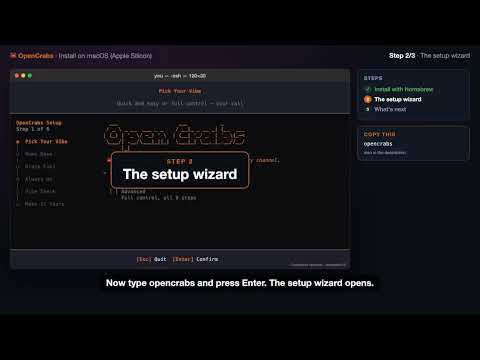 Install in under 2 minutes (Homebrew)
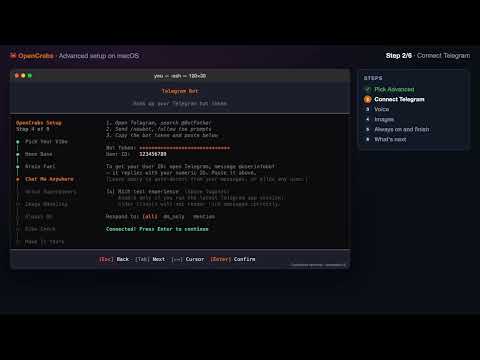 Advanced setup on macOS (Telegram, voice, images)
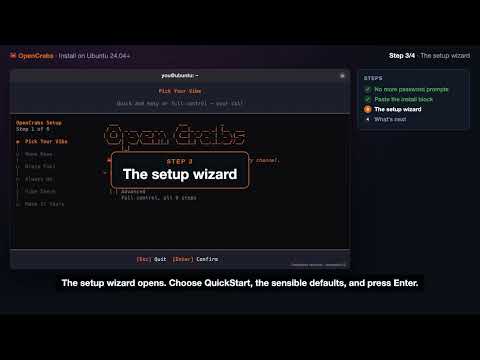 Install in 3 minutes (one paste)
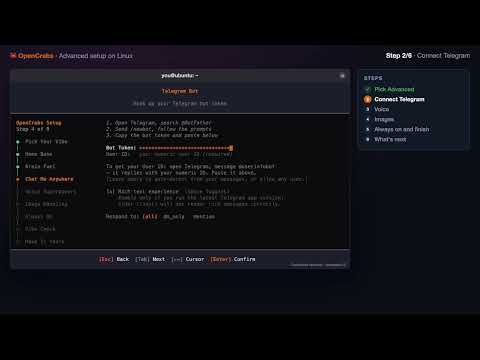 Advanced setup on Linux (Telegram, voice, images)
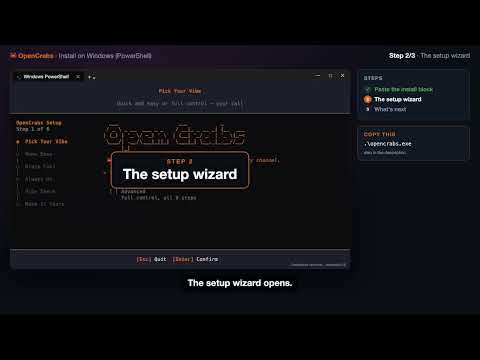 Install in 2 minutes (PowerShell)
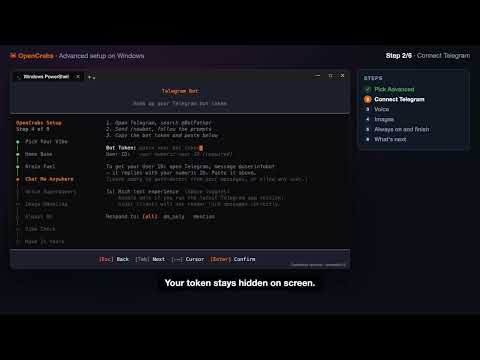 Advanced setup on Windows (Telegram, voice, images)